How to create scaffolding for commerce products in AEM 6.5 | Community
Skip to main content
hilmars68197096
New Participant
Apr 14, 2021 6:49 AM UTC
Solved

How to create scaffolding for commerce products in AEM 6.5

Hi.

When trying to create products in AEM 6.5, similar to We.Retail, we get the error message

"No scaffold definition found for /var/commerce/products"

I've looked everywhere trying to find a solution and the only article that I've been able to find suggests using classic ui and going to the Tools console, then Default Page Scaffolding. However, the Default Page Scaffolding has been deprecated and We.Retail does not seem to use this approach.

This post is no longer active and is closed to new replies. Need help? Start a new post to ask your question.
Vijayalakshmi_S
Vijayalakshmi_SAccepted solution
Level 10
Apr 14, 2021 1:40 PM UTC

Hi @hilmars68197096,

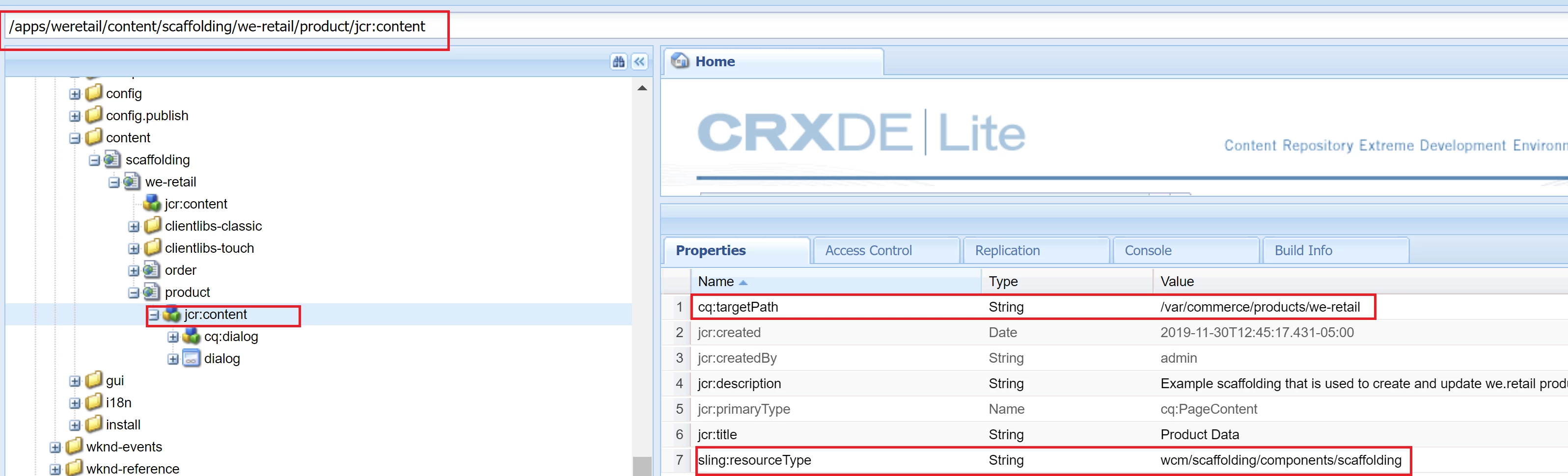
Scaffolding for we-retail resides in /apps/weretail/content/scaffolding/we-retail/product/jcr:content

Per the error message you are experiencing, you are trying to create a product directly under /var/commerce/products for which no scaffolding resource exist. (resource of type - wcm/scaffolding/components/scaffolding with respective cq:targetPath)

You can create a similar definition or copy this we-retail/product node to the desired location and update the cq:targetPath -> /var/commerce/products or if you want to create project specific folder, update the same and try creating product under that path. 

Then, you can customize the dialog content per your needs - similar to /apps/weretail/content/scaffolding/we-retail/product/jcr:content/cq:dialog/content


5 replies

Vijayalakshmi_S
Vijayalakshmi_SAccepted solution
Level 10
Apr 14, 2021 1:40 PM UTC

Hi @hilmars68197096,

Scaffolding for we-retail resides in /apps/weretail/content/scaffolding/we-retail/product/jcr:content

Per the error message you are experiencing, you are trying to create a product directly under /var/commerce/products for which no scaffolding resource exist. (resource of type - wcm/scaffolding/components/scaffolding with respective cq:targetPath)

You can create a similar definition or copy this we-retail/product node to the desired location and update the cq:targetPath -> /var/commerce/products or if you want to create project specific folder, update the same and try creating product under that path. 

Then, you can customize the dialog content per your needs - similar to /apps/weretail/content/scaffolding/we-retail/product/jcr:content/cq:dialog/content


Translate
hilmars68197096
New Participant
Apr 14, 2021 3:19 PM UTC
@vijayalakshmi_s Thank you very much, that worked
Translate
Asutosh_Jena_
New Participant
Apr 14, 2021 9:05 AM UTC

Hi @hilmars68197096 


Please refer the below article for more information about how to create a product.

https://experienceleague.adobe.com/docs/experience-manager-65/administering/ecommerce/generic.html?lang=en#creating-product-information


Thanks!

Translate
hilmars68197096
New Participant
Apr 14, 2021 9:19 AM UTC
Hi @asutosh_jena_. Thanks for your comment. I did follow that article as well, but on creating the product, I get the error "No scaffold definition found for /var/commerce/products"
Translate