How to disable DAM Update Asset workflow for a specific path | Community
Skip to main content
New Participant
January 25, 2018
Solved

How to disable DAM Update Asset workflow for a specific path

  • January 25, 2018
  • 5 replies
  • 9697 views

Hi All,

How can I disable DAM Update Asset workflow for a specific path?

My requirement is, whenever I upload or modify any files under my asset path (/content/dam/myproject/) the default DAM Update Asset workflow should not be launched automatically.

Regards

Denny
This post is no longer active and is closed to new replies. Need help? Start a new post to ask your question.
Best answer by BrijeshYadav

Hi Denny,

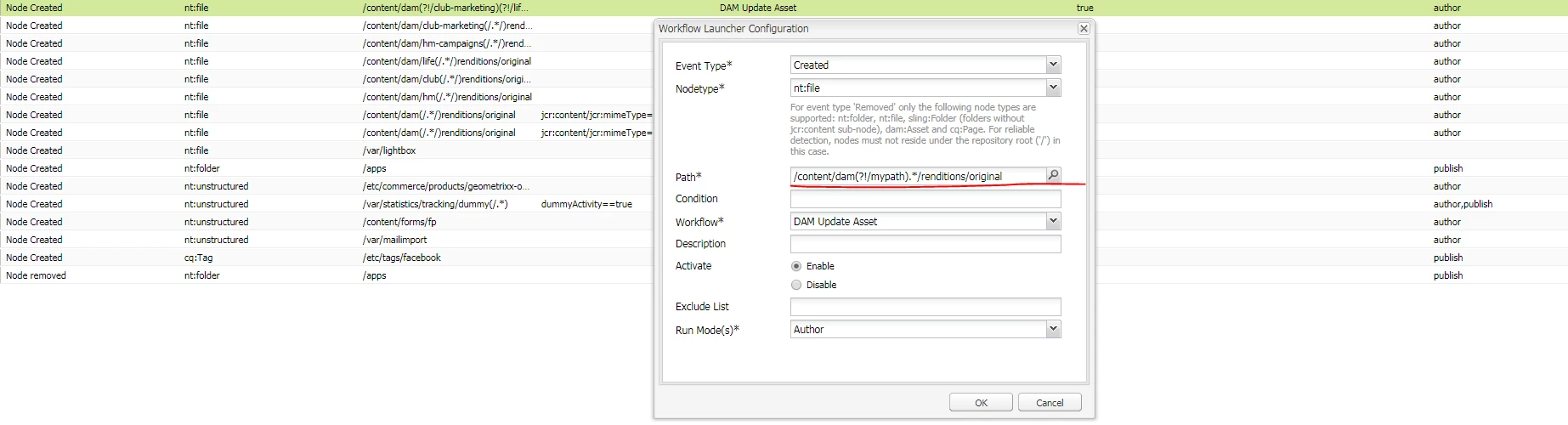
You can achieve this by modifying existing launcher of dam "Update Assest Workflow".
Open http://localhost:4502/libs/cq/workflow/content/console.html  -- go to -> Launcher Tab and search for DAM Update assest.

Edit configuration and update path filed with /content/dam(?!/myproject).*/renditions/original

/Brijesh Yadav

5 replies

BrijeshYadav
New Participant
April 10, 2018

Hi @azhare3977562

You can add as many as path you want ,
Regular expression for your question would be like below
/content/dam(?!/myproject )(?!/mytest ).*/renditions/original

/Brijesh Yadav

azhare3977562
New Participant
April 10, 2018

How to disable for 2 path ?

for example I have to disable myproject as well as mytest folder.?

New Participant
January 30, 2018

Thank you. It works..

smacdonald2008
New Participant
January 25, 2018

Thank you for the great answer!

BrijeshYadav
BrijeshYadavAccepted solution
New Participant
January 25, 2018

Hi Denny,

You can achieve this by modifying existing launcher of dam "Update Assest Workflow".
Open http://localhost:4502/libs/cq/workflow/content/console.html  -- go to -> Launcher Tab and search for DAM Update assest.

Edit configuration and update path filed with /content/dam(?!/myproject).*/renditions/original

/Brijesh Yadav