How to exclude assets,templates and other references when workflow is unpublished. | Community
Skip to main content
New Participant
December 8, 2023
Solved

How to exclude assets,templates and other references when workflow is unpublished.

  • December 8, 2023
  • 3 replies
  • 1043 views

when we publish workflow it's activating page assets and all references  but when  replicationActionType is Unpublish it should not activate assets and other references since these refernces are used in other places and it might break in other pages.

Is there a way to write condition when replicationActionType is Unpublish do not activate assets and consider only live copies and actual payload and it should not create revision for page.

This post is no longer active and is closed to new replies. Need help? Start a new post to ask your question.
Best answer by EstebanBustamante

Hi,


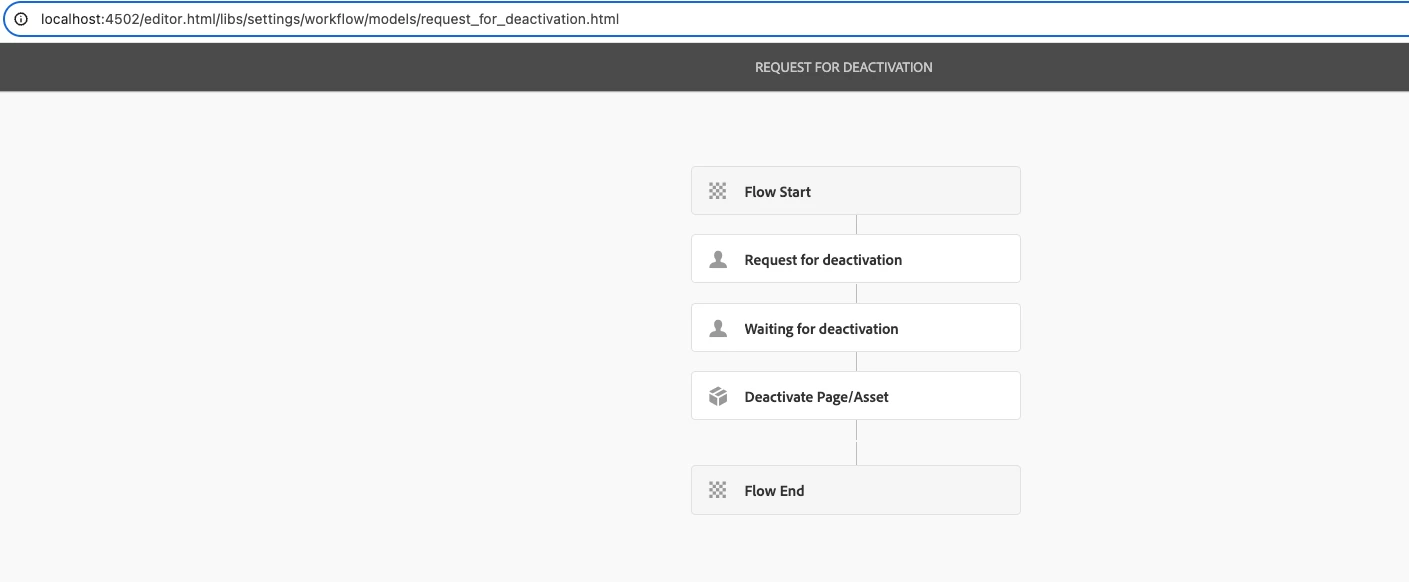
That's not the OOTB behavior, I just validated that with the OOTB workflow[1], the assets are not deactivated when you deactivate a page.  If you are observing that behavior, maybe there is a custom code running on your instance? Can you please check once more?


Please also look at this: https://experienceleaguecommunities.adobe.com/t5/adobe-experience-manager/need-to-referenced-pages-when-deactivating-the-page-similar-to/m-p/363206 


[1]. OOTB workflow for deactivation


Hope this helps.

3 replies

vijithaAuthor
New Participant
December 15, 2023

Hi, 

I have fixed this issue in my project. When we unpulish the asset we don't have any issue but issue is with fragment.

For example we have  fragmement and it is getting used in all of the pages. If we just edit the fragment and save it ,and if we unpublish the page, fragment also is getting unpublished so it will cause an issue. To avoid that when actioType is unpublish consider only payload and livecopy url.

Preetpal_Bindra
New Participant
December 11, 2023

Hello @vijitha ,

As pointed out in the other replies, most likely it is a custom workflow code that is unpublishing the dependent assets.


Do you see any such code in your code repository, and if you do, there is a high chance that you might want to exclude it for the unpublishing workflow use case.


ReferenceSearch referenceSearch = new ReferenceSearch();
Collection<ReferenceSearch.Info> resultSet = referenceSearch.search(resolver, path).values();


regards,

Preetpal

EstebanBustamante
EstebanBustamanteAccepted solution
New Participant
December 8, 2023

Hi,


That's not the OOTB behavior, I just validated that with the OOTB workflow[1], the assets are not deactivated when you deactivate a page.  If you are observing that behavior, maybe there is a custom code running on your instance? Can you please check once more?


Please also look at this: https://experienceleaguecommunities.adobe.com/t5/adobe-experience-manager/need-to-referenced-pages-when-deactivating-the-page-similar-to/m-p/363206 


[1]. OOTB workflow for deactivation


Hope this helps.

Esteban Bustamante