How to make href for content fragment | Community
Skip to main content
Level 2
Sep 13, 2023 1:29 PM UTC
Solved

How to make href for content fragment

Hi All,


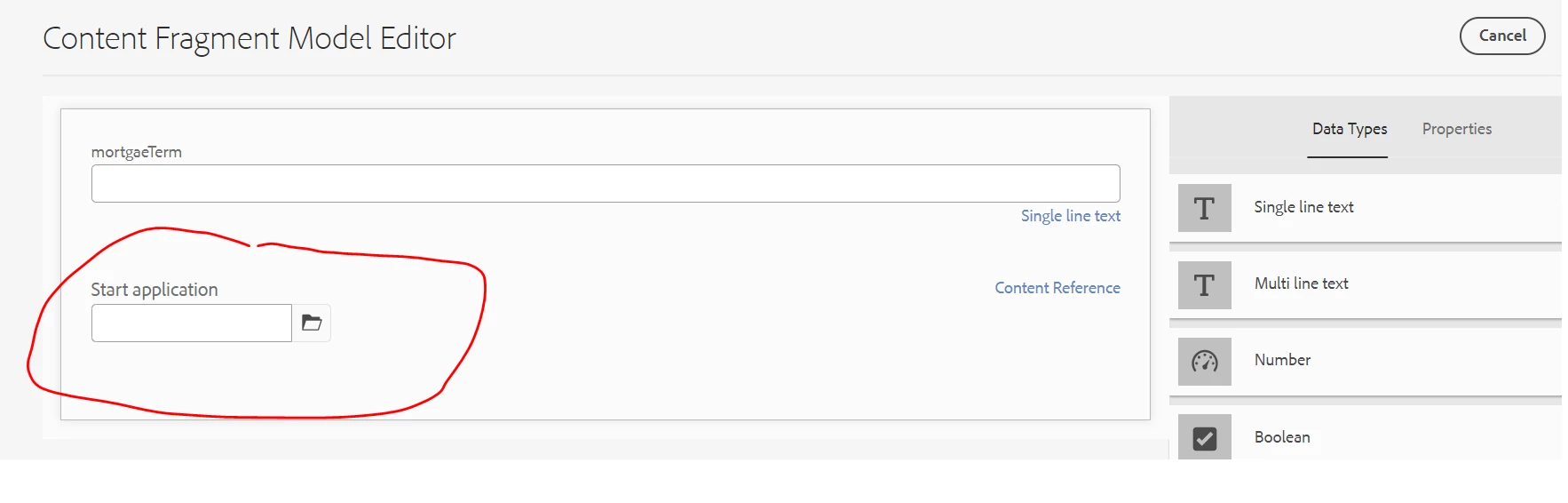
I have created one Content Fragment Model where I have included Start application path browser as shown below.


Now I am using outbox Content Fragment List and Start application is coming like below.
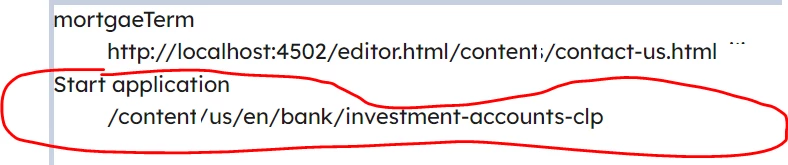
 

Here my requirement is that Start application should be hyperlink and open in new tab like below

But I am not able to achieve it. Can somebody please let me know hoe can I achieve this ?


Thanks & Regards,

Sonu

This post is no longer active and is closed to new replies. Need help? Start a new post to ask your question.
krati_garg
krati_gargAccepted solution
Employee
Sep 13, 2023 2:04 PM UTC

@sunitach You must be consuming this Content Fragment on a page via Content Fragment List Component. Please add rendering logic onto component markup as html using Sightly. HTML for reference:
https://github.com/adobe/aem-core-wcm-components/blob/main/content/src/content/jcr_root/apps/core/wcm/components/contentfragmentlist/v1/contentfragmentlist/contentfragmentlist.html

6 replies

kautuk_sahni
Employee
Sep 18, 2023 6:29 AM UTC

@sunitach Did you find the suggestions from users helpful? Please let us know if more information is required. Otherwise, please mark the answer as correct for posterity. If you have found out solution yourself, please share it with the community.

Translate
Kautuk Sahni
SunitaChAuthor
Level 2
Sep 25, 2023 2:16 AM UTC

Yes , I have called this path inside the slingmodel and then call in HTL/sightly and making it link like below.


<a x-cq-linkchecker="skip" href="${table.startApplication}.html" target="_blank">Start application</a>


Translate
aanchal-sikka
New Participant
Sep 14, 2023 8:05 AM UTC

Hello @sunitach 


The mark-up of Content Fragment component is raw. It only adds value and titles to HTML. I doubt you would use it in the same format.


To use the capabilities of Content Fragment:

- Extend the CF component

- Update HTL as per the need

- To render adaptive images, use image delegation. Example: Teaser component https://github.com/adobe/aem-core-wcm-components/blob/main/content/src/content/jcr_root/apps/core/wcm/components/teaser/v2/teaser/.content.xml

Translate
Aanchal Sikka
krati_garg
krati_gargAccepted solution
Employee
Sep 13, 2023 2:04 PM UTC

@sunitach You must be consuming this Content Fragment on a page via Content Fragment List Component. Please add rendering logic onto component markup as html using Sightly. HTML for reference:
https://github.com/adobe/aem-core-wcm-components/blob/main/content/src/content/jcr_root/apps/core/wcm/components/contentfragmentlist/v1/contentfragmentlist/contentfragmentlist.html

Translate
A_H_M_Imrul
New Participant
Sep 13, 2023 2:02 PM UTC
SunitaChAuthor
Level 2
Sep 14, 2023 12:11 AM UTC

@a_h_m_imrul 


This one is I think used for shortening URL , correct ?

Translate