
How to open aem welcome page once the AEM server is started ? | Community
Skip to main content
Mario248
New Participant
June 3, 2022
Solved

How to open aem welcome page once the AEM server is started ?

  • June 3, 2022
  • 2 replies
  • 1197 views

I am curious to know is there way to open aem welcome page once the AEM server is started. Actually this works when we setup the server for very first time, once the jar is fully extracted, the browser opens up the aem welcome page.


Same way, can we configure and setup after every start up, the browser should open up aem welcome oncer it is started ?
This post is no longer active and is closed to new replies. Need help? Start a new post to ask your question.
Best answer by Mayank_Gandhi

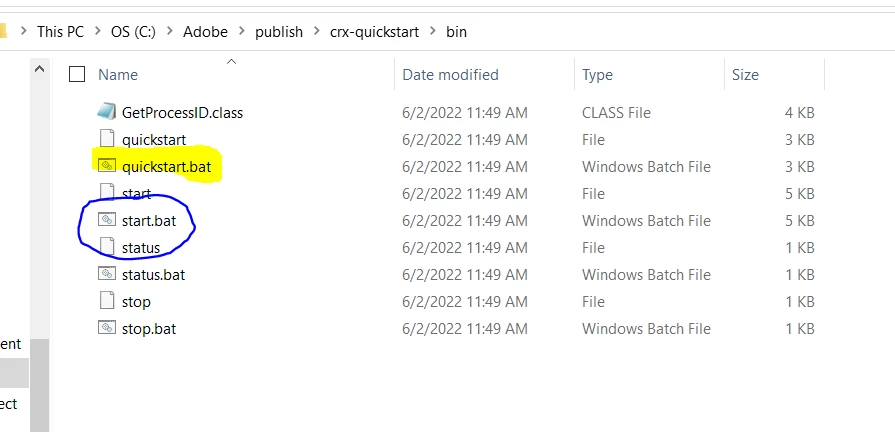
@mario248 If you start using bin/quickstart you will get the welcome page if you use ./start then it will not.


2 replies

arunpatidar
New Participant
June 3, 2022

Hi,

This is only valid for jar.

When you run jar or open AEM using jar then it opens browser because nobrowser flag is not set

https://experienceleague.adobe.com/docs/experience-manager-64/deploying/deploying/custom-standalone-install.html?lang=en#further-options-available-from-the-quickstart-file 

Arun Patidar
Mario248
Mario248Author
New Participant
June 5, 2022

Arun - Thanks for taking me to doc. it helped (y). I looked at start file but there is no flag for nobrowser but still why the browser is not opening. As per theory if you dont specify, the browser should open when server is started 

Mayank_Gandhi
Mayank_GandhiAccepted solution
Employee
June 3, 2022

@mario248 If you start using bin/quickstart you will get the welcome page if you use ./start then it will not.


Mario248
Mario248Author
New Participant
June 3, 2022

Any difference between quickstart and start files? Any idea on which case each should be used ?

Mayank_Gandhi
Employee
June 3, 2022

@mario248 No difference, you can use any but start.sh or start.bat will start with CLI.