How to overcome boxing | Community
Skip to main content
jonathon_GA
New Participant
November 16, 2015
Solved

How to overcome boxing

  • November 16, 2015
  • 3 replies
  • 1464 views

I set up my designs in 2014 to be horizontal scrolls for some longer pages. 2015 i'm getting boxing on the sides. Is there a way to overcome this so it fills the screen?

This post is no longer active and is closed to new replies. Need help? Start a new post to ask your question.
Best answer by jonathon_GA

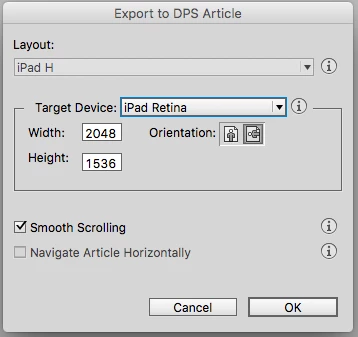
brobeldesign tip did work. When you export out of indesign, depending your final display size your going for, Im working specifically with iPad retina. I exported with the standard iPad retina dimension option with smooth scrolling selected a and this works.

3 replies

jonathon_GA
jonathon_GAAuthorAccepted solution
New Participant
November 16, 2015

brobeldesign tip did work. When you export out of indesign, depending your final display size your going for, Im working specifically with iPad retina. I exported with the standard iPad retina dimension option with smooth scrolling selected a and this works.

TommyDAQ-Bates
New Participant
November 16, 2015

Looks like you've got a Portrait oriented content displayed on a Landscape oriented tablet.

brobeldesign
New Participant
November 16, 2015

I had the same problem...but the thread below helped clear it up.

Smooth scrolling