
How to populate tags in universal editor tags field | Community
Skip to main content
sravs
New Participant
March 27, 2025
Question

How to populate tags in universal editor tags field

  • March 27, 2025
  • 2 replies
  • 550 views

I've created a block that includes a tag field. Below is the JSON configuration for setting up the tag field.


{
"component": "aem-tag",
"name": "tags",
"value": "",
"label": "Tags",
"valueType": "string"
}


I've created the taxonomy page and published it as per the instructions in the Managing Taxonomy Data | Adobe Experience Manager. However, I am still unable to see the tags under the tag field.
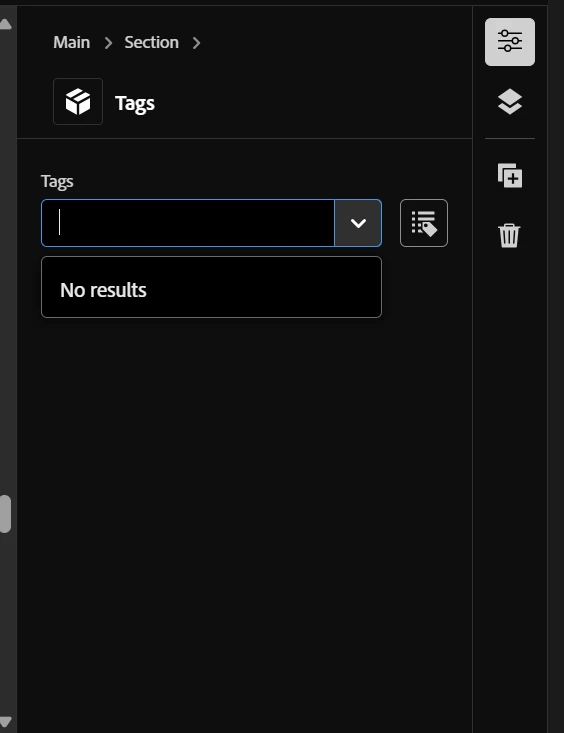
 

Please let me know if I missed anything.

2 replies

kautuk_sahni
Employee
April 1, 2025

@sravs Did you find the suggestion helpful? Please let us know if you need more information. If a response worked, kindly mark it as correct for posterity; alternatively, if you found a solution yourself, we’d appreciate it if you could share it with the community. Thank you!

Kautuk Sahni
AmitVishwakarma
New Participant
March 27, 2025

Hi @sravs ,

1. Verify Taxonomy Configuration

Make sure you have:
      - Created the taxonomy page in AEM (/taxonomy)
     - Published the taxonomy page as per Adobe’s guidelines
     - Ensured that your taxonomy terms have proper IDs

2. Check Your JSON Configuration

Your current JSON config:

{ "component": "aem-tag", "name": "tags", "value": "", "label": "Tags", "valueType": "string" }

This looks correct, but you need to ensure:
"valueType" is "array" instead of "string" (tags usually support multiple values)

Update your JSON like this:


3. Ensure the Correct Data Source

The Universal Editor (aem-tag field) must fetch tags from the published taxonomy.
If the tags are not appearing, do the following:

Check if tags exist in the Published Taxonomy JSON
Run this in your browser:

https://your-aem-instance/taxonomy.json

If tags are missing, your taxonomy was not published correctly!

Ensure the tags have correct namespace and ID references.
Example correct structure:

{ "tags": [ { "id": "marketing:campaigns/summer-2025", "title": "Summer 2025", "path": "/taxonomy/marketing/campaigns/summer-2025" }, { "id": "products/electronics", "title": "Electronics", "path": "/taxonomy/products/electronics" } ] }

  If your tags do not follow this structure, update your taxonomy.

4. Confirm the Correct Namespaces in Universal Editor

Sometimes, tags don’t appear because of a missing namespace reference.
Update the JSON configuration to explicitly reference the taxonomy path:

{ "component": "aem-tag", "name": "tags", "value": [], "label": "Tags", "valueType": "array", "taxonomy": "/taxonomy/marketing" }

Replace "/taxonomy/marketing" with your actual taxonomy root path.

5. Debug Using Console Logs

If tags still do not appear, open the browser console:

Go to Network Tab
Look for requests to /taxonomy.json
Check if it's loading correctly
If the request fails, your taxonomy is misconfigured or not published properly

Regards,
Amit

sravs
sravsAuthor
New Participant
April 8, 2025

Hi @amitvishwakarma ,


The suggested approach didn't work either. The tags are still not loading, even though the taxonomy.json is loading without any issues.