How to prevent page locking (through user rights or other means)? | Community
Skip to main content
Level 2
May 31, 2018 7:56 AM UTC
Solved

How to prevent page locking (through user rights or other means)?

The question is really simple but I can't seem to find an easy answer to it.

How can I prevent a user from locking a page. Is there a simple way through which the option is removed from the different menu's? Can this be achieved through user rights? Other (simple) means? I know I can customise each menu - but I'd rather only do this as a last resort

This post is no longer active and is closed to new replies. Need help? Start a new post to ask your question.
arunpatidar
arunpatidarAccepted solution
New Participant
May 31, 2018 12:30 PM UTC

This is easy, you need to

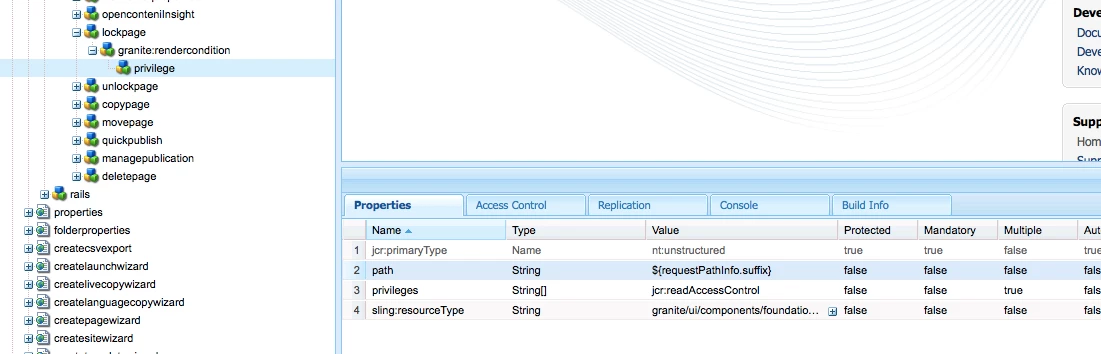
1. overlay /libs/wcm/core/content/sites/jcr:content/actions/selection/lockpage

2. create granite:rendercondition child node of /apps/wcm/core/content/sites/jcr:content/actions/selection/lockpage/ 

3. create privilege(granite/ui/components/foundation/renderconditions/privilege) node under granite:rendercondition

4. add properties to this node  refer Privilege — Granite UI 1.0 documentation

5. create a group which has readAccessControl or modifyAccessControl access or other access which you like for that lock button should display

JCR 2.0: 16 Access Control Management (Content Repository for Java Technology API v2.0)

you can do same for unlock node as well.

Arun Patidar

5 replies

joerghoh
Employee
Jun 3, 2018 7:10 PM UTC

Techically it's an overlay, but you are actually using a documented way to do it. It's much more stable than overlaying Javascript functions.

Translate
3xil3Author
Level 2
May 31, 2018 12:34 PM UTC

I was hoping not to have to overlay anything, but it's the best practical answer! Thank you for your effort!

Translate
arunpatidar
arunpatidarAccepted solution
New Participant
May 31, 2018 12:30 PM UTC

This is easy, you need to

1. overlay /libs/wcm/core/content/sites/jcr:content/actions/selection/lockpage

2. create granite:rendercondition child node of /apps/wcm/core/content/sites/jcr:content/actions/selection/lockpage/ 

3. create privilege(granite/ui/components/foundation/renderconditions/privilege) node under granite:rendercondition

4. add properties to this node  refer Privilege — Granite UI 1.0 documentation

5. create a group which has readAccessControl or modifyAccessControl access or other access which you like for that lock button should display

JCR 2.0: 16 Access Control Management (Content Repository for Java Technology API v2.0)

you can do same for unlock node as well.

Translate
Arun Patidar
3xil3Author
Level 2
May 31, 2018 11:23 AM UTC

Hi Ankush, I'm aware of what you're saying, but I'm asking exactly HOW I can prevent it from happening in the first place. You say it can be done through user management. Can you specify exactly how I can prevent a user from locking a page? What roles/rights should the user have to prevent this? This is the core question.

Translate
Employee
May 31, 2018 11:13 AM UTC

A locked page is unlocked only by the user who locked it , or an admin account. So yes the best way would be through user management.

Editing Page Content

Translate