How to set min max item in Multifield AEM 6.3? | Community
Skip to main content
Tai_Nguyen_Duc
New Participant
September 25, 2017
Solved

How to set min max item in Multifield AEM 6.3?

  • September 25, 2017
  • 11 replies
  • 26661 views

Hi all,

I have a problem with multifield, that is set min max item in multifield AEM 6.3?

Please help me.

Thank you so much!

This post is no longer active and is closed to new replies. Need help? Start a new post to ask your question.
Best answer by Techaspect_Solu

Hi,

I was able to set min size and max size restrictions in multifield in AEM 6.3.

Max size restriction: Following sample code can be used to put max size restriction in a multifield -

1. Add a new property - "maxlinksallowed" to the multifield node in your cq:dialog. Refer the screenshot below -
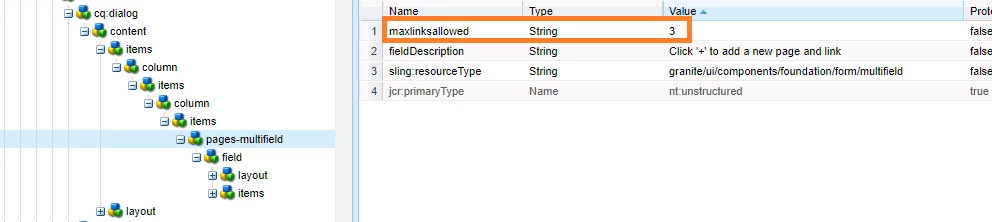
2. Put the below sample code in a clientlibs JS file with category "cq.authoring.dialog".

$(document).on("dialog-ready", function () {

$(".js-coral-Multifield-add").click(function() {

    var field = $(this).parent();

    var size = field.attr("data-maxlinksallowed");

    if (size) {

        var ui = $(window).adaptTo("foundation-ui");

        var totalLinkCount = $(this).prev('ol').children('li').length;

        if (totalLinkCount >= size) {

            ui.alert("Warning", "Maximum " + size + " links are allowed!", "notice");

            return false;

        }

    }

});

});

Below is the screenshot of sample output:
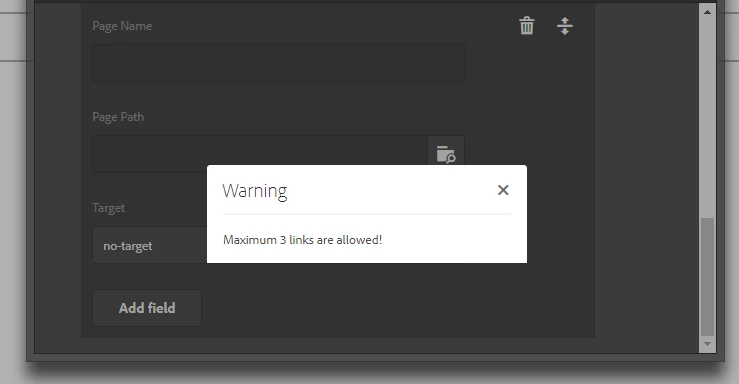
Min size restriction: Following sample code can be used to put min size restriction in a multifield -

1. Add a new property - "minlinksallowed" to the multifield node in your cq:dialog. Refer the screenshot below -

2. Put the below sample code in a clientlibs JS file with category "cq.authoring.dialog".

(function (document, $, ns) {

     "use strict";

$(document).on("click", ".cq-dialog-submit", function (e) {

     e.stopPropagation();

     e.preventDefault();

    var $form = $(this).closest("form.foundation-form"), title = $form.find("[name='./jcr:title']").val(), message, clazz = "coral-Button ";

    var fieldd = $(".coral-Multifield");

    var sizee = fieldd.attr("data-minlinksallowed");

    if(($(this).prev('ol').children('li').length) < sizee){

              message = "Minimum" + sizee + " links are required. Are you sure to submit?";

              clazz = clazz + "coral-Button--warning";

    }

    ns.ui.helpers.prompt({

             title: Granite.I18n.get("Confirm"),

             message: message,

             actions: [{

                    id: "CANCEL",

                    text: "CANCEL",

                    className: "coral-Button"

                },{

                    id: "SUBMIT",

                    text: "SUBMIT",

                    className: clazz

                }

            ],

             callback: function (actionId) {

                if (actionId === "SUBMIT") {

                    $form.submit();

                }

            }

        });

    });

})(document, Granite.$, Granite.author);

Below is the screenshot of sample output:
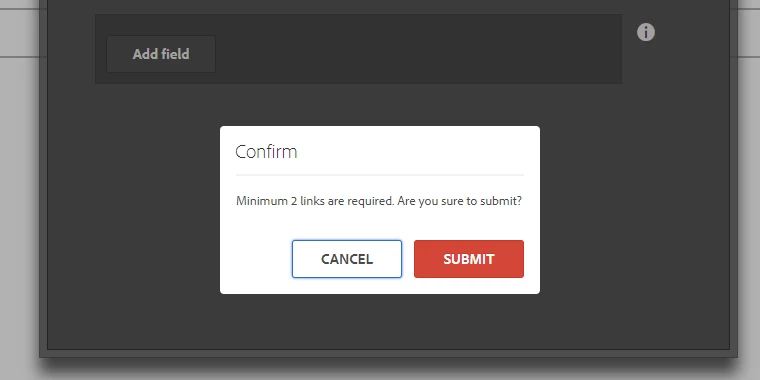
Regards,

TechAspect Solutions

11 replies

New Participant
December 10, 2018

Hi All,

I have also achieved the above using below code snippet:

For Maximum links validation:

Add a new property - "maxlinksallowed", type- String to the multifield node in your cq:dialog.

Add below javascript code to touchui js file.

            $(".js-coral-Multifield-add").click(function() {

            var field = $(this).parent();

            var size = field.attr("data-maxlinksallowed");

            if (size) {

                var ui = $(window).adaptTo("foundation-ui");

                var totalLinkCount = $(this).prev('ol').children('li').length;

                if (totalLinkCount >= size) {

                    ui.alert("Warning", "Maximum " + size + " links are allowed!", "notice");

                    return false;

                }

             }

           });

For Minimum links validation:

Add a new property - "minlinksallowed" , type- String to the multifield node in your cq:dialog.

Add below javascript code to touchui js file.

        $(document).on("click", ".cq-dialog-submit", function () {

            var $multifields = $("[" + DATA_EAEM_NESTED + "]");

            if(_.isEmpty($multifields)){

                return;

            }

            var $form = $(this).closest("form.foundation-form");

            var fieldd = $(".coral-Multifield");

            var minsize = fieldd.attr("data-minlinksallowed");

            var multilinks = $multifields.length-1;

            if (multilinks < minsize) {

                var ui = $(window).adaptTo("foundation-ui");

                ui.alert("Warning", "Minimum " + minsize + " link is required!", "notice");

                return false;

            }

        });

Regards,

Mayank Saxena

Cognizant Technology Solutions

arunpatidar
New Participant
May 10, 2018

I am able to make it work for Coral by setting validation property with value min:mx
And on ADD button(for max) and Submit(for min) click , I am reading this property and doing validating like below:

//For min

$(document).on("click", ".cq-dialog-submit", function(e) {

        var $form = $(this).closest("form.foundation-form");

        var field = $form.find("[data-granite-coral-multifield-name='./phoneitems']");

        var attrDV = field.attr("data-validation");

        var size;

        if (typeof attrDV !== undefined && attrDV !== false) {

            if(typeof attrDV.split(':')[1] !== undefined){

                    size = attrDV.split(':')[0];

                    }

        }

        // console.log("min size : " + size)

        if (size) {

            var ui = $(window).adaptTo("foundation-ui");

            var totalLinkCount = field.children('coral-multifield-item').length;

            if (totalLinkCount < size) {

                ui.alert("Warning", "Minimum " + size + " Phone numbers are allowed!", "notice");

                return false;

            } else {

                return true;

            }

        }

    });

//For Max

$(document).on("dialog-ready", function() {

        $(".coral-Button").click(function() {

            var attr = $(this).attr('coral-multifield-add');

            if (typeof attr !== typeof undefined && attr !== false) {

                var field = $(this).parent();

                var attrDV = field.attr("data-validation");

                var size;

                if (typeof attrDV !== undefined && attrDV !== false) {

                    if(typeof attrDV.split(':')[1] !== undefined){

                    size = attrDV.split(':')[1];

                    }

                }

                //console.log(size);

                if (size) {

                    var ui = $(window).adaptTo("foundation-ui");

                    var totalLinkCount = $(this).parent().children('coral-multifield-item').length;

                    if (totalLinkCount >= size) {

                        ui.alert("Warning", "Maximum " + size + " Phone numbers are allowed!", "notice");

                        return false;

                    }

                }

            }

        });

    });

Arun Patidar
Vijayalakshmi_S
New Participant
May 10, 2018

Hi,

This validation logic can be easily  achieved with foundation validation.

Difference with coral UI 2 and UI 3 would be the HTML markup in identifying the multifield items.

Below link has validation for fieldLimit. Same can be followed for min max with change in logic alone.

Custom Validation for Coral UI 3 Multifield using foundation-validation

prabodh
New Participant
May 10, 2018

Did you find a solution to implement the same for coral?

New Participant
September 27, 2017

it working with granite/ui/components/foundation/form/multifield

but not working with granite/ui/components/coral/foundation/form/multifield

Coral is not working.

Tai_Nguyen_Duc
New Participant
September 26, 2017

Hi,

It has worked already.

Thank you so much!

smacdonald2008
New Participant
September 25, 2017

Excellent response!

Techaspect_Solu
Techaspect_SoluAccepted solution
New Participant
September 25, 2017

Hi,

I was able to set min size and max size restrictions in multifield in AEM 6.3.

Max size restriction: Following sample code can be used to put max size restriction in a multifield -

1. Add a new property - "maxlinksallowed" to the multifield node in your cq:dialog. Refer the screenshot below -

2. Put the below sample code in a clientlibs JS file with category "cq.authoring.dialog".

$(document).on("dialog-ready", function () {

$(".js-coral-Multifield-add").click(function() {

    var field = $(this).parent();

    var size = field.attr("data-maxlinksallowed");

    if (size) {

        var ui = $(window).adaptTo("foundation-ui");

        var totalLinkCount = $(this).prev('ol').children('li').length;

        if (totalLinkCount >= size) {

            ui.alert("Warning", "Maximum " + size + " links are allowed!", "notice");

            return false;

        }

    }

});

});

Below is the screenshot of sample output:

Min size restriction: Following sample code can be used to put min size restriction in a multifield -

1. Add a new property - "minlinksallowed" to the multifield node in your cq:dialog. Refer the screenshot below -

2. Put the below sample code in a clientlibs JS file with category "cq.authoring.dialog".

(function (document, $, ns) {

     "use strict";

$(document).on("click", ".cq-dialog-submit", function (e) {

     e.stopPropagation();

     e.preventDefault();

    var $form = $(this).closest("form.foundation-form"), title = $form.find("[name='./jcr:title']").val(), message, clazz = "coral-Button ";

    var fieldd = $(".coral-Multifield");

    var sizee = fieldd.attr("data-minlinksallowed");

    if(($(this).prev('ol').children('li').length) < sizee){

              message = "Minimum" + sizee + " links are required. Are you sure to submit?";

              clazz = clazz + "coral-Button--warning";

    }

    ns.ui.helpers.prompt({

             title: Granite.I18n.get("Confirm"),

             message: message,

             actions: [{

                    id: "CANCEL",

                    text: "CANCEL",

                    className: "coral-Button"

                },{

                    id: "SUBMIT",

                    text: "SUBMIT",

                    className: clazz

                }

            ],

             callback: function (actionId) {

                if (actionId === "SUBMIT") {

                    $form.submit();

                }

            }

        });

    });

})(document, Granite.$, Granite.author);

Below is the screenshot of sample output:

Regards,

TechAspect Solutions

smacdonald2008
New Participant
September 25, 2017

I got it working on 6.3 - i can only put 3 Multifield here:

Watch the demo and then install the package here:

Experiencing Adobe Experience Manager - Day CQ: AEM 61 - Sample Granite Widget In Touch UI extending Multifield to Limit…

Tai_Nguyen_Duc
New Participant
September 25, 2017

Thank you so much,

I'm try. But not work in AEM 6.3.