How to skip childnode in rollout | Community
Skip to main content
New Participant
November 20, 2024
Solved

How to skip childnode in rollout

  • November 20, 2024
  • 3 replies
  • 1227 views

Hi,

I have a child node(translate) under jcr:content for some pages, on rollout of the master page, I don't want this child node to get updated. This child node has properties which are unique to each page and thus should not get updated with master values on rollout.

The Day CQ RolloutManagerImpl configuration has a checkbox Handle Conflict, which if unchecked, the nodes don't get overridden. But in this case, even the multifield child node (item0, item1, etc) also don't get updated. So rollout doesn't work for multifield nodes.

I need an approach which will help rolling out multifield without updating the translate node.

This post is no longer active and is closed to new replies. Need help? Start a new post to ask your question.
Best answer by konstantyn_diachenko

/content/project/master-blueprint/en/test/jcr:content/help.

/content/project/us/en/test/jcr:content/help.


The help node is having unique value for each page. Some pages may have this node while some may not. When the master doesn't have the help node, and the live copy has it. On rolling out, the help node gets deleted.

If I uncheck the Handle Conflict in OOTB RolloutManagerImpl config, then the issue is resolved. But then the multifield rollout starts to fail. I need the Handle Conflict checked, but I also dont want the help node to get deleted on rollout.


Hi @shaheenask,

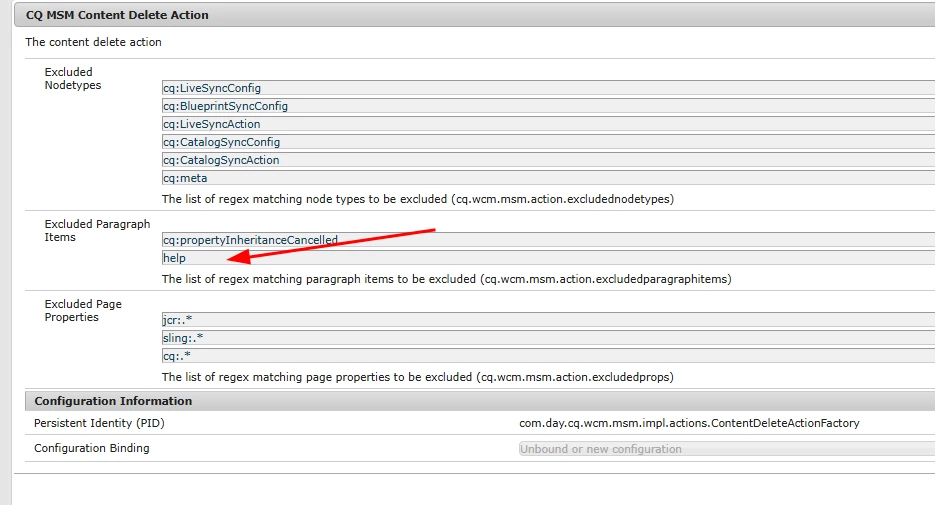
I just tried to play with the following configuration: com.day.cq.wcm.msm.impl.actions.ContentDeleteActionFactory.

I added help to the cq.wcm.msm.action.excludedparagraphitems property and it stopped to be removed on rollout.

I tested the following scenario - rollout master page without help node to target page with help node. As a results, help node was not removed.

In addition, if you don't want to update help node under target page with content from master page you need to add help to the cq.wcm.msm.action.excludedparagraphitems in the com.day.cq.wcm.msm.impl.actions.ContentUpdateActionFactory.


Best regards,

Kostiantyn Diachenko.

3 replies

kautuk_sahni
Employee
November 26, 2024

@shaheena_sheikh Did you find the suggestions helpful? Please let us know if you require more information. Otherwise, please mark the answer as correct for posterity. If you've discovered a solution yourself, we would appreciate it if you could share it with the community. Thank you!

Kautuk Sahni
konstantyn_diachenko
New Participant
November 20, 2024

Hi @shaheena_sheikh ,

You can configure several OSGi services that support corresponding synchronization actions so that they do not affect specific node types and properties. For example, many properties and subnodes related to the internal functioning of AEM should not be included in a live copy. Only the content that is relevent to the user of the page should be copied.

CQ MSM Content Update Action - Exclusions (com.day.cq.wcm.msm.impl.actions.ContentUpdateActionFactory)

Several properties and node types are excluded by default, these are defined in the OSGi configuration of CQ MSM Content Update Action, under Excluded Page Properties.

By default properties matching the following regular expressions are excluded (i.e. not updated) on rollout:

You can change the expressions defining the exclusion list as required. Try to configure your nodes/properties in highlighted lists. 


Best regards,

Kostiantyn Diachenko.

Kostiantyn DiachenkoCheck out AEM VLT Intellij plugin
New Participant
November 21, 2024

Hi @konstantyn_diachenko ,

the node type of the child node is nt:unstructured, so I am unable to mark that node type for exclusion since most nodetypes are nt:unstructured.

The node is under jcr:content so, page property exclusion also won't work.


I want to understand what does paragraph items mean?

konstantyn_diachenko
New Participant
November 21, 2024

Hi @shaheena_sheikh,

Could you please provide an example of content structure that you are going to exclude from updating.

Best regards,

Kostiantyn Diachenko.

Kostiantyn DiachenkoCheck out AEM VLT Intellij plugin
TarunKumar
New Participant
November 20, 2024

HI @shaheena_sheikh ,

You will have to write a custom logic to achieve the requirement. You can try to write an event listener to attach/detach the node from the blueprint whenever there is a condition/property set to a page.


-Tarun

New Participant
November 21, 2024

Hi @tarunkumar ,

is there example for the same?