How to use folder level properties for permissions ACL in DAM | Community
Skip to main content
New Participant
April 25, 2025
Solved

How to use folder level properties for permissions ACL in DAM

  • April 25, 2025
  • 2 replies
  • 736 views

trying to use Metadata based permissions for show/hide assets


Metadata-Driven Permissions in AEM Assets | Adobe Experience Manager


this is working fine for assets 

deny all assets using rep:ntNames="dam:Asset"

and then allowing based on metadata property status="Approved "
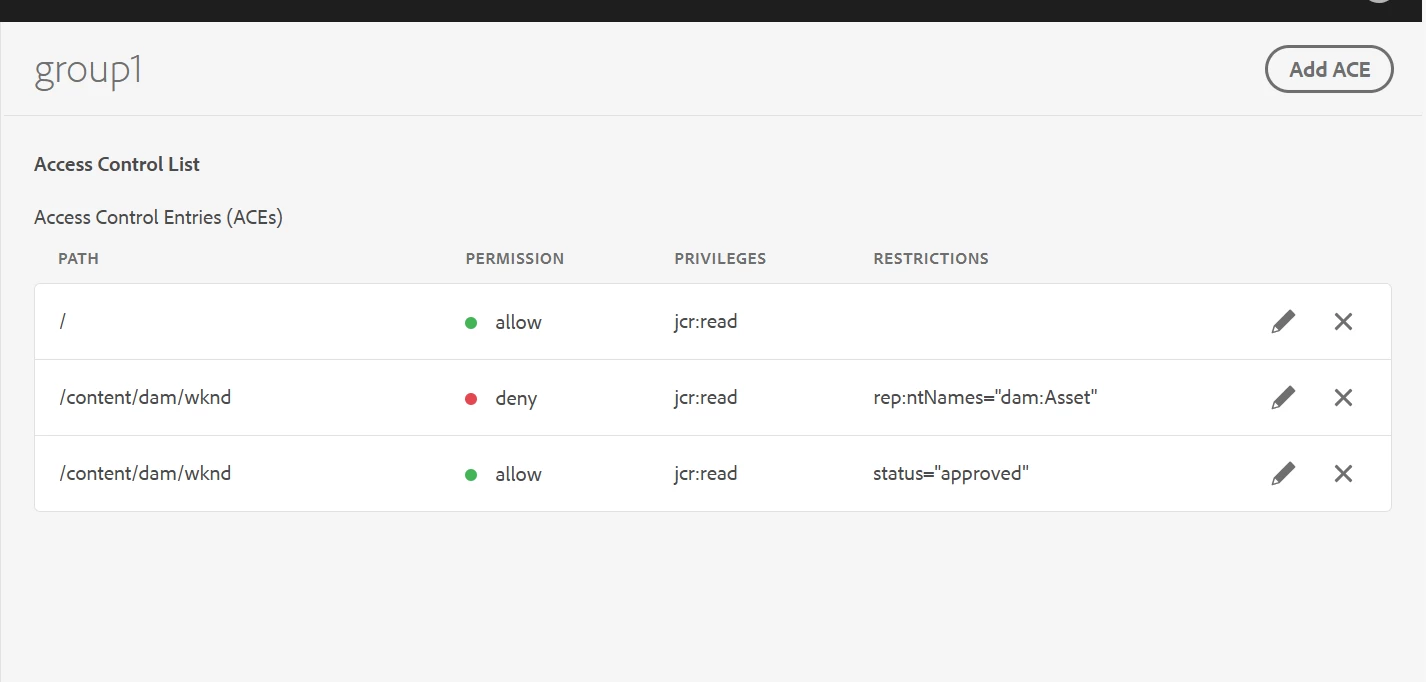


Now I am trying to do similar for a folder,

i.e. I am hiding all folders based on rep:ntNames="sling:Folder"
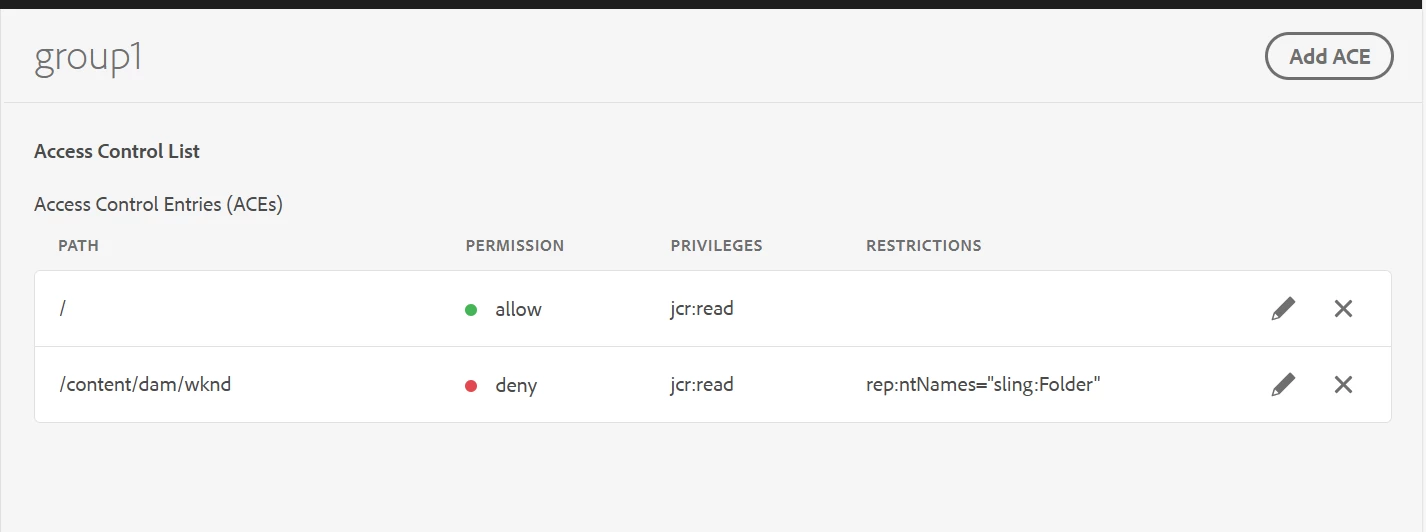


now how to allow specific folders under this folder based on a property value at folder level or at jcr:content level??


Please advice 


Thank you very much 

 

Best answer by SantoshSai

Hi @vishnure4,

Yeah, Netcentric ACL Tool doesn't support conditional rule evaluation based on node properties like jcr:content/visibility. It's limited to path- and node-type-based rules.

If metadata-based filtering is critical for folders, here are a few approaches that come to mind at the moment:

  • Restructuring the DAM folder hierarchy so that permission is tied to location (e.g., /approved, /unapproved)

  • Or using a custom solution outside Netcentric ACL - such as manual policy injection or UI-based filtering (though not secure for enforcement).

2 replies

kautuk_sahni
Employee
June 17, 2025

@vishnure4 Did you find the suggestion helpful? If you need more information, please let us know. If a response resolved your issue, kindly mark it as correct to help others in the future. Alternatively, if you discovered a solution on your own, we'd appreciate it if you could share it with the community. Thank you.

Kautuk Sahni
SantoshSai
New Participant
April 25, 2025

Hi @vishnure4,

Try this below approach:

  • Set a custom property at folder/jcr:content, e.g., visibility=approved.

  • In your permission setup, add an allow rule that checks this property (jcr:content/visibility=approved).

Important: You must configure your CUG (Closed User Group) or Permission Management Tool to recognize that for folders, the condition check happens at jcr:content.
Eg.

Suppose you have the folder structure:

/content/dam/marketing/folder1 (sling:Folder)
/content/dam/marketing/folder1/jcr:content (nt:unstructured)

You add this property at jcr:content:

visibility = "approved"

Then your permission rules should:

  1. Deny all sling:Folder nodes.

  2. Allow if jcr:content/visibility == "approved".

Hope that helps!

Santosh Sai
VishnuRe4Author
New Participant
April 30, 2025

@santoshsai 


we are using netcentric tool for permissions.

I couldn't find an attribute / condition that takes in a node property value for checking the status.


Are you aware of any such rule condition in netcentric that I can use to achieve property-based condition?


If netcentric doesn't allow these types of rules, then is there any other way to achieve the filter?

SantoshSai
SantoshSaiAccepted solution
New Participant
April 30, 2025

Hi @vishnure4,

Yeah, Netcentric ACL Tool doesn't support conditional rule evaluation based on node properties like jcr:content/visibility. It's limited to path- and node-type-based rules.

If metadata-based filtering is critical for folders, here are a few approaches that come to mind at the moment:

  • Restructuring the DAM folder hierarchy so that permission is tied to location (e.g., /approved, /unapproved)

  • Or using a custom solution outside Netcentric ACL - such as manual policy injection or UI-based filtering (though not secure for enforcement).

Santosh Sai
