HTL context override on data-sly-attribute.href | Community
Skip to main content
New Participant
December 9, 2022
Solved

HTL context override on data-sly-attribute.href

  • December 9, 2022
  • 2 replies
  • 2709 views

good morning.


I am working on part of a script that outputs search results and includes links to reorder these results using data-sly-attribute.href properties on <a> links.


I have found that the values trigger the XSS detection in HTL and removes the attribute. I have some test code below that demonstrate these cases


As you can see, when I use context='unsafe' the code displays, but not on the data-sly-attribute.href of the <a>. It seems like the implicit context='uri' that is set on the href overrides the passed unsafe context.


I have 2 questions.

1. Is this the correct behavior? It seems that the context passed by the expression should overrule the default context.

2. Can anyone point me to documentation to configure the xss api to accespt these uri's?


Thanks


<sly data-sly-list.orderByOption="${articleList.orderByOptions}"> <li> <pre> uri: ${'{0}.html?{1}' @ format=[resource.path,orderByOption.queryString], context='uri'}, unsafe: ${'{0}.html?{1}' @ format=[resource.path,orderByOption.queryString], context='unsafe'} </pre> <a data-sly-attribute.href="${'{0}.html?{1}' @ format=[resource.path,orderByOption.queryString], context='unsafe'}" data-sly-attribute.class="${'{0}' @ format=[orderByOption.text == articleList.activeOrderByOption.text ? 'active' : '']}" data-orderby="${orderByOption.orderBy}" data-orderby-sort="${orderByOption.orderBySort}">${orderByOption.text}</a> </li> </sly>


results in:


<li> <pre> uri: , unsafe: /content/test-uc/news/search/jcr:content/main/article_list.html?article-list-id=163453488&manualArticles=&term=&authors=&contacts=&displayDateRangeType=&displayDateStart=&displayDateEnd=&tags=&anyAll=&showEvents=&articlesExclude=&authorsExclude=&tagsExclude=&limit=10&orderBy=story.[jcr:content/dispDate]&orderBySort=desc </pre> <a data-orderby="story.[jcr:content/dispDate]" data-orderby-sort="desc" class="active">Newest First</a> </li> <li> <pre> uri: , unsafe: /content/test-uc/news/search/jcr:content/main/article_list.html?article-list-id=163453488&manualArticles=&term=&authors=&contacts=&displayDateRangeType=&displayDateStart=&displayDateEnd=&tags=&anyAll=&showEvents=&articlesExclude=&authorsExclude=&tagsExclude=&limit=10&orderBy=story.[jcr:content/dispDate]&orderBySort=asc </pre> <a data-orderby="story.[jcr:content/dispDate]" data-orderby-sort="asc">Oldest First</a> </li> <li> <pre> uri: , unsafe: /content/test-uc/news/search/jcr:content/main/article_list.html?article-list-id=163453488&manualArticles=&term=&authors=&contacts=&displayDateRangeType=&displayDateStart=&displayDateEnd=&tags=&anyAll=&showEvents=&articlesExclude=&authorsExclude=&tagsExclude=&limit=10&orderBy=story.[jcr:score]&orderBySort=desc </pre> <a data-orderby="story.[jcr:score]" data-orderby-sort="desc">Best Match First</a> </li> <li> <pre> uri: , unsafe: /content/test-uc/news/search/jcr:content/main/article_list.html?article-list-id=163453488&manualArticles=&term=&authors=&contacts=&displayDateRangeType=&displayDateStart=&displayDateEnd=&tags=&anyAll=&showEvents=&articlesExclude=&authorsExclude=&tagsExclude=&limit=10&orderBy=story.[jcr:score]&orderBySort=asc </pre> <a data-orderby="story.[jcr:score]" data-orderby-sort="asc">Worst Match First Descending</a> </li>


This post is no longer active and is closed to new replies. Need help? Start a new post to ask your question.
Best answer by lukasz-m

Hi @benst10,

Let me first try quickly answer your questions, and next elaborate a bit more about potential solution.

1. Is this the correct behavior? It seems that the context passed by the expression should overrule the default context.

In my opinion this is correct behavior, at least looking into what has been written in HTL specification - Display Context


${properties.jcr:title @ context='uri'}           <!--/* Outputs nothing if the value contains XSS risks */-->

2. Can anyone point me to documentation to configure the xss api to accespt these uri's?

I do not think you should manipulate/change xss api rules. I think this will be rather a workaround then a proper solution.

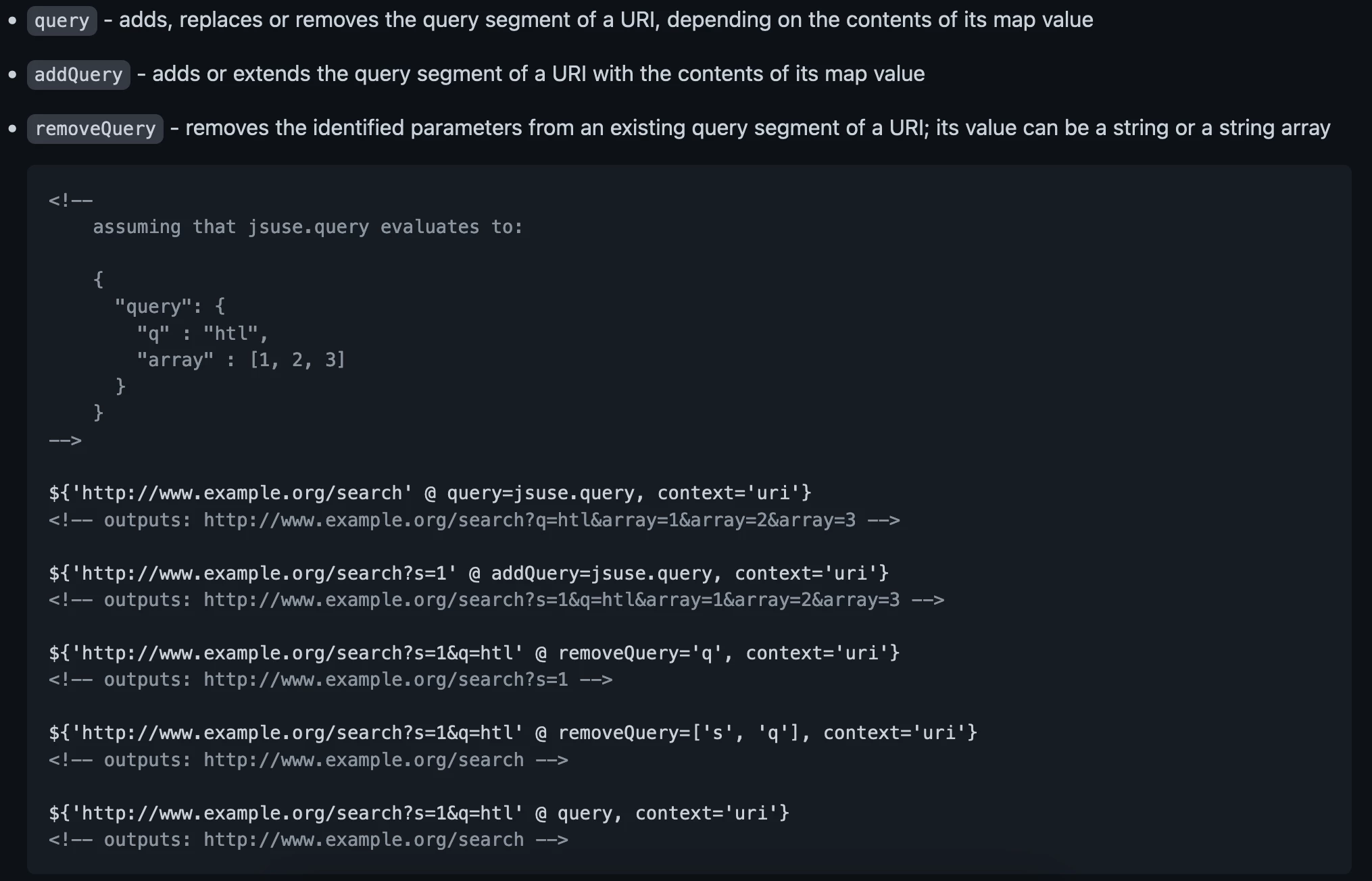
In general you should have a closer look into options described in URI Manipulation section of HTL specification. Especially section about query looks interesting.

In other words you should use query attribute together with context='uri' to get expected result.

I did a short test on my own, and I have found one issue in your query string format. But lets have a closer look into scenarios I have checked.

  1. Using only context='uri' - this will not work - as you already pointed out
    ${'/content/test-uc/news/search/jcr:content/main/article_list.html?article-list-id=163453488&manualArticles=&term=&authors=&contacts=&displayDateRangeType=&displayDateStart=&displayDateEnd=&tags=&anyAll=&showEvents=&articlesExclude=&authorsExclude=&tagsExclude=&limit=10&orderBy=story.[jcr:content/dispDate]&orderBySort=desc' @ context='uri'}
  2. Using context='unsafe' only - will work - but is rather a workaround
    ${'/content/test-uc/news/search/jcr:content/main/article_list.html?article-list-id=163453488&manualArticles=&term=&authors=&contacts=&displayDateRangeType=&displayDateStart=&displayDateEnd=&tags=&anyAll=&showEvents=&articlesExclude=&authorsExclude=&tagsExclude=&limit=10&orderBy=story.[jcr:content/dispDate]&orderBySort=desc' @ context='unsafe'}
  3. Using context='uri' and query attribute - surprisingly this did not work as well
    ${'/content/test-uc/news/search/jcr:content/main/article_list.html?article-list-id=163453488&manualArticles=&term=&authors=&contacts=&displayDateRangeType=&displayDateStart=&displayDateEnd=&tags=&anyAll=&showEvents=&articlesExclude=&authorsExclude=&tagsExclude=&limit=10&orderBy=story.[jcr:content/dispDate]&orderBySort=desc' @ context='uri', query}
    The reason why this combination is not working, is a fact that you are using reserved characters in your query, which are [ and ]. Please have a look into reserved characters section from RFC - https://www.rfc-editor.org/rfc/rfc3986#section-2.2
    If you will change query format and remove square brackets or encode them properly combination of context='uri' and query will work correctly and you will see url with query params. I checked something like this and it worked.
    ${'/content/test-uc/news/search/jcr:content/main/article_list.html?article-list-id=163453488&manualArticles=&term=&authors=&contacts=&displayDateRangeType=&displayDateStart=&displayDateEnd=&tags=&anyAll=&showEvents=&articlesExclude=&authorsExclude=&tagsExclude=&limit=10&orderBy=story.jcr:content/dispDate&orderBySort=desc' @ context='uri', query

Summarizing if you are using contex='uri', then query attribute should be the option to be used for getting query string to be displayed.

2 replies

arunpatidar
New Participant
December 11, 2022

Hi,

I think the issue with the

story.[jcr:content/dispDate]

part of your returned query string, If you removed that it works, see below


To fix this issue you must return the actual value from backedn rather than using HTL expression inside query string.


Arun Patidar
lukasz-m
lukasz-mAccepted solution
New Participant
December 10, 2022

Hi @benst10,

Let me first try quickly answer your questions, and next elaborate a bit more about potential solution.

1. Is this the correct behavior? It seems that the context passed by the expression should overrule the default context.

In my opinion this is correct behavior, at least looking into what has been written in HTL specification - Display Context


${properties.jcr:title @ context='uri'}           <!--/* Outputs nothing if the value contains XSS risks */-->

2. Can anyone point me to documentation to configure the xss api to accespt these uri's?

I do not think you should manipulate/change xss api rules. I think this will be rather a workaround then a proper solution.

In general you should have a closer look into options described in URI Manipulation section of HTL specification. Especially section about query looks interesting.

In other words you should use query attribute together with context='uri' to get expected result.

I did a short test on my own, and I have found one issue in your query string format. But lets have a closer look into scenarios I have checked.

  1. Using only context='uri' - this will not work - as you already pointed out
    ${'/content/test-uc/news/search/jcr:content/main/article_list.html?article-list-id=163453488&manualArticles=&term=&authors=&contacts=&displayDateRangeType=&displayDateStart=&displayDateEnd=&tags=&anyAll=&showEvents=&articlesExclude=&authorsExclude=&tagsExclude=&limit=10&orderBy=story.[jcr:content/dispDate]&orderBySort=desc' @ context='uri'}
  2. Using context='unsafe' only - will work - but is rather a workaround
    ${'/content/test-uc/news/search/jcr:content/main/article_list.html?article-list-id=163453488&manualArticles=&term=&authors=&contacts=&displayDateRangeType=&displayDateStart=&displayDateEnd=&tags=&anyAll=&showEvents=&articlesExclude=&authorsExclude=&tagsExclude=&limit=10&orderBy=story.[jcr:content/dispDate]&orderBySort=desc' @ context='unsafe'}
  3. Using context='uri' and query attribute - surprisingly this did not work as well
    ${'/content/test-uc/news/search/jcr:content/main/article_list.html?article-list-id=163453488&manualArticles=&term=&authors=&contacts=&displayDateRangeType=&displayDateStart=&displayDateEnd=&tags=&anyAll=&showEvents=&articlesExclude=&authorsExclude=&tagsExclude=&limit=10&orderBy=story.[jcr:content/dispDate]&orderBySort=desc' @ context='uri', query}
    The reason why this combination is not working, is a fact that you are using reserved characters in your query, which are [ and ]. Please have a look into reserved characters section from RFC - https://www.rfc-editor.org/rfc/rfc3986#section-2.2
    If you will change query format and remove square brackets or encode them properly combination of context='uri' and query will work correctly and you will see url with query params. I checked something like this and it worked.
    ${'/content/test-uc/news/search/jcr:content/main/article_list.html?article-list-id=163453488&manualArticles=&term=&authors=&contacts=&displayDateRangeType=&displayDateStart=&displayDateEnd=&tags=&anyAll=&showEvents=&articlesExclude=&authorsExclude=&tagsExclude=&limit=10&orderBy=story.jcr:content/dispDate&orderBySort=desc' @ context='uri', query

Summarizing if you are using contex='uri', then query attribute should be the option to be used for getting query string to be displayed.