Solved
I am attempting to concatenate an input text and a dropdown list, but I encountered an error. Below is my code:
this is my custom componant code for adabtive form
.content.xml
<?xml version="1.0" encoding="UTF-8"?>
<jcr:root xmlns:jcr="http://www.jcp.org/jcr/1.0"
          xmlns:nt="http://www.jcp.org/jcr/nt/1.0"
          xmlns:sling="http://sling.apache.org/jcr/sling/1.0"
          jcr:primaryType="cq:Component"
          component.name="Mohammed"
          componentGroup="WKND Sites Project - Form"
          sling:resourceSuperType="fd/af/components/guidefield"

/>
Mohammed.jsp
<!-- customcomponent.html -->
<div data-sly-use.customcomponent="customcomponent.js">
    <form action="#" method="post" data-sly-test="${customcomponent.submitted != true}">
        <label for="inputName">Name:</label>
        <input type="text" id="inputName" name="inputName" value="${customcomponent.name}" />

        <label for="dropdown">Dropdown:</label>
        <select id="dropdown" name="dropdown" data-sly-list="${customcomponent.dropdownOptions}" data-sly-test="${customcomponent.dropdownOptions != null}">
            <option value="">Select an option</option> <!-- Default empty option -->
            <option value="${item}" data-sly-test="${item == customcomponent.selectedOption}" selected>${item}</option>
            <option value="${item}" data-sly-test="${item != customcomponent.selectedOption}">${item}</option>
            <option value="New Option 1">New Option 1</option>
            <option value="New Option 2">New Option 2</option>
            <!-- Add more options as needed -->
        </select>

        <button type="submit" data-sly-test="${customcomponent.name != null && customcomponent.selectedOption != null}" data-sly-unwrap>Submit</button>
    </form>

    <div data-sly-test="${customcomponent.submitted == true}">
        <p>Concatenated Value: ${customcomponent.concatenatedValue}</p>
    </div>
</div>
Mohammed.js
// customcomponent.js
"use strict";
use(function () {
  var name = "";
  var selectedOption = "";
  var dropdownOptions = ["Option 1", "Option 2", "Option 3"];
  var submitted = request.getMethod() === "POST";
  var concatenatedValue = "";

  if (submitted) {
    name = request.getParameter("inputName");
    selectedOption = request.getParameter("dropdown");
    concatenatedValue = name + " " + selectedOption;
  }

  return {
    name: name,
    selectedOption: selectedOption,
    dropdownOptions: dropdownOptions,
    submitted: submitted,
    concatenatedValue: concatenatedValue
  };
});
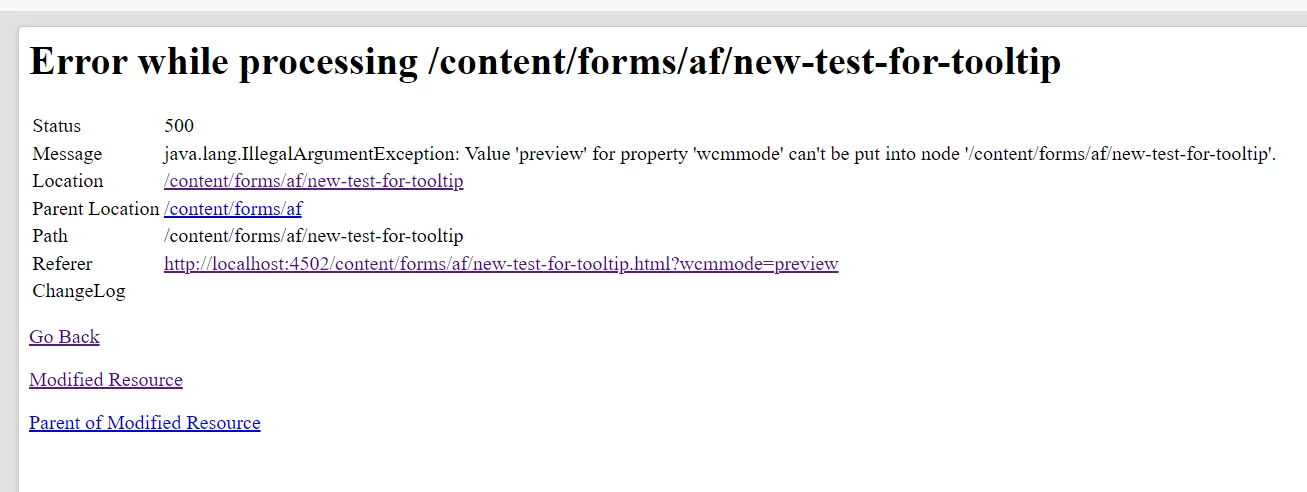
The error