i want to hide template /conf/test-web/settings/wcm/templates/page-content | Community
Skip to main content
Level 2
Jul 6, 2023 5:49 PM UTC
Solved

i want to hide template /conf/test-web/settings/wcm/templates/page-content

i want to hide this template /conf/test-web/settings/wcm/templates/page-content


when i create any page  don't want to show this template. how to hide. 

imshaileshAccepted solution
Level 2
Jul 6, 2023 7:11 PM UTC

Hi @gmahendra !

There can be two cases for your scenario.

  1. Hide template for all paths
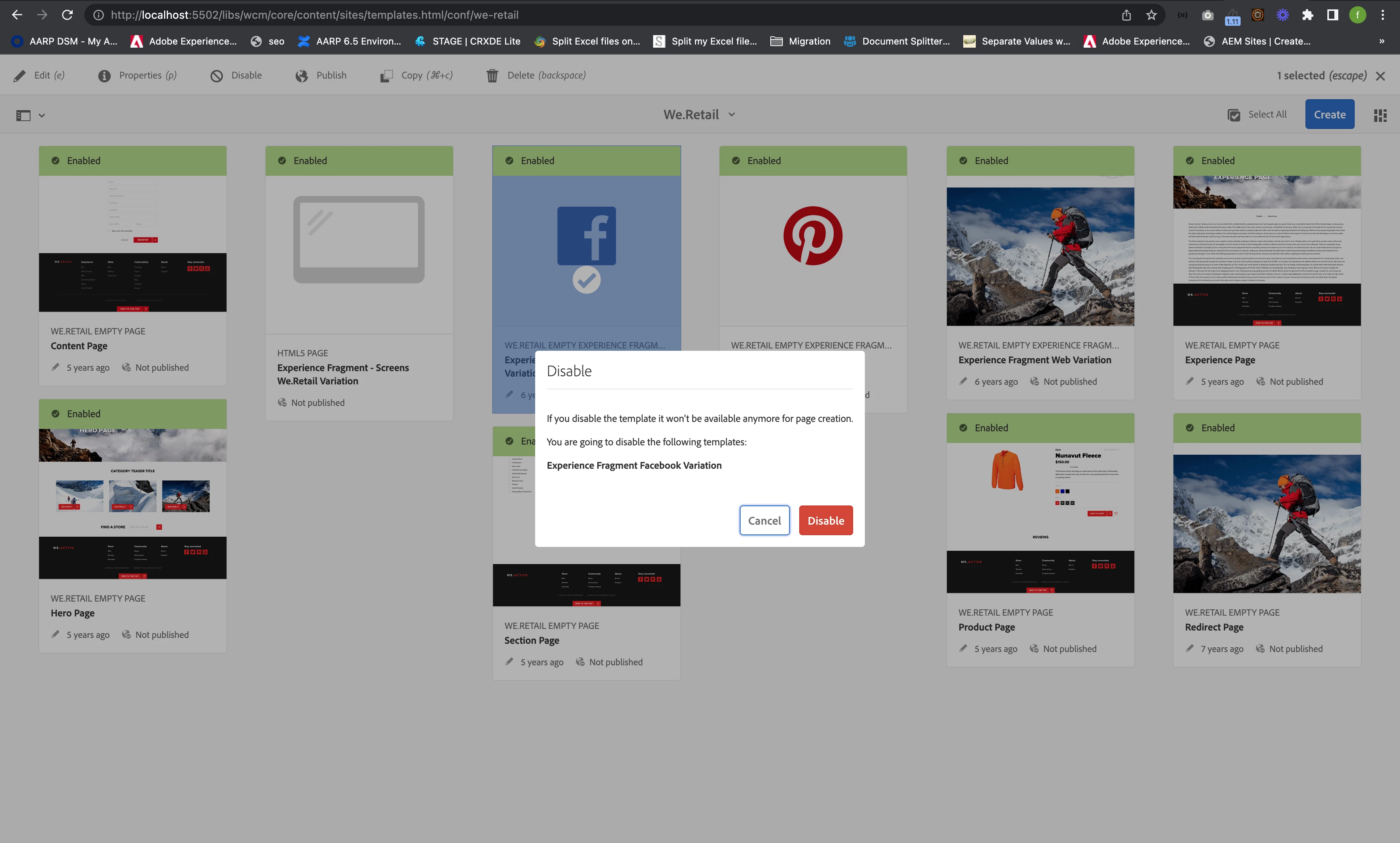
    In this scenario, you can go to Tools -> General -> Templates -> Project Folder, Select page-content template and click on Disable button present in Action Bar.

    Click on Disable Button in the Modal.


  2. Hide template for certain paths
    Consider you want to hide template for certain path /content/we-retail/language-masters,Follow below steps

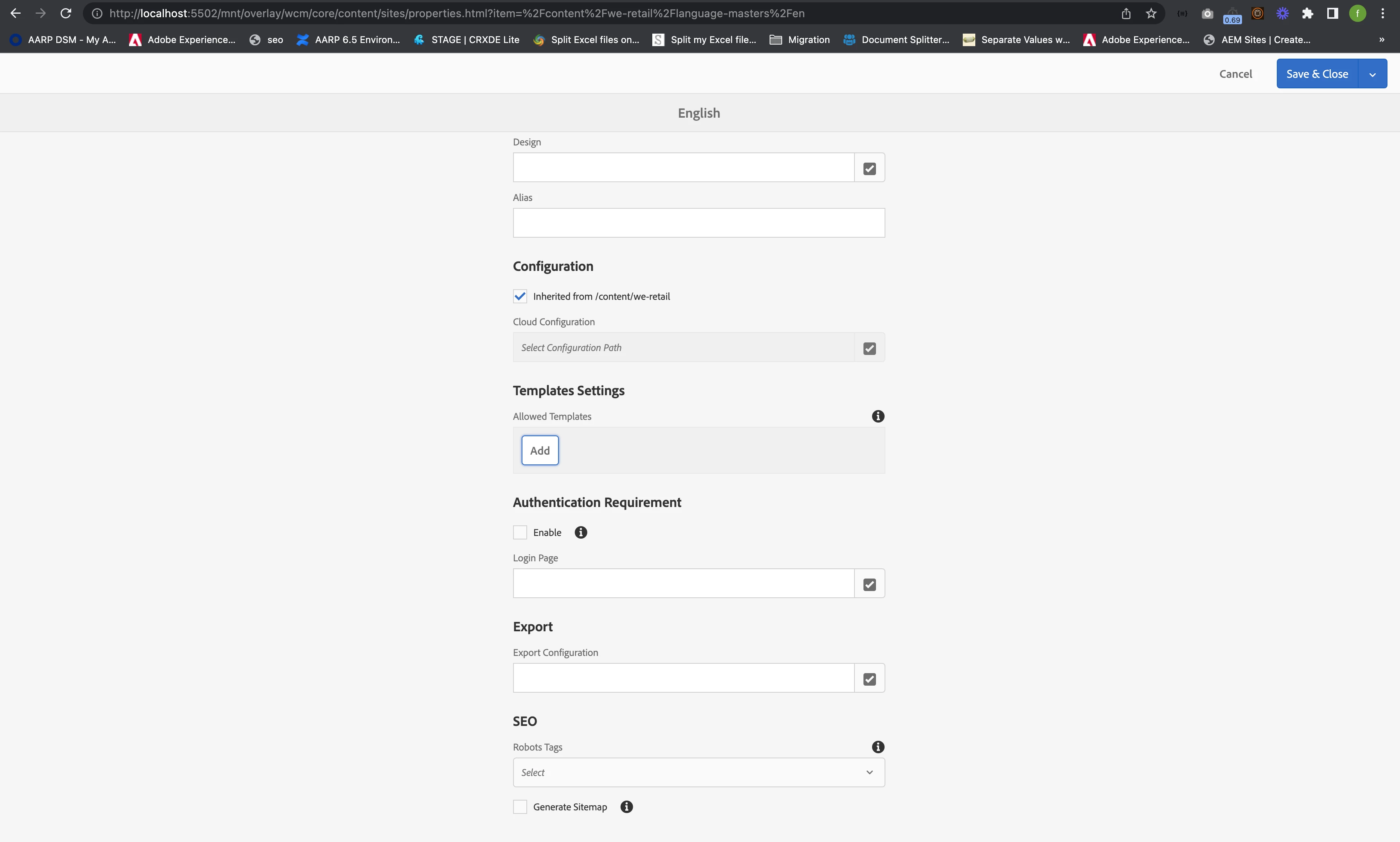
    Sites -> path where you want to exclude -> Select the folder -> Open properties of that folder -> Go to Advanced tab -> Search for Allowed Templates -> Add all template path which you want to allow one by one and exclude the path of 

    /conf/test-web/settings/wcm/templates/page-content. 

    It will exclude page-content template when we will try to create a page inside the content path.


    Regards,
    Shailesh


4 replies

Tanika02
Level 7
Jul 6, 2023 7:13 PM UTC

@gmahendra -


  • In the Templates console, locate the "/conf/test-web/settings/wcm/templates/page-content" template in the template list.

      Tools > Templates > Select your template


  • Click on the template to select it, and choose to disable.


Translate
Preetpal_Bindra
New Participant
Jul 6, 2023 7:12 PM UTC

Hello @gmahendra,

Following are the ways you could potentially hide the template,

1. Of course you can "delete" the template.

2. If you do not want to delete, then you can disable it completely from the AEM Authoring instance. See screenshot 1 below.

3. Usually the templates are allowed using cq:allowedTemplates property on the content page. You could remove the templates name from that property. See screenshot 2.


screenshot 1


screenshot 2


thanks,

Preetpal


Translate
imshaileshAccepted solution
Level 2
Jul 6, 2023 7:11 PM UTC

Hi @gmahendra !

There can be two cases for your scenario.

  1. Hide template for all paths
    In this scenario, you can go to Tools -> General -> Templates -> Project Folder, Select page-content template and click on Disable button present in Action Bar.

    Click on Disable Button in the Modal.


  2. Hide template for certain paths
    Consider you want to hide template for certain path /content/we-retail/language-masters,Follow below steps

    Sites -> path where you want to exclude -> Select the folder -> Open properties of that folder -> Go to Advanced tab -> Search for Allowed Templates -> Add all template path which you want to allow one by one and exclude the path of 

    /conf/test-web/settings/wcm/templates/page-content. 

    It will exclude page-content template when we will try to create a page inside the content path.


    Regards,
    Shailesh


Translate
ayush-anand
Level 4
Jul 6, 2023 5:59 PM UTC

@gmahendra You can either disable the template or you can specify the cq:allowedPath property based on the requirement.


Regards,

Ayush

Translate