
Icons on AEM landing page are not loading properly | Community
Skip to main content
Santhosh_Talepalle
Level 2
Aug 25, 2023 6:51 AM UTC
Solved

Icons on AEM landing page are not loading properly

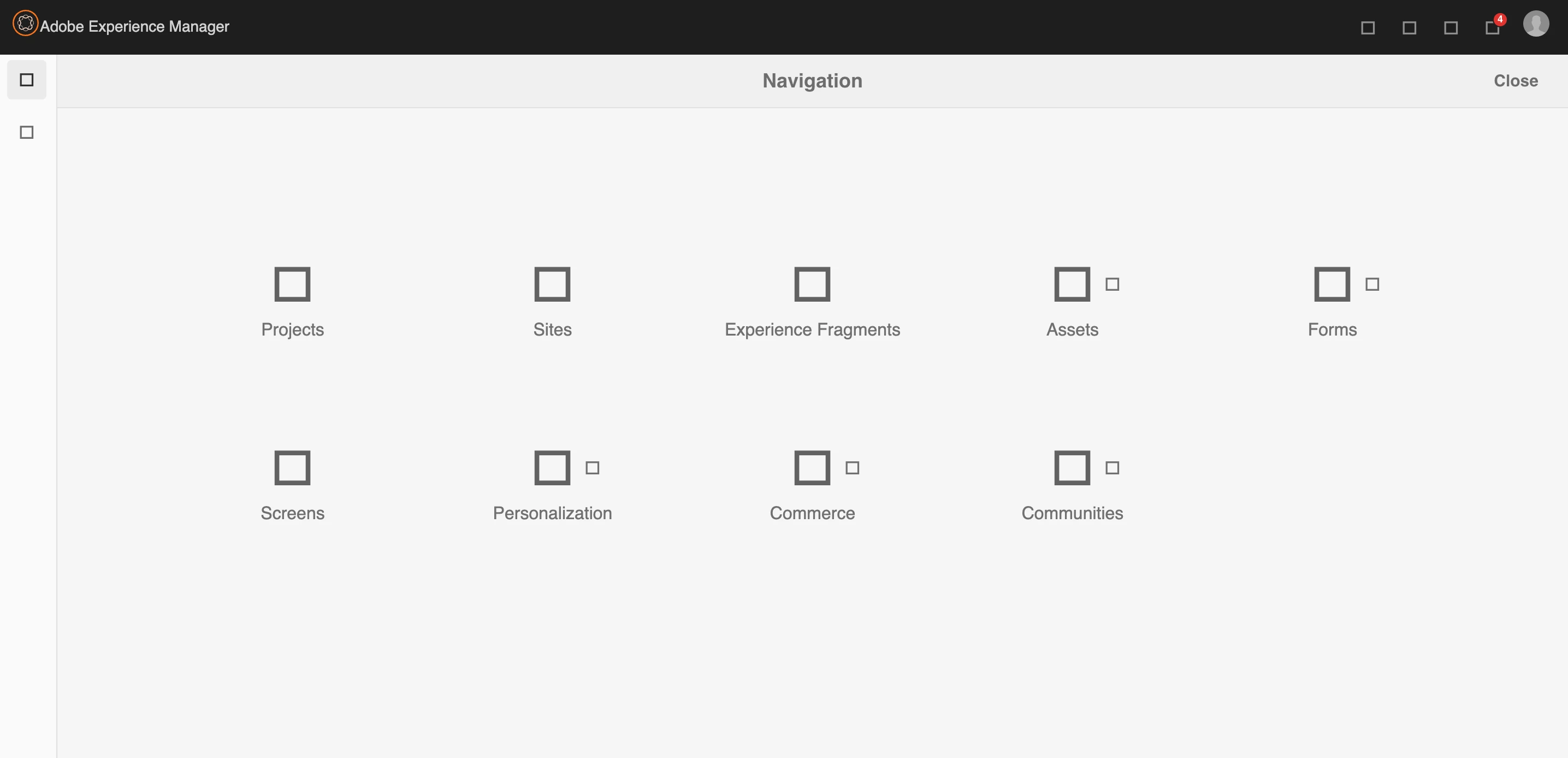
I am currently using AEM 6.5.16 on my machine. Most of the time, I end up getting broken icons through out the AEM.

To fix this, I have tried Rebuilding the client libs, but i end up getting the same error as always. 


Can anyone suggest me a permanent fix for this. Thanks in advance.
 

This post is no longer active and is closed to new replies. Need help? Start a new post to ask your question.
DPrakashRaj
DPrakashRajAccepted solution
New Participant
Aug 26, 2023 4:37 AM UTC

Log suggest that it’s related to data store consistency issue. If it’s your local you can setup a new instance and if you still want to resolve it then check https://experienceleague.adobe.com/docs/experience-cloud-kcs/kbarticles/KA-17469.html?lang=en#:~:text=This%20error%20means%20that%20you,disk%2C%20or%20network%20share%20instability.

9 replies

DPrakashRaj
New Participant
Aug 25, 2023 6:12 PM UTC

it seems from the screenshot all icons are referring to the AEM OOTB icons/clientlibs. For me it looks like permissioning issue.

Please check below things

  1. on local are you logged in as Admin user?
  2. Check what is getting logged on the AEM log. Log is available inside crx-quickstart/log directory of your AEM
Translate
Santhosh_Talepalle
Level 2
Aug 25, 2023 7:54 PM UTC

1. I am admin user

2. I could see couple of errors repeatedly in the error.log file

25.08.2023 01:37:21.188 *ERROR* [[0:0:0:0:0:0:0:1] [1692945441178] GET /etc.clientlibs/clientlibs/granite/coralui3/resources/coralui-component-icon/AdobeSpectrumIcons18.ttf HTTP/1.1] org.apache.sling.engine.impl.SlingMainServlet service: Uncaught Problem handling the request
java.io.IOException: java.io.IOException: org.apache.jackrabbit.core.data.DataStoreException: Record 428aab34f80fc8431654442ac641fd965bb5da39460cff105fd4ca2ad43b4c18 does not exist.


5.08.2023 01:37:21.188 *WARN* [[0:0:0:0:0:0:0:1] [1692945441183] GET /etc.clientlibs/clientlibs/granite/coralui3/resources/coralui-component-icon/AdobeSpectrumIcons18.woff HTTP/1.1] org.apache.jackrabbit.oak.plugins.blob.BlobStoreBlob Error occurred while obtaining InputStream for blobId [c7d1bee099f3685f923eaf340d41e5773d8e4e6e0cef5c0959e94b9bb0d9335a#238616]
java.io.IOException: org.apache.jackrabbit.core.data.DataStoreException: Record c7d1bee099f3685f923eaf340d41e5773d8e4e6e0cef5c0959e94b9bb0d9335a does not exist.

Can you please check this?


Translate
DPrakashRaj
DPrakashRajAccepted solution
New Participant
Aug 26, 2023 4:37 AM UTC

Log suggest that it’s related to data store consistency issue. If it’s your local you can setup a new instance and if you still want to resolve it then check https://experienceleague.adobe.com/docs/experience-cloud-kcs/kbarticles/KA-17469.html?lang=en#:~:text=This%20error%20means%20that%20you,disk%2C%20or%20network%20share%20instability.

Translate
TarunKumar
New Participant
Aug 25, 2023 9:47 AM UTC

HI @santhosh_talepalle ,

Can you check in chrome dev console if you see any error.

Thanks
Tarun

Translate
Santhosh_Talepalle
Level 2
Aug 25, 2023 5:55 PM UTC

I could see this error


Translate
varun249715
Employee
Aug 25, 2023 6:17 PM UTC

Please access the below URL and click on the "Invalidate Caches" button.

http://localhost:4502/libs/granite/ui/content/dumplibs.rebuild.html?invalidate=true

Then click on the "Rebuild Libraries" and check if the issues are fixed.

Translate
varun249715
Employee
Aug 25, 2023 8:25 AM UTC

@santhosh_talepalle Is there any console error you are seeing?


Translate
Santhosh_Talepalle
Level 2
Aug 25, 2023 5:55 PM UTC

I could see this


Translate