In AEM SPA com.adobe.aem.spa.project.core.models not found | Community
Skip to main content
New Participant
May 26, 2023
Solved

In AEM SPA com.adobe.aem.spa.project.core.models not found

  • May 26, 2023
  • 1 reply
  • 1768 views

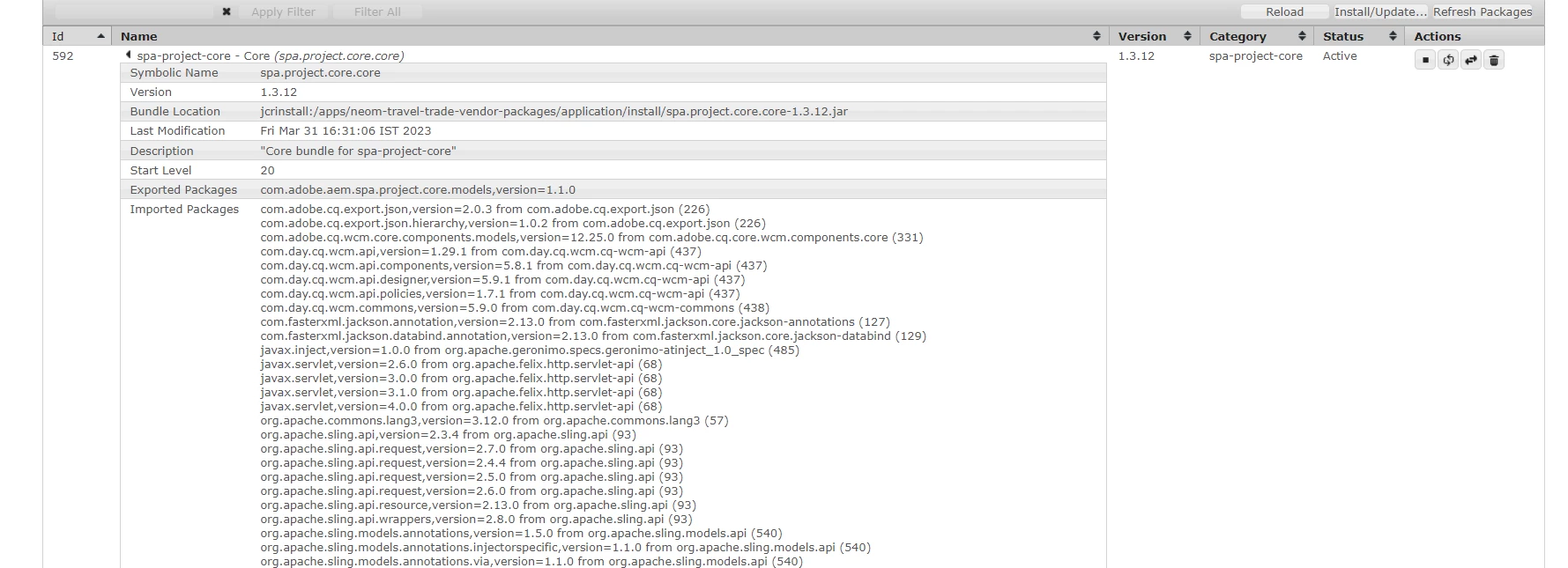
I have to override and modify getExportedPath() present inside spa page core model. I cannot find that in my import. I can find core component page but not the aem.spa.project.core but I can find the dependency are available even in system/console/bundle it is available and active 


For dispatcher I need to over ride and shorten the URL how can I do that if it is not available


This post is no longer active and is closed to new replies. Need help? Start a new post to ask your question.
Best answer by lukasz-m

Hi @ronnie09,

This is expected, because implementation of models is part of internal package, which is not exported. You can find implementation under:

You should use delegate pattern in case you want to made some modification. This is standard approach for models from Core Components, and SPA models are not exception here.

Sample code, that should give you an idea which direction to go.


package com.example.page; import com.adobe.aem.spa.project.core.models.Page; import com.adobe.cq.export.json.ContainerExporter; import com.adobe.cq.export.json.ExporterConstants; import org.apache.sling.api.SlingHttpServletRequest; import org.apache.sling.models.annotations.Exporter; import org.apache.sling.models.annotations.Model; import org.apache.sling.models.annotations.Via; import org.apache.sling.models.annotations.injectorspecific.Self; import org.apache.sling.models.annotations.via.ResourceSuperType; import org.jetbrains.annotations.Nullable; import java.util.Calendar; @Model( adaptables = SlingHttpServletRequest.class, adapters = { Page.class, ContainerExporter.class }, resourceType = CustomPageImpl.RESOURCE_TYPE ) @Exporter( name = ExporterConstants.SLING_MODEL_EXPORTER_NAME, extensions = ExporterConstants.SLING_MODEL_EXTENSION ) public class CustomPageImpl implements Page { static final String RESOURCE_TYPE = "custom/page/resource"; @Self @Via(type = ResourceSuperType.class) private Page delegate; @Override public String getExportedPath() { // place for your implementation } // other methods from Page, use methods from delegate if you do not want change them y @Override public @Nullable Page getHierarchyRootModel() { return delegate.getHierarchyRootModel(); } @Override public String getLanguage() { return delegate.getLanguage(); } @Override public Calendar getLastModifiedDate() { return delegate.getLastModifiedDate(); } @Override public String[] getKeywords() { return delegate.getKeywords(); } // repeat for all other methods from Page }


1 reply

lukasz-m
lukasz-mAccepted solution
New Participant
May 26, 2023

Hi @ronnie09,

This is expected, because implementation of models is part of internal package, which is not exported. You can find implementation under:

You should use delegate pattern in case you want to made some modification. This is standard approach for models from Core Components, and SPA models are not exception here.

Sample code, that should give you an idea which direction to go.


package com.example.page; import com.adobe.aem.spa.project.core.models.Page; import com.adobe.cq.export.json.ContainerExporter; import com.adobe.cq.export.json.ExporterConstants; import org.apache.sling.api.SlingHttpServletRequest; import org.apache.sling.models.annotations.Exporter; import org.apache.sling.models.annotations.Model; import org.apache.sling.models.annotations.Via; import org.apache.sling.models.annotations.injectorspecific.Self; import org.apache.sling.models.annotations.via.ResourceSuperType; import org.jetbrains.annotations.Nullable; import java.util.Calendar; @Model( adaptables = SlingHttpServletRequest.class, adapters = { Page.class, ContainerExporter.class }, resourceType = CustomPageImpl.RESOURCE_TYPE ) @Exporter( name = ExporterConstants.SLING_MODEL_EXPORTER_NAME, extensions = ExporterConstants.SLING_MODEL_EXTENSION ) public class CustomPageImpl implements Page { static final String RESOURCE_TYPE = "custom/page/resource"; @Self @Via(type = ResourceSuperType.class) private Page delegate; @Override public String getExportedPath() { // place for your implementation } // other methods from Page, use methods from delegate if you do not want change them y @Override public @Nullable Page getHierarchyRootModel() { return delegate.getHierarchyRootModel(); } @Override public String getLanguage() { return delegate.getLanguage(); } @Override public Calendar getLastModifiedDate() { return delegate.getLastModifiedDate(); } @Override public String[] getKeywords() { return delegate.getKeywords(); } // repeat for all other methods from Page }


Ronnie09Author
New Participant
May 26, 2023

Hi @lukasz-m 

com.adobe.aem.spa.project.core.models.Page

this page is not coming up while overriding the Page


lukasz-m
New Participant
May 26, 2023

Make sure you have included below dependency in your project pom. As it provides SPA project api.

<dependency> <groupId>com.adobe.aem</groupId> <artifactId>spa.project.core.core</artifactId> <version>1.3.12</version> </dependency>