in crx/de, create component, create template and create dialog are missing. | Community
Skip to main content
New Participant
March 31, 2021
Solved

in crx/de, create component, create template and create dialog are missing.

  • March 31, 2021
  • 2 replies
  • 4756 views

According to the tutorials, in the local author instance, in crx/de, if I navigate to /apps/wknd/components I should be able to create new components by right clicking. I can create folders or nodes, but thats it.  The other options have always been missing.  I am logged in as admin/admin, and I deployed wknd using mvn clean install -PautoInstallSinglePackage.  I have also tried creating a folder under /apps/wknd/components and creating under that, but same problem.
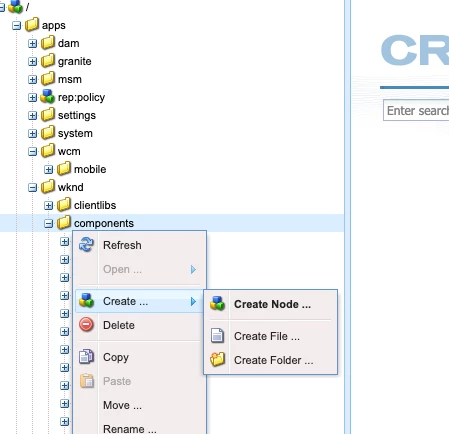


Any ideas?


Im using the latest could SDK downloaded from Adobe yesterday, and M1 Mac.
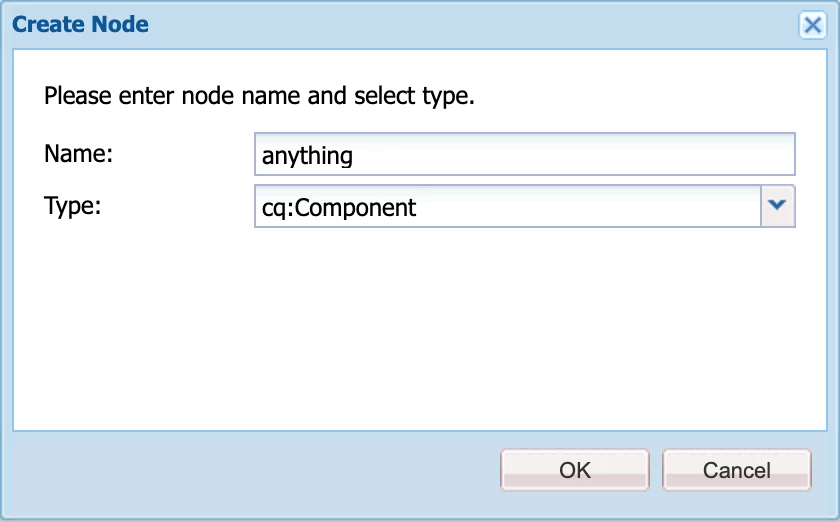
Best answer by Asutosh_Jena_

Hi @tb3dock 

You are correct. Those options are now not avilable for any of the folders. You will need to create the component either on the IDE, build and deploy the package to get the component on CRX/DE or you can right click on the folder and select it as "Create Node" by providing the type as cq:Component which will create the component node. This will allow you to create component in CRX/DE and then can be imported into FS using VLT or any other plugin.


Hope this helps!

Thanks!

2 replies

New Participant
March 31, 2021

Hi @tb3dock ,


As mentioned by @asutosh_jena_  the option to create components directly in crx/de is available via Create Node option. But if you want to directly integrate your IDE with crx/de than you can use Vault Configuration in IntellijIdea or Eclipse whichever you are using. These are basically plug-ins which integrates your IDE directly with crx and you dont have to worry about moving content from one place to another.

TB3dockAuthor
New Participant
March 31, 2021
Unforutnatley, the create node option only create a node, not the other files and structure which the tutorials dont detail. I cant find what files/structure is needed for a component.
Asutosh_Jena_
Asutosh_Jena_Accepted solution
New Participant
March 31, 2021

Hi @tb3dock 

You are correct. Those options are now not avilable for any of the folders. You will need to create the component either on the IDE, build and deploy the package to get the component on CRX/DE or you can right click on the folder and select it as "Create Node" by providing the type as cq:Component which will create the component node. This will allow you to create component in CRX/DE and then can be imported into FS using VLT or any other plugin.


Hope this helps!

Thanks!

TB3dockAuthor
New Participant
March 31, 2021

thanks for the info. Pretty much all tutorials use the "create component" route. I have not found one which details how to crate a component via IDE, e.g. which files to create, and what they should contain, what the structure should be etc.  I guess I could install an old version of AEM, create the component, then copy the contents to the new AEM.