In Workflow email Part - How to display the current URL host name in email template? | Community
Skip to main content
Level 5
Jan 28, 2019 6:56 AM UTC
Solved

In Workflow email Part - How to display the current URL host name in email template?

In the path /etc/workflow/notification/email we have a template like

subject=Workflow notification: ${event.EventType}

header=-------------------------------------------------------------------------------------\n \

Time: ${event.TimeStamp}\n \

Step: ${item.node.title}\n \

User: ${participant.name} (${participant.id})\n \

Workflow: ${model.title}\n \

-------------------------------------------------------------------------------------\n\n

message=Content: ${host.prefix}${payload.path.open}\n

footer=\n \

-------------------------------------------------------------------------------------\n \

View the overview in your ${host.prefix}/inbox\n \

-------------------------------------------------------------------------------------\n \

This is an automatically generated message. Please do not reply.

In that template send the localhost:4502 as a host.prefix -------- I used the template in UAT as well as PRO server at that stage also it sends localhost:4502

Anyone can help me to how to get the message a respective server host name.

This post is no longer active and is closed to new replies. Need help? Start a new post to ask your question.
Gaurav-Behl
Gaurav-BehlAccepted solution
Level 10
Jan 28, 2019 11:32 AM UTC

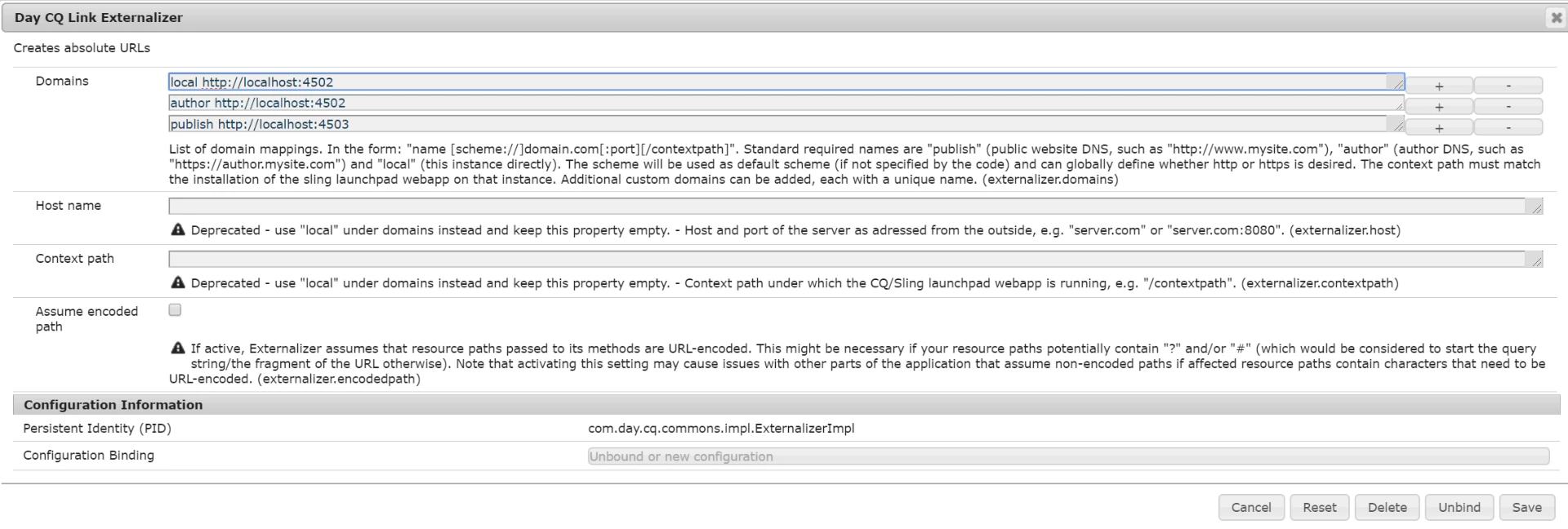
Set the host url prefix in OSGI config under CQ Workflow Email Notification Service  or

use Externalizer configuration settings for same as mentioned here -

chlimage_1

How to get host name in the workflow?

5 replies

aravinds-9BohMp
Level 2
Feb 6, 2019 8:58 AM UTC

Hi ..

     Anyone can help me to how to change the content in template, i change the template in /etc/workflow/email template after that also i'm receiving same content in mail.

Please anyone can help me to resolve that.

Thanks,

Aravind

Translate
aravindSAuthor
Level 5
Jan 30, 2019 7:26 AM UTC

Hi Gaurav,

     Here i didn't use any code, just i used the template from AEM OOTB code those template code path is                 /etc/workflow/notification/email/. This template is triggered when the workflow triggers.

Thanks and regards,

Aravind S

Translate
Gaurav-Behl
Level 10
Jan 29, 2019 5:29 PM UTC

Make the changes in Workflow Email Notification then it would work without any changes.

I suspect that Externalizer property would not get directly embedded by simply using {host.prefix}.  You would have to write code for it - Externalizing URLs

Translate
aravindSAuthor
Level 5
Jan 29, 2019 12:25 PM UTC

Hi gaurav,

     This one is not working, i made the changes in the Link Externalizer. After that also i receive the mail like localhost:4502 only.

Translate
Gaurav-Behl
Gaurav-BehlAccepted solution
Level 10
Jan 28, 2019 11:32 AM UTC

Set the host url prefix in OSGI config under CQ Workflow Email Notification Service  or

use Externalizer configuration settings for same as mentioned here -

chlimage_1

How to get host name in the workflow?

Translate