Inplace search DropDown AEM6.4 | Community
Skip to main content
Level 2
Aug 18, 2018 8:56 PM UTC
Solved

Inplace search DropDown AEM6.4

Hi All,

We have a requirement that we need to populate the dynamic list in dropdown. We achieved that task but the list is almost 700 items so its quite tough for content author to scroll the dropdown to select appropriate value. Is it possible to have a kind of In place search dropdown where content author can type the character and drop down list will only show relevant value. If someone had did it or have any information, Kindly share with us.

Thanks in Advance.

This post is no longer active and is closed to new replies. Need help? Start a new post to ask your question.
arunpatidar
arunpatidarAccepted solution
New Participant
Aug 18, 2018 10:46 PM UTC

Hi,

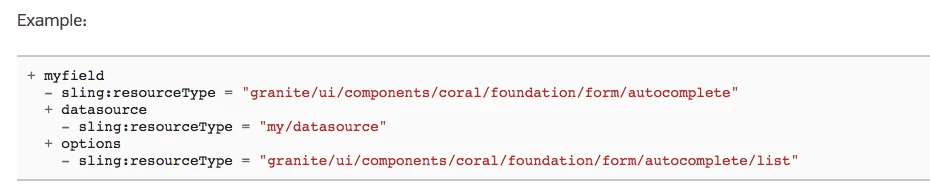
There is a granite component 'Autocomplete' already available. It does the exact same task which you are looking for.

Autocomplete — Granite UI 1.0 documentation

Thanks

Arun

Arun Patidar

3 replies

arunpatidar
New Participant
Aug 20, 2018 8:51 AM UTC

Hi,

It can't be done from datasource.

For 'select' datasource return options and injected into dom and where you can set property selected=true or selected=selected

For 'autocomplete' datasource return list(li) and injected into dom and due to that you can't set dropdown properties like selected=true or selected=selected

If you know the default value you can directly set the value property with default value in dropdown node in CRXDE

value = "defaultVal"

Translate
Arun Patidar
Level 2
Aug 20, 2018 6:35 AM UTC

Hi Arun,

Thanks for the response. It serve most of the purpose but we need default value for the each dropdown, So can you help us in understanding that how we can set default value in auto complete dropdown. Even in datasource we are using servlet where we are putting selected true to default value.

Translate
arunpatidar
arunpatidarAccepted solution
New Participant
Aug 18, 2018 10:46 PM UTC

Hi,

There is a granite component 'Autocomplete' already available. It does the exact same task which you are looking for.

Autocomplete — Granite UI 1.0 documentation

Thanks

Arun

Translate
Arun Patidar