New Participant
January 18, 2018

Is it possible to customize a content fragment, inserting other types of fields on it's creation?

  • January 18, 2018
  • 6 replies
  • 5432 views

Hello,

is it possible to customize a content fragment template so it has advanced options, like datepicker and checkbox fields on it's creation? It is for it that the option WeakReference exists? I cannot found this option on the documentation. If it is not possible with content fragment, there is another way that I can create a complete asset type, with url, checkbox and date fields?

I am seeing only these few options to use in the content fragment template:
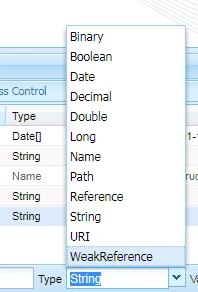
Thank you very much!

This post is no longer active and is closed to new replies. Need help? Start a new post to ask your question.

6 replies

New Participant
January 18, 2018

Hello, thank you for your reply.

I have been trying that, I created the same original structure of the libs folder under the apps, as shown below,

and I updated the label of a field, but when I do the test creating a new content fragment, the label that is showed is the default label. Is this something that I am missing?

this should work right?

This is the same structure

Thank you very much!

rwinkle
New Participant
January 18, 2018

Remove the libs folder from your path and that should fix the issue.  It should be under /apps/dam/cfm/admin/content.  The documentation for creating Content Fragment Templates may also be helpful in understanding how the overlay works.  It's the same concept only for templates.  Content fragment templates may also be a solution to the problem you are trying to solve.

saurabhn3378167
New Participant
September 25, 2018

Hello,

I have added one field i.e weightage to this but its neither storing data under metadata node nor in jcr:content.

New Participant
January 18, 2018

Hello, thank you! But I think these documentations is to customize the components, isn't?

I wish I could customize the template fragment options in this window below to create more options to have a complete asset, with all its information.

Thanks!!

edubey
New Participant
January 18, 2018

Referencing AEM 6.3

These fields are defined at path

/libs/dam/cfm/admin/content/createfragment/jcr:content/body/items/form/items/wizard/items/properties/items/tabs/items/basic/items/column/items/info/items

You can overlay this path and add more fields

edubey
New Participant
January 18, 2018