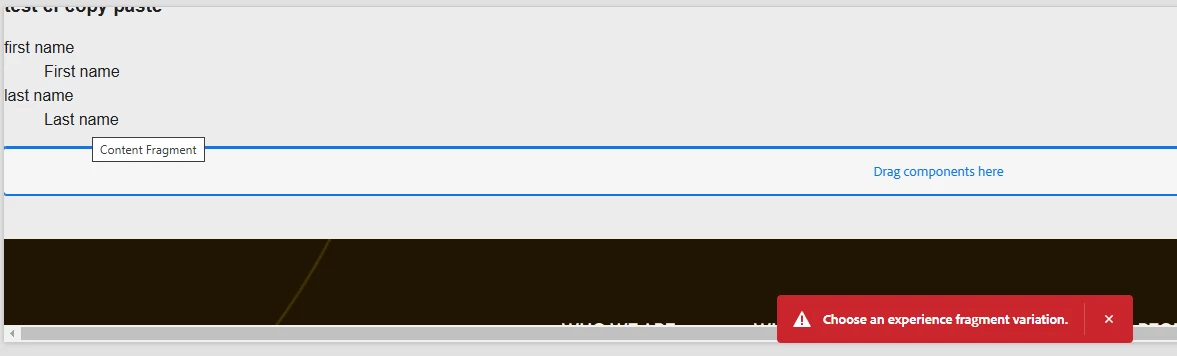
Issue when copy and pasting content fragment | Community
Skip to main content

5 replies

kautuk_sahni
Employee
July 14, 2025

@shashankra8 Just checking in — were you able to resolve your issue?
We’d love to hear how things worked out. If the suggestions above helped, marking a response as correct can guide others with similar questions. And if you found another solution, feel free to share it — your insights could really benefit the community. Thanks again for being part of the conversation!

Kautuk Sahni
mathrik
New Participant
January 22, 2025

I have run into the same error. Did you figure out a way to resolve it?

Fanindra_Surat
New Participant
November 30, 2024

Hi @shashankra8 , When you copy and paste a CF, there's going to be a network call that can be observed in the Dev tools of the browser. Can you share what the network call's response says and the underlying error from error.log file?


Regards,

New Participant
December 2, 2024

Request Url : http://localhost:4502/bin/wcm/experiencefragments/verifyreferences.json
Response:
{
"status": "invalid",
"validationErrorMessage": "Choose an experience fragment variation."
}
and there is no errror in the error.log

Employee
December 3, 2024

Convert that section to an experience fragment using an XF variation template and then use copy paste. 

Nikhil-Kumar
New Participant
November 29, 2024

@shashankra8  - Do you have any variation/variations for this Content Fragment. I am not sure if we can copy the variation, try if any variation exists and if we are able to copy it.

New Participant
December 2, 2024

there is no variation , its just master 

anupampat
New Participant
November 28, 2024

Hi @shashankra8 ,


Can you please provide more information, if you drag and drop a content fragment on the OOTB content fragment component, there's no error. I hope the CF which you are trying to drop is a valid CF with at least the Master copy. Unless there's some customization on the component which only allows choosing a variation you should not see any errors. Also check the template policy if the particular CF is blocked.


Regards,

Anupam Patra

New Participant
November 28, 2024

hi @anupampat ,  thanks for the reply
Dnd the content fragment component and configuring the component with the configuring the content fragment in it works fine, but when i try to copy the mentioned cf component and paste is somewhere on the page, then the error comes up
Yes, its a valid cf which has the master copy and i did try to create a basic cf as well but the same issue i am facing 

anupampat
New Participant
November 28, 2024

Hi @shashankra8 ,


Copy pasting the CF component with a CF also works for me. What happens if you drag and drop 2 CF components and author with same/different CFS. Do you get any errors or does it work ?


Regards,

Anupam Patra