issue with the permissions | Community
Skip to main content
New Participant
May 18, 2023
Solved

issue with the permissions

  • May 18, 2023
  • 2 replies
  • 823 views

Hi,

I have an xxx user who is part of administrator group

XXX user has all permissions for /conf/project/setting/wcm these permissions are coming from administrator group.

I tried changing permissions for this path /conf/project/setting/wcm at user level.

 I removed delete, and replicate at user level for the mentioned path and saved it. when I return its showing old permissions.

Is administrator group permissions overriding the user level permissions, can anyone help me here.
Best answer by SantoshSai

Hi @vani1012 ,

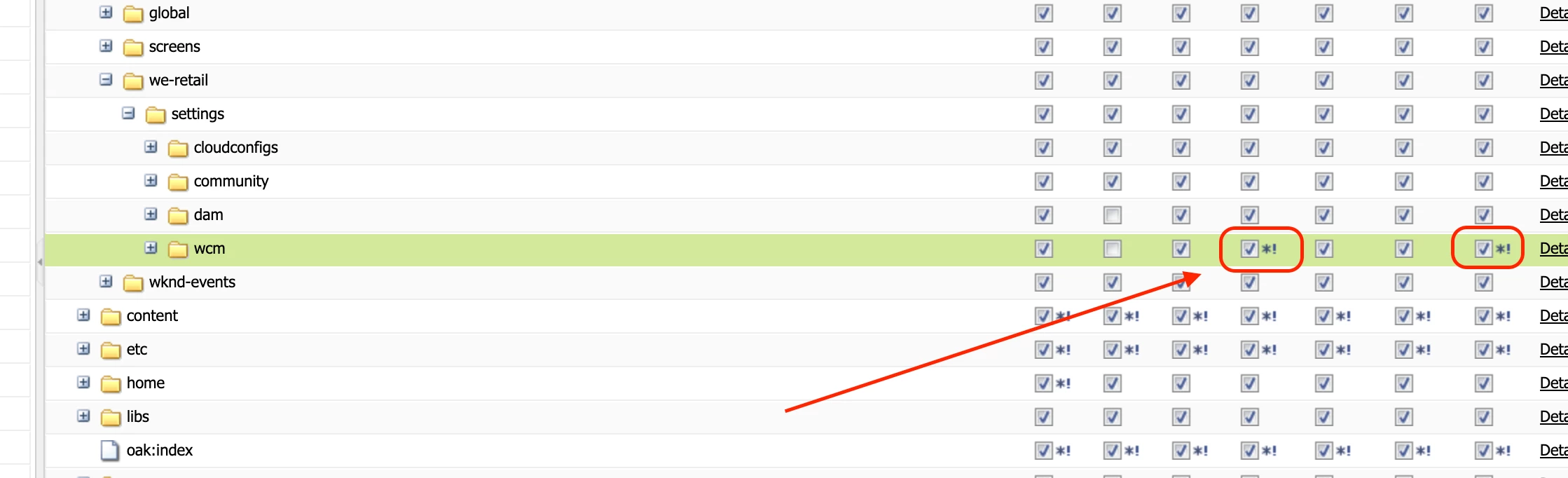
You must be seeing this Asterisk and Exclamation marks in PERMISSION STATES.

This user will be able to achieve the highest level of permissions among the user groups he/she is assigned to, as expected.

If a user is part of multiple groups and different groups have different permissions on a particular node. The effective overall permissions are determined by different combinations.

Local Entry means that manually permission has been updated on particular node (through useradmin or crx access control panel) instead of permissions getting inherited from ancestor node (e.g. a permission on parent node getting applied to child node).

Effective Permission means that a permission is getting applied as per the group permission configuration. e.g. for a group there is "allow" permission on a node and we see that "allow" is shown in useradmin for user who is member of that group.

Ineffective permission means that a permission is NOT getting applied as per the group permission configuration. e.g. on a node there are 2 group permissions. For group A its "allow", for group B its "deny" on a particular node. But for a user who is member of both groups, user admin shows "allow" on that node. So in this case effective permission is group A's "allow" and ineffective permission is group B's "deny"

You would see * (asterisk) only for effective only scenarios. And both *(asterisk) and !(exclamation) for ineffective or effective + ineffective combinations

Permissions can be tricky, follow quote from Adobe standards sums it up.

Hope that helps!

Regards,

Santosh

2 replies

aanchal-sikka
New Participant
May 21, 2023

Hello @vani1012 


I would suggest not to use administrators as a parent group, when fine tuning permissions.


Using OOTB content-authors, template-authors, dam-users etc will be more ideal.

The administrators groups have much higher/default accesses to do things, not allowed by a normal use (even the ones discouraged by Adobe because of deprecation of a feature).


Please add this user to template-authors groups and then further fine-tune access. 

Aanchal Sikka
SantoshSai
SantoshSaiAccepted solution
New Participant
May 18, 2023

Hi @vani1012 ,

You must be seeing this Asterisk and Exclamation marks in PERMISSION STATES.

This user will be able to achieve the highest level of permissions among the user groups he/she is assigned to, as expected.

If a user is part of multiple groups and different groups have different permissions on a particular node. The effective overall permissions are determined by different combinations.

Local Entry means that manually permission has been updated on particular node (through useradmin or crx access control panel) instead of permissions getting inherited from ancestor node (e.g. a permission on parent node getting applied to child node).

Effective Permission means that a permission is getting applied as per the group permission configuration. e.g. for a group there is "allow" permission on a node and we see that "allow" is shown in useradmin for user who is member of that group.

Ineffective permission means that a permission is NOT getting applied as per the group permission configuration. e.g. on a node there are 2 group permissions. For group A its "allow", for group B its "deny" on a particular node. But for a user who is member of both groups, user admin shows "allow" on that node. So in this case effective permission is group A's "allow" and ineffective permission is group B's "deny"

You would see * (asterisk) only for effective only scenarios. And both *(asterisk) and !(exclamation) for ineffective or effective + ineffective combinations

Permissions can be tricky, follow quote from Adobe standards sums it up.

Hope that helps!

Regards,

Santosh

Santosh Sai
Vani1012Author
New Participant
May 19, 2023

yes, I obeserved asterisk and Exclamation marks in PERMISSION STATES.

Here in my case administrator permissions overriding the user-level permissions or what?

What to do in that case should I remove the group and apply the user level permissions?