Issues with Custom Title Component Based on Core Title v3 | Community
Skip to main content
New Participant
July 25, 2025
Solved

Issues with Custom Title Component Based on Core Title v3

  • July 25, 2025
  • 3 replies
  • 395 views

Hi,


We created a new  title component under my project folder with sling:resourceSuperType: core/wcm/components/title/v3/title. And for title component dialog we are having 2 fields one is jcr:title and the other is heroText. For heroText we used sling:orderbefore property to show only one sibling field i.e jcr:title. And we are having one more field on our custom component dialog i.e Type/Size(to select the header tag i.e h1,h2,etc). And this title component were used in multiple shelves and other components. But i am facing below two Issues by using the title(v3) component.

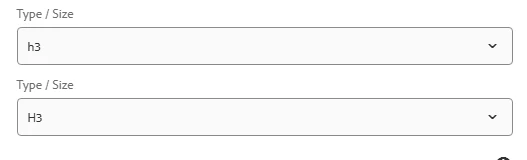
Issue1: Suppose i have one shelf i.e single article and in this single article shelf i included title(v3) component. When i add this shelf on the page if i open the singlearticleshelf dialog and i am closing it then i am opening the title(v3) dialog. Where i can see two textarea fields and two Type/Size dropdown fields one is from core and the other is from custom component  even though i am using sling:orderbefore for text areaa fields but still showing two fields on the dialog.

Issue2: After refreshing the same page when i open the title component dialog first then its working as expected and its showing one textarea on dialog and one Type/size dropdown fields on dialog.


The behaviour of title component is same in all shelves wherever its included.
 

Best answer by SantoshSai

Hi @maturubhanu,

The property sling:orderBefore only controls order among sibling nodes, but it does not remove inherited fields. When you say it works after a page refresh, the dialog rendering might be correct because of caching or JS-driven initialization.

Could you try explicitly disabling the inherited fields you don’t need?

Example: 

<?xml version="1.0" encoding="UTF-8"?> <jcr:root xmlns:sling="http://sling.apache.org/jcr/sling/1.0" xmlns:jcr="http://www.jcp.org/jcr/1.0" jcr:primaryType="nt:unstructured" jcr:title="Title" sling:resourceType="cq/gui/components/authoring/dialog"> <content jcr:primaryType="nt:unstructured" sling:resourceType="granite/ui/components/coral/foundation/fixedcolumns"> <items jcr:primaryType="nt:unstructured"> <column jcr:primaryType="nt:unstructured" sling:resourceType="granite/ui/components/coral/foundation/container"> <items jcr:primaryType="nt:unstructured"> <!-- Disable inherited jcr:title field --> <jcrTitle sling:hideResource="true" jcr:primaryType="nt:unstructured" /> <!-- Custom heroText --> <heroText jcr:primaryType="nt:unstructured" sling:resourceType="granite/ui/components/coral/foundation/form/textarea" fieldLabel="Hero Text" name="./heroText" sling:orderBefore="type" /> <!-- Type/Size dropdown --> <type jcr:primaryType="nt:unstructured" sling:resourceType="granite/ui/components/coral/foundation/form/select" fieldLabel="Type/Size" name="./type"> <items jcr:primaryType="nt:unstructured"> <h1 jcr:primaryType="nt:unstructured" text="H1" value="h1"/> <h2 jcr:primaryType="nt:unstructured" text="H2" value="h2"/> <h3 jcr:primaryType="nt:unstructured" text="H3" value="h3"/> </items> </type> </items> </column> </items> </content> </jcr:root>

Here, sling:hideResource="true" hides the inherited jcr:title field from Core Title.

Reference: https://experienceleague.adobe.com/en/docs/experience-manager-65/content/implementing/developing/platform/sling-resource-merger

3 replies

kautuk_sahni
Employee
August 4, 2025

@maturubhanu Just checking in — were you able to resolve your issue? We’d love to hear how things worked out. If the suggestions above helped, marking a response as correct can guide others with similar questions. And if you found another solution, feel free to share it — your insights could really benefit the community. Thanks again for being part of the conversation!

Kautuk Sahni
SantoshSai
SantoshSaiAccepted solution
New Participant
July 26, 2025

Hi @maturubhanu,

The property sling:orderBefore only controls order among sibling nodes, but it does not remove inherited fields. When you say it works after a page refresh, the dialog rendering might be correct because of caching or JS-driven initialization.

Could you try explicitly disabling the inherited fields you don’t need?

Example: 

<?xml version="1.0" encoding="UTF-8"?> <jcr:root xmlns:sling="http://sling.apache.org/jcr/sling/1.0" xmlns:jcr="http://www.jcp.org/jcr/1.0" jcr:primaryType="nt:unstructured" jcr:title="Title" sling:resourceType="cq/gui/components/authoring/dialog"> <content jcr:primaryType="nt:unstructured" sling:resourceType="granite/ui/components/coral/foundation/fixedcolumns"> <items jcr:primaryType="nt:unstructured"> <column jcr:primaryType="nt:unstructured" sling:resourceType="granite/ui/components/coral/foundation/container"> <items jcr:primaryType="nt:unstructured"> <!-- Disable inherited jcr:title field --> <jcrTitle sling:hideResource="true" jcr:primaryType="nt:unstructured" /> <!-- Custom heroText --> <heroText jcr:primaryType="nt:unstructured" sling:resourceType="granite/ui/components/coral/foundation/form/textarea" fieldLabel="Hero Text" name="./heroText" sling:orderBefore="type" /> <!-- Type/Size dropdown --> <type jcr:primaryType="nt:unstructured" sling:resourceType="granite/ui/components/coral/foundation/form/select" fieldLabel="Type/Size" name="./type"> <items jcr:primaryType="nt:unstructured"> <h1 jcr:primaryType="nt:unstructured" text="H1" value="h1"/> <h2 jcr:primaryType="nt:unstructured" text="H2" value="h2"/> <h3 jcr:primaryType="nt:unstructured" text="H3" value="h3"/> </items> </type> </items> </column> </items> </content> </jcr:root>

Here, sling:hideResource="true" hides the inherited jcr:title field from Core Title.

Reference: https://experienceleague.adobe.com/en/docs/experience-manager-65/content/implementing/developing/platform/sling-resource-merger

Santosh Sai
narendragandhi
New Participant
July 25, 2025

Hi @maturubhanu 


As I understand, the issue is that you want to hide the properties that gets inherited from core components and only show the custom properties that you created. You can try using sling:hideProperties for this purpose. Please refer this link for details - https://experienceleague.adobe.com/en/docs/experience-manager-65/content/implementing/developing/platform/sling-resource-merger


Hope this helps!


Thanks

Narendra

New Participant
July 25, 2025

Hi Narendragandhi,


Thanks for replying.

But when I open a titlev3 component dialog first then it's showing only one fields no duplicate fields but when I open the shelf(in shelf title component included) dialog and then if I open titlev3 component dialog then it's showing duplicate fields one from core component