JCR:Node is not appearing for cq:included component in AEM 6.2. | Community
Skip to main content
Level 2
Oct 20, 2017 7:44 AM UTC
Solved

JCR:Node is not appearing for cq:included component in AEM 6.2.

When creating a new page using the template which has many cq:included components doesn't create the nodes in jcr:content repository for the same components.

so when i am targeting a component , it shows an error that component node is not defined and not able to target but when i edit the component then it creates the node and targeting is working fine. This is the behaviour in AEM 6.2 wherever when checking the same in CQ5 even without editing the component or without having the nodes , it allows the component to target.

This post is no longer active and is closed to new replies. Need help? Start a new post to ask your question.
VeenaVikraman
VeenaVikramanAccepted solution
New Participant
Oct 23, 2017 7:09 PM UTC

Hi ranjnak64657715​

  That is the way the components work. When you include a component on your template , until unless you author it for atleast once (atleast you open dialog and close once) it will not create a node . But when you have a parsys and you drag and drop the components , a corresponding  node will be created immediately when the component is dropped to the parsys.  Let me know if you need anymore info

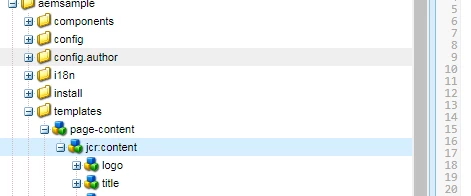
     What you can do to fix this is add the nodes for your components under your corresponding template. Doing so , it will always create the component node , when you create your page

Thanks

Veena

2 replies

VeenaVikraman
VeenaVikramanAccepted solution
New Participant
Oct 23, 2017 7:09 PM UTC

Hi ranjnak64657715​

  That is the way the components work. When you include a component on your template , until unless you author it for atleast once (atleast you open dialog and close once) it will not create a node . But when you have a parsys and you drag and drop the components , a corresponding  node will be created immediately when the component is dropped to the parsys.  Let me know if you need anymore info

     What you can do to fix this is add the nodes for your components under your corresponding template. Doing so , it will always create the component node , when you create your page

Thanks

Veena

Translate
smacdonald2008
Level 10
Oct 23, 2017 3:37 PM UTC

Can you show the syntax you are using.

Translate
