languages copies are not translated in different languages | Community
Skip to main content
New Participant
July 23, 2024
Solved

languages copies are not translated in different languages

  • July 23, 2024
  • 4 replies
  • 1353 views

hi ,

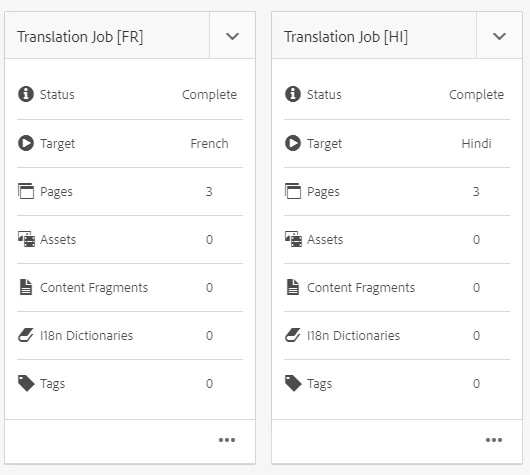
when I am creating the translation jobs for different languages and completing it my pages are not getting translated, they are still showing in english. Also the i18n dictionaries become 0 after completing. I am using the default microsoft machine translator.

can anyone tell me how to solve it?
 

This post is no longer active and is closed to new replies. Need help? Start a new post to ask your question.
Best answer by h_kataria

Can you check if the OOB microsoft translation connection is proper ? I think you will still have to provide your own subscription key in the connection as the one provided OOB is probably not valid anymore. 
I tried on my local and got following in error logs :

{"error":{"code":"401","message": "Access denied due to invalid subscription key or wrong API endpoint. Make sure to provide a valid key for an active subscription and use a correct regional API endpoint for your resource."}}

You can create a free translation service in Azure and use subscription keys from there as mentioned here https://www.albinsblog.com/2021/10/microsoft-translator-service-issue-aem.html 
and https://www.albinsblog.com/2021/11/adobe-experience-manageraem-content-translation-deep-dive-part2.html 
Hope this helps.

4 replies

kautuk_sahni
Employee
July 23, 2024

@samargill Did you find the suggestion helpful? Please let us know if you require more information. Otherwise, please mark the answer as correct for posterity. If you've discovered a solution yourself, we would appreciate it if you could share it with the community. Thank you!

Kautuk Sahni
SamarGillAuthor
New Participant
July 31, 2024

@kautuk_sahni  yes this suggestion was helpful. Thank you

HrishikeshKagne
New Participant
July 23, 2024

Hi @samargill ,

Please go through the below video, you will get the clarification on it

https://www.youtube.com/watch?v=MMtS8ag6OUE&list=PLEaEQSM_Y4tmJjQICTFDm2lU5mNmd_Oar&index=25


Thanks

Hrishikesh Kagane
SamarGillAuthor
New Participant
July 24, 2024

Hi @hrishikeshkagne , yes i have watched this reference and followed all the steps but still my languages copies are not translated to respective target languages.

if there is error what type of error can there be in logs


Could there be some issues related to version(currently using aem 6.5.20)?


bhavigoyal
New Participant
July 23, 2024

Have you created the BluePrint for this??

SamarGillAuthor
New Participant
July 24, 2024

yes, i have created it.

h_kataria
h_katariaAccepted solution
New Participant
July 23, 2024

Can you check if the OOB microsoft translation connection is proper ? I think you will still have to provide your own subscription key in the connection as the one provided OOB is probably not valid anymore. 
I tried on my local and got following in error logs :

{"error":{"code":"401","message": "Access denied due to invalid subscription key or wrong API endpoint. Make sure to provide a valid key for an active subscription and use a correct regional API endpoint for your resource."}}

You can create a free translation service in Azure and use subscription keys from there as mentioned here https://www.albinsblog.com/2021/10/microsoft-translator-service-issue-aem.html 
and https://www.albinsblog.com/2021/11/adobe-experience-manageraem-content-translation-deep-dive-part2.html 
Hope this helps.