Layout changing in AEM not enabled in component. | Community
Skip to main content
New Participant
June 4, 2021
Solved

Layout changing in AEM not enabled in component.

  • June 4, 2021
  • 1 reply
  • 955 views

Hi ,


Layout changing option is not showing in my component to allow the author to change column width.


In my component only these options are showing.

 

Need to enable below red color circle option



Could you please advice on this.
 

This post is no longer active and is closed to new replies. Need help? Start a new post to ask your question.
Best answer by Asutosh_Jena_

Hi @nesan 


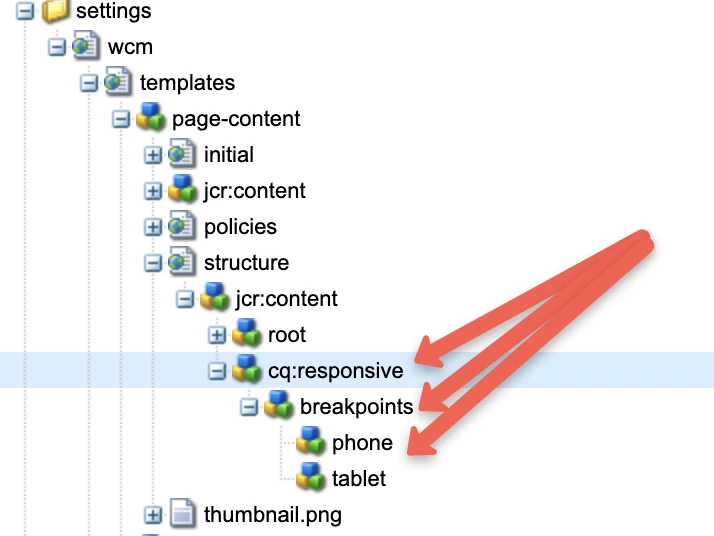
Please ensure your editable template structure node has cq:responsive and all it's child property to enable the responsive grid.

/conf/project/settings/wcm/templates/page-content/structure/jcr:content/cq:responsive


 If you have these property available on template, you will be able to see the layout option for component in all the resultant pages which all are created using the template. No update required at the component level.


Thanks!

1 reply

Asutosh_Jena_
Asutosh_Jena_Accepted solution
New Participant
June 4, 2021

Hi @nesan 


Please ensure your editable template structure node has cq:responsive and all it's child property to enable the responsive grid.

/conf/project/settings/wcm/templates/page-content/structure/jcr:content/cq:responsive


 If you have these property available on template, you will be able to see the layout option for component in all the resultant pages which all are created using the template. No update required at the component level.


Thanks!