Layout mode unavailable | Community
Skip to main content
Level 2
Dec 14, 2018 10:08 AM UTC
Solved

Layout mode unavailable

I have used a sample archetype to create pages in AEM 6.4. However, I am not able to use the layout feature as it is not appearing in dropdown. What could be its reason ? I have tried looking for it on the web only to fail. Please Help !

This post is no longer active and is closed to new replies. Need help? Start a new post to ask your question.
arunpatidar
arunpatidarAccepted solution
New Participant
Dec 15, 2018 1:36 PM UTC

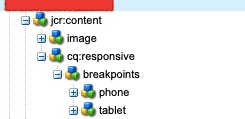
Actually to enable layout mode, your template is not setup properly for your custom template or you can directly add cq:resposive node in site root.

Configuring Layout Container and Layout Mode

Arun Patidar

9 replies

smacdonald2008
Level 10
Dec 15, 2018 4:10 PM UTC

If you deleted the default templates that was built by a Maven Arch - that would explain it.

Translate
arunpatidar
arunpatidarAccepted solution
New Participant
Dec 15, 2018 1:36 PM UTC

Actually to enable layout mode, your template is not setup properly for your custom template or you can directly add cq:resposive node in site root.

Configuring Layout Container and Layout Mode

Translate
Arun Patidar
VeenaVikraman
New Participant
Dec 15, 2018 9:46 AM UTC

Hi Rishab

      There could be a chance that the template was not created properly. Could you please recheck ? Also are you using static template or editable template ? Can you give a screen shot of the options you are getting ?

Thanks

Veena

Translate
RishabhKrAuthor
Level 2
Dec 15, 2018 8:55 AM UTC

Yeah, sure. Initially there were two templates in the template folder. I deleted both of them and created one custom template. Is this the reason why layout mode is not showing up ?

Translate
arunpatidar
New Participant
Dec 15, 2018 8:08 AM UTC

Can you check the page that you have created using templates which were created using command.

One more question are you creating your own templates?

Translate
Arun Patidar
RishabhKrAuthor
Level 2
Dec 15, 2018 5:20 AM UTC

Yeah, problem is layout is not appearing in the dropdown as marked in your reply. For we-retail I am getting it but not for my project. Is it the problem with the archetype command that i have used:

mvn org.apache.maven.plugins:maven-archetype-plugin:2.4:generate -DarchetypeGroupId=com.adobe.granite.archetypes -DarchetypeArtifactId=aem-project-archetype -DarchetypeVersion=13 -DarchetypeCatalog=https://repo.adobe.com/nexus/content/groups/public/

Translate
RishabhKrAuthor
Level 2
Dec 15, 2018 5:18 AM UTC

This is the command that I have used for making my project.

mvn org.apache.maven.plugins:maven-archetype-plugin:2.4:generate -DarchetypeGroupId=com.adobe.granite.archetypes -DarchetypeArtifactId=aem-project-archetype -DarchetypeVersion=13 -DarchetypeCatalog=https://repo.adobe.com/nexus/content/groups/public/

Translate
smacdonald2008
Level 10
Dec 14, 2018 6:58 PM UTC

Just tested with this artilce -- Creating an Adobe Experience Manager 6.4 Project using Adobe Maven Archetype 13

That mode is there --

Translate
arunpatidar
New Participant
Dec 14, 2018 2:03 PM UTC

Hi,

Could you please let us which command you have used to create project. I would suggest you to take reference from wretail site, you need to configure if your project doesn't contain same.

Trying out Responsive Layout in We.Retail

Translate
Arun Patidar