Logging in Groovy script | Community
Skip to main content
New Participant
May 28, 2023
Solved

Logging in Groovy script

  • May 28, 2023
  • 2 replies
  • 3851 views

Hi,

Is there a way to enable logger in Groovy Script? I want to print Groovy script response in the logger file.


Thanks!

This post is no longer active and is closed to new replies. Need help? Start a new post to ask your question.
Best answer by lukasz-m

Hi @mvelicheti,

Groovy console provides OOTB logger. So there is no need to add any imports, or create logger instance manually.
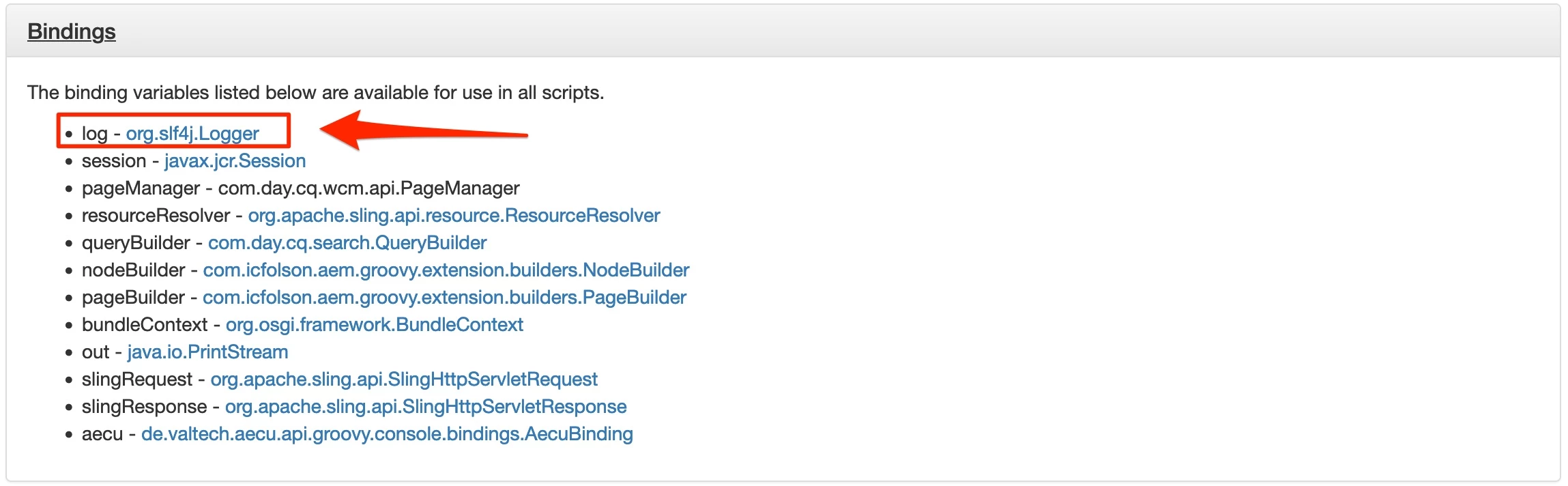
As you can see it is available under log variable. Below is sample code that presents how to use it.


log.info "Info message" log.error "Error message" log.debug "Debug message" log.trace "Trace message"


in error.log file you can expect entries like this


*INFO* [127.0.0.1 [1685283081856] POST /bin/groovyconsole/post.json HTTP/1.1] groovyconsole Info message *ERROR* [127.0.0.1 [1685283081856] POST /bin/groovyconsole/post.json HTTP/1.1] groovyconsole Error message *DEBUG* [127.0.0.1 [1685283081856] POST /bin/groovyconsole/post.json HTTP/1.1] groovyconsole Debug message *TRACE* [127.0.0.1 [1685283081856] POST /bin/groovyconsole/post.json HTTP/1.1] groovyconsole Trace message


Please be aware that what will be logged, depends also on error.log level. You can change log level that will be stored under error.log under /system/console/slinglog

Last but not least, log object represents org.slf4j.Logger class, so you can use any method exposed by it.


In case you would like to collect groovy console logs in separate/custom file. This can be done like this:
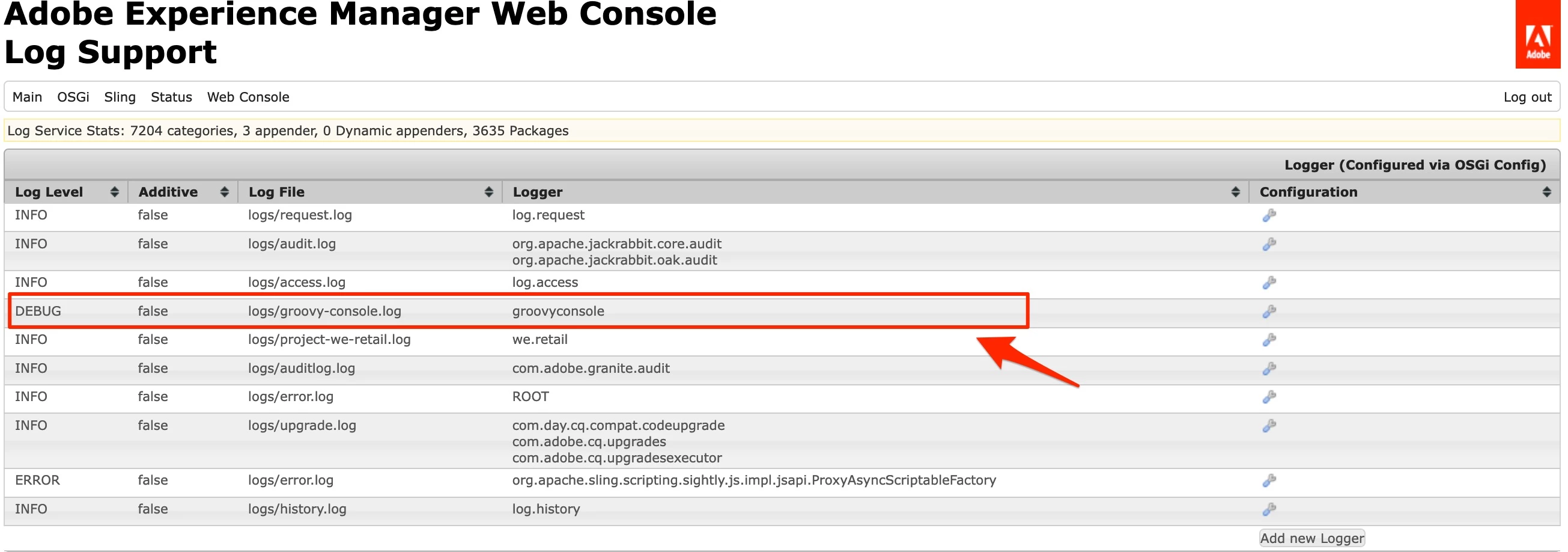
  1. Open Log Support view under Web Console - /system/console/slinglog
  2. Add new Logger like below

Base on above configuration groovy console logs will be stored under groovy-console.log file.

2 replies

lukasz-m
lukasz-mAccepted solution
New Participant
May 28, 2023

Hi @mvelicheti,

Groovy console provides OOTB logger. So there is no need to add any imports, or create logger instance manually.

As you can see it is available under log variable. Below is sample code that presents how to use it.


log.info "Info message" log.error "Error message" log.debug "Debug message" log.trace "Trace message"


in error.log file you can expect entries like this


*INFO* [127.0.0.1 [1685283081856] POST /bin/groovyconsole/post.json HTTP/1.1] groovyconsole Info message *ERROR* [127.0.0.1 [1685283081856] POST /bin/groovyconsole/post.json HTTP/1.1] groovyconsole Error message *DEBUG* [127.0.0.1 [1685283081856] POST /bin/groovyconsole/post.json HTTP/1.1] groovyconsole Debug message *TRACE* [127.0.0.1 [1685283081856] POST /bin/groovyconsole/post.json HTTP/1.1] groovyconsole Trace message


Please be aware that what will be logged, depends also on error.log level. You can change log level that will be stored under error.log under /system/console/slinglog

Last but not least, log object represents org.slf4j.Logger class, so you can use any method exposed by it.


In case you would like to collect groovy console logs in separate/custom file. This can be done like this:

  1. Open Log Support view under Web Console - /system/console/slinglog
  2. Add new Logger like below

Base on above configuration groovy console logs will be stored under groovy-console.log file.

New Participant
May 28, 2023

Thanks for your reply. This is working and logs are printed in custom log file

nitesh_kumar-1
Employee
May 28, 2023

Hi @mvelicheti ,


You need to import the dependent classes for logging, Something like this 


import org.slf4j.Logger; import org.slf4j.LoggerFactory; def Logger logger = LoggerFactory.getLogger(getClass()); logger.info("Your log statement")


This would print your logs in the error.log file.


Hope this helps!


Regards,

Nitesh