Managing multiple assets metadata unselected not updated | Community
Skip to main content
New Participant
July 4, 2017
Solved

Managing multiple assets metadata unselected not updated

  • July 4, 2017
  • 3 replies
  • 913 views

Hello

I was reading the documentation about managing bulk assets metadata: Managing Multiple Assets and Collections. The documentation states the following: " The asset list has all the assets selected by default. The metadata for assets that you remove from the list is not updated."
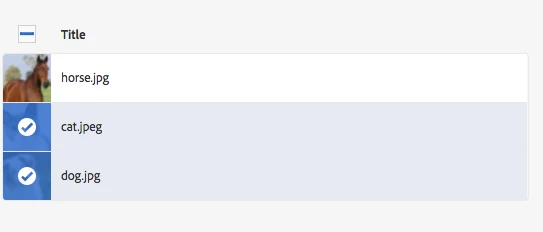
This means that in my case that for example tag updates are only saved for "cat.jpeg" and "dog.jpg". Here is my use-case:

  1. Marketing uploads several assets
  2. They go into the bulk metadata edit mode > all assets are selected by default (see documentation)
  3. They assign new tags that apply to ALL of the images
  4. They deselect "horse.jpg"
  5. They assign new tags that apply to ONLY "cat.jpeg" and "dog.jpg"
  6. They click save and expect the tags for "horse.jpg" to have been persisted.

Obviously as stated in the documentation it has only updated the metadata for "cat.jpeg" and "dog.jpg". Is there a way to make this work?

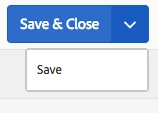
I was also looking into the "Save & Close" button in the top right corner, but when I click on the arrow > save, it also redirects me back into the assets overview...
Thanks in advance!

Jeroen

This post is no longer active and is closed to new replies. Need help? Start a new post to ask your question.
Best answer by dwevediu7965896

Hi Jeroen,

Current behaviour is if the asset is deselected in the bulk metadata editor then the changes are not applied to it, even though they may have been previously added but not saved. There isn't a way to choose what happens, so user education would be the preferred option.

I believe what you are saying is, you want to apply metadata or tags to 3 assets, then deselect one, apply metadata to 2 remaining, then submit it all together?

This would be a enhancement request, which you could log through a Customer Care ticket.

You'd have to customise the metadata editor yourself to add this ability.

Mark

3 replies

New Participant
July 6, 2017

I rewrote some parts of the metadata editor jsp's. The save button under 'Save & Close' now saves my configuration but does not redirect my page, seems the most logical to me.

dwevediu7965896
dwevediu7965896Accepted solution
New Participant
July 5, 2017

Hi Jeroen,

Current behaviour is if the asset is deselected in the bulk metadata editor then the changes are not applied to it, even though they may have been previously added but not saved. There isn't a way to choose what happens, so user education would be the preferred option.

I believe what you are saying is, you want to apply metadata or tags to 3 assets, then deselect one, apply metadata to 2 remaining, then submit it all together?

This would be a enhancement request, which you could log through a Customer Care ticket.

You'd have to customise the metadata editor yourself to add this ability.

Mark

kautuk_sahni
Employee
July 5, 2017

I have asked expert to have a look at this.

~kautuk

Kautuk Sahni