Manually modifying the package and re-uploading | Community
Skip to main content
Level 3
Nov 28, 2017 3:48 PM UTC
Solved

Manually modifying the package and re-uploading

Hi all,

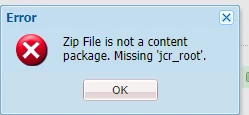
I have a requirement where I have to download a dam package, extract it and add more images through windows explorer, re-zip it and upload the package again. However, AEM rejects any package which is compressed manually saying 'missing JCR_ROOT'. Even if i dont change any content, AEM still rejects packages which are zipped manually. Is there any workaround for it? Our use-case is to have the author add more images in the folders, re-zip it and upload again, as this reduces authoring time.

This post is no longer active and is closed to new replies. Need help? Start a new post to ask your question.
chun-pin
chun-pinAccepted solution
Level 2
Feb 10, 2021 1:56 PM UTC

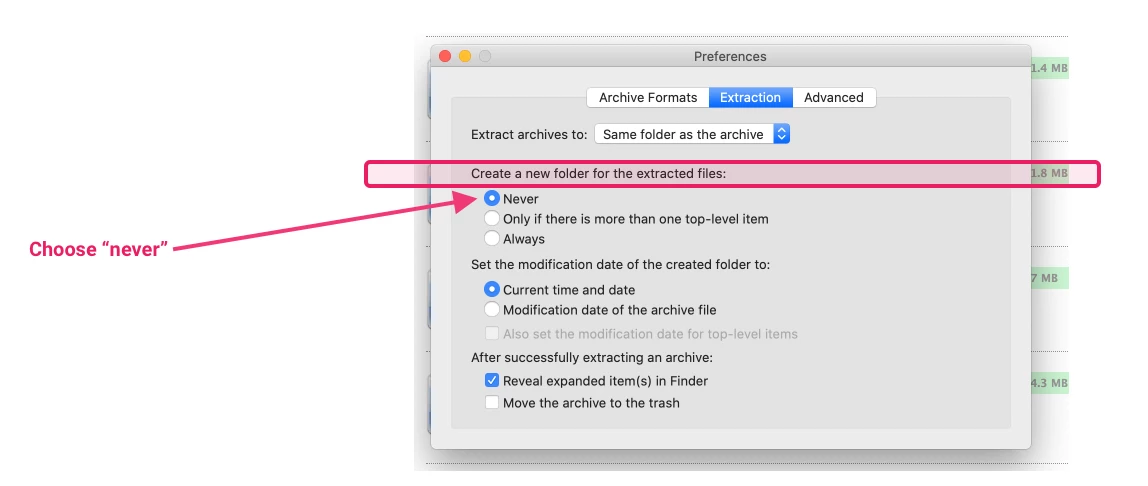
Make sure when you Extract the zip file, the configuration is NOT creating folder for the extracted file. 
Otherwise, when you compress the file back into a zip file again, the folder structure will be different than the original one.
 

8 replies

chun-pin
chun-pinAccepted solution
Level 2
Feb 10, 2021 1:56 PM UTC

Make sure when you Extract the zip file, the configuration is NOT creating folder for the extracted file. 
Otherwise, when you compress the file back into a zip file again, the folder structure will be different than the original one.
 

Translate
kautuk_sahni
Employee
Feb 26, 2021 4:23 AM UTC
@chun-pin thank you for sharing answer with community.
Translate
Kautuk Sahni
chun-pin
Level 2
Nov 2, 2021 4:31 PM UTC

@kautuk_sahniAnytime! 😁

Translate
Level 4
Nov 28, 2017 7:55 PM UTC

Use 7-Zip to add to the archive.  It has been my experience with other 'jar' archives that Windows or other 'zip' technologies can change the file signatures.  7-Zip has always allowed me to add things without breaking the archive.  Please post your result if you use 7-zip.

By the way, if you repackage with 'jar' and use '-cvMf', you must use a capital 'M' to preserve existing META-INF.  The small 'm' means something else....

Translate
VeenaVikraman
New Participant
Nov 28, 2017 7:49 PM UTC

Hi Vitis

     How are you planning to copy the DAM content ? Every DAM asset will have below structure when extracted. Do you have another DAM zip which you are trying to copy to this one ?

If so , Please do the following

1. Right click your zip file and click "Extract here ". (Do not extract to a folder)

2. Once you get these folders , add/modify your content to the corresponding folder

3. Select the jcr_root and META-INF folder and right click and "Add to Zip file" .

(I use WinSCP for this and it works fine). Give the name of the package . If you want to change the name of the package to be uploaded just change the name in the properties.xml file inside META-INF --> Vault

Please make sure that if you are adding DAM assets you do it the right way. The content structure for the DAM assets should be followed properly else you will end up in corrupted packages. I will not recommend to do this way unless for a small fix or tweak .

Translate
vitis90Author
Level 3
Nov 28, 2017 6:34 PM UTC

Thanks for sending the link. But the command jar -cvfm <<new-package-name>.zip  META-INF/   jcr_root/ is not working unfortunatelty.

Getting this message

jar -cvfm racha.zip  META-INF/   jcr_root/

java.io.FileNotFoundException: META-INF (Access is denied)

        at java.io.FileInputStream.open0(Native Method)

Translate
Ravi_Pampana
New Participant
Nov 28, 2017 5:57 PM UTC

Hope this helps...

How to manually edit AEM Content Package?

Translate
kautuk_sahni
Employee
Feb 26, 2021 4:24 AM UTC
@ravi_pampana thank you for providing solution to the community.
Translate
Kautuk Sahni