Migrate Assets | Community
Skip to main content
New Participant
Sep 13, 2019 3:01 PM UTC
Solved

Migrate Assets

Hi, I need to know a strategy to be able to migrate assets from AEM 6.0 to 6.4. The problem is that some users will upload content in 6.4 and the rest will continue uploading content in 6.0. I want to know how I can do so that users who enter content in 6.0 do not lose this content at the time of migrating them to 6.4 (so as not to migrate the assets again, since I would have to install 20 gb again).
This post is no longer active and is closed to new replies. Need help? Start a new post to ask your question.
kapilaAccepted solution
Employee
Sep 15, 2019 5:50 AM UTC

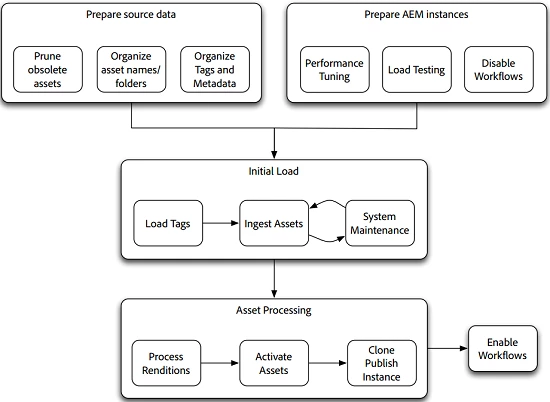
Migrating assets to AEM requires several steps and should be viewed as a phased process. The phases of the migration are as follows:

  1. Disable workflows.
  2. Migrate tags.
  3. Migrate assets.

There are two tools that are recommended for moving assets from one AEM instance to another:

  • Vault Remote Copy,
  • Grabbit

4. Activate assets.

5.Clone publish.

6.Enabling workflows. Refer Assets Migration Guide

4 replies

kapilaAccepted solution
Employee
Sep 15, 2019 5:50 AM UTC

Migrating assets to AEM requires several steps and should be viewed as a phased process. The phases of the migration are as follows:

  1. Disable workflows.
  2. Migrate tags.
  3. Migrate assets.

There are two tools that are recommended for moving assets from one AEM instance to another:

  • Vault Remote Copy,
  • Grabbit

4. Activate assets.

5.Clone publish.

6.Enabling workflows. Refer Assets Migration Guide

Translate
Employee
Sep 13, 2019 8:04 PM UTC

Also, check the section "Migrating Between AEM Instances" in doc Assets Migration Guide.

Translate
Level 2
Sep 13, 2019 7:38 PM UTC

You can also try using vlt rcp with ACS

VLT-RCP

Translate
Employee
Sep 13, 2019 3:36 PM UTC

You can migrate assets by employing crx2oak tool Using the CRX2Oak Migration Tool

Translate