mixed content https, http login fail - AEM 6.3 sp1 | Community
Skip to main content
sreenu539
Level 7
Jan 17, 2018 10:50 PM UTC
Solved

mixed content https, http login fail - AEM 6.3 sp1

Hi there,

Following issue not happened on AEM 6.3.0.2

I have AEM 6.3.1.0 version ( 6.3 with service pack1 ) in my QA environment.

QA AEM author instance accessed through an vip url with 2FA (externa url with https talks to AEM author instance)

When any author user tries to access the AEM author instance using vip url (browser console has js errors about mixed content https, http login), enter credential on aem login screen and click submit button, it just stays on the login page only.

If author user access the AEM instance directly without any vip url and with http , login works and could access the site admin pages.

I tried to have https configuration in my local author instance to see, if i could get login request with httpS rather than http to solve https vs http issue on QA Author when accessed using vip url.

Question:  Is there some new  configuration in AEM 6.3 Service Pack 1 that needs to be done to solve https vs http login issue, this issue did not occur on earlier version 6.3 or 6.3.0.2?


I did not get https configuration worked on my local. I have done following things to enable https and tried to access HTTPS://<computername.companyname.com>:4502/crx/de , following is ther response.

This site can’t provide a secure connection

How can I get the https enabled on my local instance?

  I generated a keystore file using following command:

  keytool -genkeypair -keyalg RSA -validity 3650 -alias cqse

-keystore /Users/pulijas/Desktop/Author-latest/ssl/keystorename.keystore  -keypass password123

-storepass password123 -dname "CN=computername.companyname.com, OU=CQ,

O=BWI,L=PHX, S=AZ, C=US"

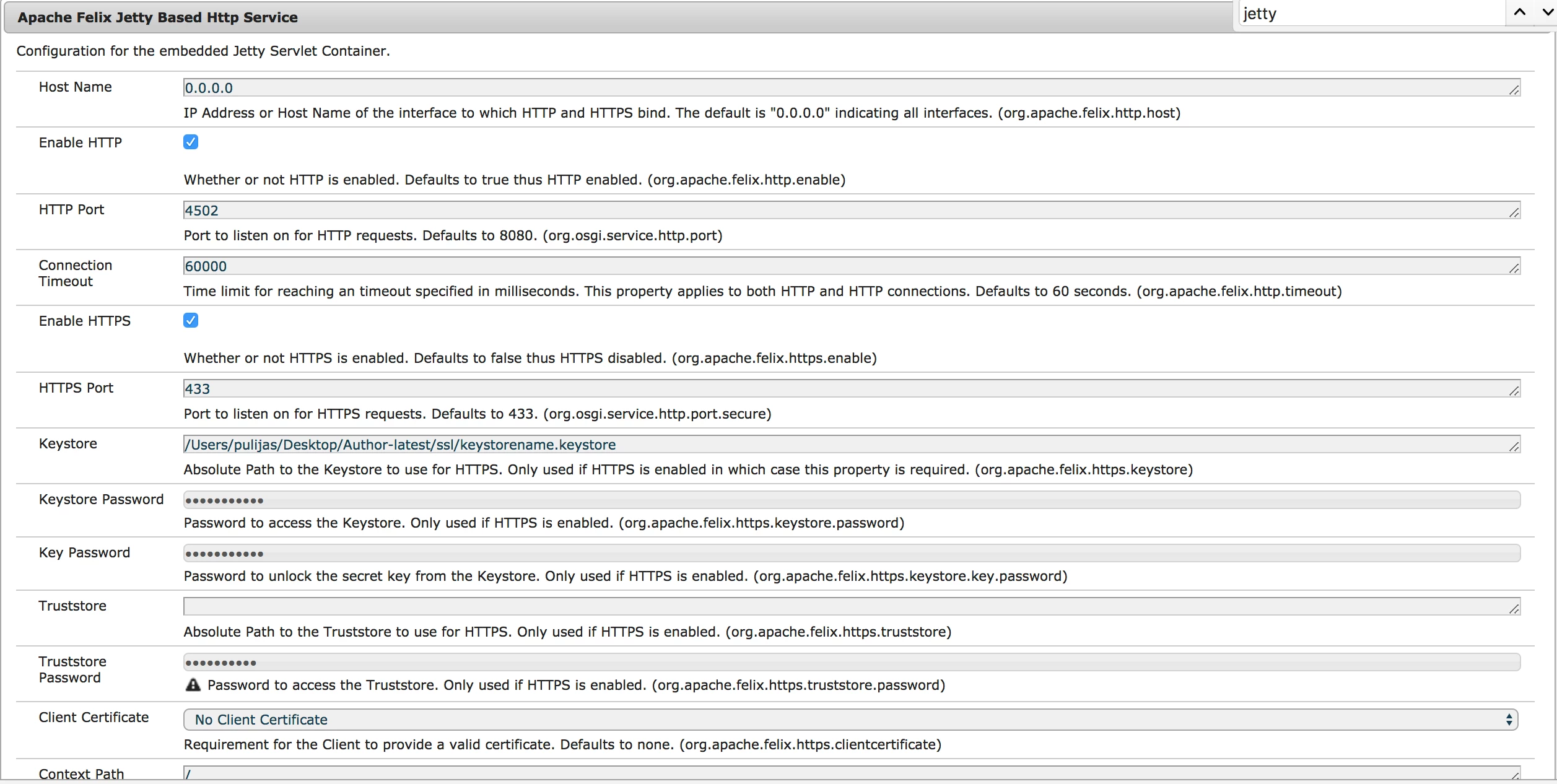
There were two Apache Felix Jetty Based Http Service configurations.

I clicked on second one with + symbol, as the first one giving ajax error and not able to save the configurations.

and then following OSGI config updated.
Thanks,

Sreeni

This post is no longer active and is closed to new replies. Need help? Start a new post to ask your question.
sreenu539
sreenu539Accepted solution
Level 7
Jan 17, 2018 11:12 PM UTC

I was not able to get the https working in my local to verify if enabling the local instance "httpS" solve the issue.

7 replies

sreenu539
sreenu539Author
Level 7
Feb 19, 2018 5:12 PM UTC

I did. Adobe suggested to have SSL enable on the instance though did not get an answer why this issue happened on SP1 and not on earlier version.

Translate
New Participant
Feb 19, 2018 11:59 AM UTC

Did you open up a Daycare ticket for thissreenu539?

Translate
smacdonald2008
Level 10
Jan 18, 2018 8:29 PM UTC

Looks like an issue with SP1. I recommend opening a ticket so this can be investigated by the AEM Eng/Support team

Translate
sreenu539
sreenu539Author
Level 7
Jan 18, 2018 8:26 PM UTC

Any update on this?

Following is the request/response cycle.

Request  process:  VIP URL -> https request -> F5 load balancer -> http request -> author

Response process: author -> http response -> F5 load balancer -> http response -> VIP URL ( mixed content issue)

Is it possible to revert back the service pack installed? I was looking to revert back, but I could not see any service pack package in package manager. on welcome screen version number is 6.3.1.0 though.

Translate
sreenu539
sreenu539AuthorAccepted solution
Level 7
Jan 17, 2018 11:12 PM UTC

I was not able to get the https working in my local to verify if enabling the local instance "httpS" solve the issue.

Translate
sreenu539
sreenu539Author
Level 7
Jan 17, 2018 11:10 PM UTC
smacdonald2008
Level 10
Jan 17, 2018 10:55 PM UTC

Checking with internal ppl. If this did not happen on AEM 6.3 but after the patch - there may be an issue with sp1

Translate