multicompositepanel not appearing properly in dialog
I have added multicompositepanel in one of the project
It is working fine with respect to data on ui.
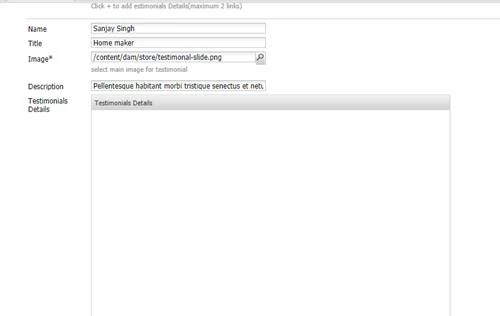
but when i reopen the dialog , multicompositepanel is not able to retain the structure in dialog.
so editing existing content is not possible.
dialog config:
<menu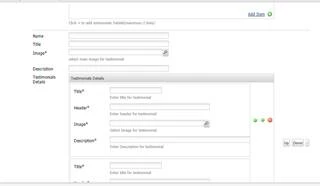
jcr:primaryType="cq:Widget"
title="Navigation Menu"
xtype="panel">
<items jcr:primaryType="cq:WidgetCollection">
<testimonials
jcr:primaryType="cq:Widget"
fieldDescription="Click to add Testimonials"
fieldLabel="Add Testimonials"
matchBaseName="false"
name="./testimonials"
width="500"
xtype="multicompositefield">
<fieldConfigs jcr:primaryType="cq:WidgetCollection">
<name
jcr:primaryType="cq:Widget"
fieldLabel="Name"
name="name"
width="300"
xtype="textfield"/>
<testimonialsDetails
jcr:primaryType="cq:Widget"
fieldDescription="Click + to add estimonials Details(maximum 2 links)"
fieldLabel="Testimonials Details"
name="testimonialsDetails"
title="Testimonials Details"
width="600"
xtype="multifield">
<fieldConfig
jcr:primaryType="nt:unstructured"
hideLabel="false"
xtype="multifieldpanel">
<items jcr:primaryType="cq:WidgetCollection">
<titleDetail
jcr:primaryType="cq:Widget"
allowBlank="false"
fieldDescription="Enter title for testimonial"
fieldLabel="Title"
key="titleDetail"
width="3x100"
xtype="textfield"/>
<headerDetail
jcr:primaryType="cq:Widget"
allowBlank="false"
fieldDescription="Enter header for testimonial"
fieldLabel="Header"
key="headerDetail"
width="300"
xtype="textfield"/>
<imageDetail
jcr:primaryType="cq:Widget"
allowBlank="false"
fieldDescription="Select Image for testimonial"
fieldLabel="Image"
key="imageDetail"
width="300"
xtype="pathfield"/>
<descDetail
jcr:primaryType="cq:Widget"
allowBlank="false"
fieldDescription="Enter Description for testimonial"
fieldLabel="Description"
key="descDetail"
width="500"
xtype="textfield"/>
</items>
</fieldConfig>
</testimonialsDetails>
</fieldConfigs>
</testimonials>
</items>
</menu>
let me know what else i have to add to make this work.