Multifield data not stored in JSON format | Community
Skip to main content
gargsahil099
New Participant
November 23, 2017
Solved

Multifield data not stored in JSON format

  • November 23, 2017
  • 12 replies
  • 11158 views

Hi All,

I have created a multifield component in touch ui after adding the values to dialog the content stored in zcrx is not in JSON format it is in below array format.

Can some one please suggest on this.
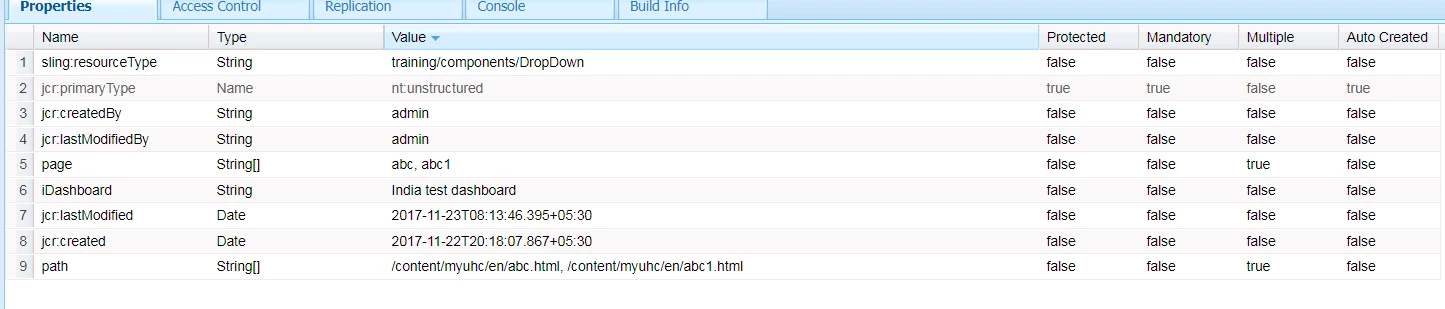
Thanks

Sahil Garg

This post is no longer active and is closed to new replies. Need help? Start a new post to ask your question.
Best answer by smacdonald2008

See this article - it tells you everything you need to do - including how to download the ACS-COmmons package -- Creating an AEM HTML Template Language 6.3 component that uses a Multifield

12 replies

santony
New Participant
December 3, 2019

I am running into the same issue as you. I am running AEM 6.5 and acs 4.3.2.


@smacdonald2008 or anyone else at Adobe, is it possible to store the values as json on AEM 6.5?

New Participant
April 18, 2019

I am trying to switch from Classic UI (ACS Commons Multi Field Panel) To Coral Touch UI and am following the demo linked above but the data is getting saved to the JCR as a String Array for each item under the multi field instead of saving them all under the same property.

You can see below that they are getting stored as flag, link, and title. Instead of being stored as JSON under myUserSubmenu

EDIT: I am running AEM 6.5 and ACS Commons 4.0

Capture.PNG

This is the Dialog I am using.

<?xml version="1.0" encoding="UTF-8"?>
<jcr:root xmlns:sling="http://sling.apache.org/jcr/sling/1.0" xmlns:cq="http://www.day.com/jcr/cq/1.0" xmlns:jcr="http://www.jcp.org/jcr/1.0" xmlns:nt="http://www.jcp.org/jcr/nt/1.0"
   jcr:primaryType="nt:unstructured"
   jcr:title="User Menu"
   sling:resourceType="cq/gui/components/authoring/dialog">

   <content
   jcr:primaryType="nt:unstructured"
   sling:resourceType="granite/ui/components/foundation/container">

   <layout
   jcr:primaryType="nt:unstructured"
   sling:resourceType="granite/ui/components/foundation/layouts/tabs"
   type="nav"/>

   <items jcr:primaryType="nt:unstructured">

   <tabs
   jcr:primaryType="nt:unstructured"
   jcr:title="General"
   sling:resourceType="granite/ui/components/foundation/container">

   <items jcr:primaryType="nt:unstructured">

   <usersubmenu
   jcr:primaryType="nt:unstructured"
   jcr:title="User Submenu"
   sling:resourceType="granite/ui/components/foundation/section">

   <layout
   jcr:primaryType="nt:unstructured"
   sling:resourceType="granite/ui/components/foundation/layouts/fixedcolumns"/>

   <items jcr:primaryType="nt:unstructured">

   <tab
   jcr:primaryType="nt:unstructured"
   sling:resourceType="granite/ui/components/foundation/container">

   <items jcr:primaryType="nt:unstructured">

   <usersubmenudetails
   jcr:primaryType="nt:unstructured"
   sling:resourceType="granite/ui/components/foundation/form/multifield"
   class="full-width"
   fieldDescription="Click 'Add field' to add a new User Submenu title and links"
   fieldLabel="User Submenu Items">

   <field
   jcr:primaryType="nt:unstructured"
   sling:resourceType="granite/ui/components/foundation/form/fieldset"
   acs-commons-nested=""
   name="./myUserSubmenu">

   <layout
   jcr:primaryType="nt:unstructured"
   sling:resourceType="granite/ui/components/foundation/layouts/fixedcolumns"
   method="absolute"/>

   <items jcr:primaryType="nt:unstructured">

   <column
   jcr:primaryType="nt:unstructured"
   sling:resourceType="granite/ui/components/foundation/container">

   <items jcr:primaryType="nt:unstructured">

   <title
   jcr:primaryType="nt:unstructured"
   sling:resourceType="granite/ui/components/foundation/form/textfield"
   fieldDescription="Enter User Submenu title"
   fieldLabel="User Submenu Title"
   name="./title"/>

   <link
   jcr:primaryType="nt:unstructured"
   sling:resourceType="granite/ui/components/foundation/form/pathbrowser"
   fieldDescription="Enter User Submenu Link"
   fieldLabel="User Submenu Link"
   name="./link"
   rootPath="/content"/>

   <flag
   jcr:primaryType="nt:unstructured"
   sling:resourceType="granite/ui/components/foundation/form/checkbox"
   checked="{Boolean}false"
   fieldDescription="Testing Flag for checkbox"
   name="./flag"
   text="Flag"
   title="Checkbox Tooltip"/>

   </items>

   </column>

   </items>

   </field>

   </usersubmenudetails>

   </items>

   </tab>

   </items>

   </usersubmenu>

   </items>

   </tabs>

   </items>

   </content>

</jcr:root>

vidyab9364493
New Participant
April 11, 2018

Does the same apply to classic UI as well or is there any different approach?

smacdonald2008
New Participant
November 23, 2017

The data will be stored as JSON--

smacdonald2008
smacdonald2008Accepted solution
New Participant
November 23, 2017

See this article - it tells you everything you need to do - including how to download the ACS-COmmons package -- Creating an AEM HTML Template Language 6.3 component that uses a Multifield

gargsahil099
New Participant
November 23, 2017

Hi Tech Aspect,

I have tried to download and install the acs-commons package but still same issue persists.Can you please help me on this. Can you please help me to convert my cq:dialog node to xml format so that i can share the same with you.

Thanks

Techaspect_Solu
New Participant
November 23, 2017

Hi,

Here is the link to download acs-commons package:

https://adobe-consulting-services.github.io/acs-aem-commons/

Once you download the package, you can simply upload and install it from package manager.

We hope this helps!

Regards,

TechAspect Solutions

Amit-Tiwari
New Participant
November 23, 2017

Please share your dialog structure.

try use ACS commons multifieldpanel xtype

gargsahil099
New Participant
November 23, 2017

Hi TechAspect,

yes i haven't installed the acs-commons package can you please share the link to download this package and how can i install this. Do i need to simply install this from package manger.

Thanks in advance.

Techaspect_Solu
New Participant
November 23, 2017

Hi,

We were sucessfully able to implement your use case by following the link that we had mentioned earlier. It's working fine for us.

However, we've uninstalled acs-commons package and see that the values are getting saved in String[] format. So possible reason behind your issue is, you might not have acs-commons package installed.

Try installing acs-commons package. This should resolve your issue.

We hope this helps!

Regards,

TechAspect Solutions