my templates and pages gets deleted | Community
Skip to main content
Feb 11, 2019 1:37 PM UTC
Solved

my templates and pages gets deleted

Hello all,

My problem statement is that I am developing site and components from eclipse and I have also synced my eclipse with CRX-DE but when I am doing Import from server in eclipse some of my templates and pages getting missed out and due to that  i have to create templates and pages again from the scratch.

Please, help me with this.

Thank you.

This post is no longer active and is closed to new replies. Need help? Start a new post to ask your question.
Gaurav-Behl
Gaurav-BehlAccepted solution
Level 10
Feb 12, 2019 2:44 PM UTC

This is the filter.xml where you would want to validate configurations.

Refer - Jackrabbit Filevault - Workspace Filter

The filter element can have an optional mode attribute which specified the import mode used when importing content. the following values are possible:

“replace”
This is the normal behavior. Existing content is replaced completely by the imported content, i.e. is overridden or deleted accordingly.
“merge”
Existing content is not modified, i.e. only new content is added and none is deleted or modified.
“update”
Existing content is updated, new content is added and none is deleted.
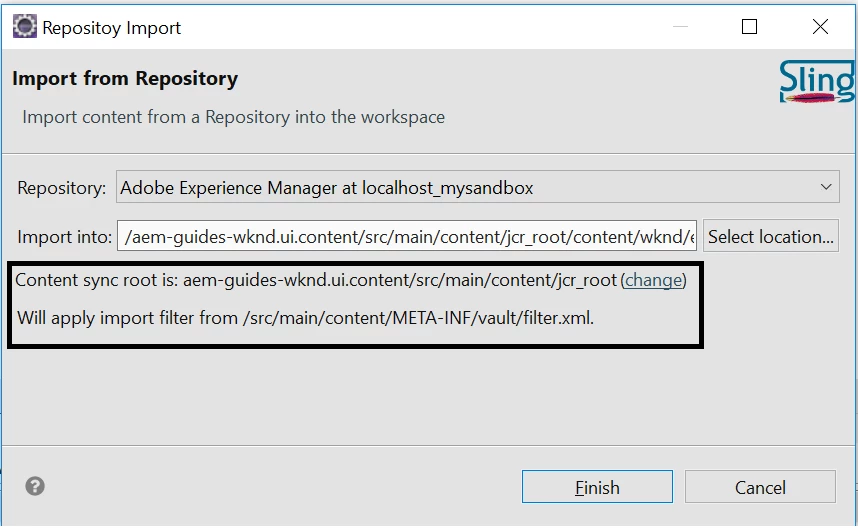
Import from server would sync the /crx/de contents to local filesystem/eclipse and

Export to server would do the vice versa

If you modify something in eclipse which is not present in /crx/de then you should perform 'Export to server'. In this case, if you do import from server, then you local eclipse changes that are not yet synced would get deleted from filesystem/eclipse.

If you modify something in /crx/de which is not present in eclipse/filesystem then you should perform 'Import to server'.

6 replies

Feb 13, 2019 6:32 AM UTC

Thank you so much. :-)

Translate
Gaurav-Behl
Gaurav-BehlAccepted solution
Level 10
Feb 12, 2019 2:44 PM UTC

This is the filter.xml where you would want to validate configurations.

Refer - Jackrabbit Filevault - Workspace Filter

The filter element can have an optional mode attribute which specified the import mode used when importing content. the following values are possible:

“replace”
This is the normal behavior. Existing content is replaced completely by the imported content, i.e. is overridden or deleted accordingly.
“merge”
Existing content is not modified, i.e. only new content is added and none is deleted or modified.
“update”
Existing content is updated, new content is added and none is deleted.

Import from server would sync the /crx/de contents to local filesystem/eclipse and

Export to server would do the vice versa

If you modify something in eclipse which is not present in /crx/de then you should perform 'Export to server'. In this case, if you do import from server, then you local eclipse changes that are not yet synced would get deleted from filesystem/eclipse.

If you modify something in /crx/de which is not present in eclipse/filesystem then you should perform 'Import to server'.

Translate
Feb 12, 2019 12:02 PM UTC

Yes It has a valid path .

can you tell me which is the best practice to keep your crx and eclipse in sync..

I mean we have creating components from eclipse and we are creating templates and pages from front-ends.

so which step I need to do first

should I import from server first or should i export from eclipse?

Translate
Gaurav-Behl
Level 10
Feb 12, 2019 11:13 AM UTC

check the one which is sibling to 'definition' folder or child of 'vault' folder where you observe the issue either in /apps or /content.

Translate
Feb 12, 2019 9:18 AM UTC

Thank you for the response but can you please tell me which filter.xml I should refer because I have found 4 to 5 filter.xml files.

Translate
Gaurav-Behl
Level 10
Feb 11, 2019 4:08 PM UTC

check the filter.xml and /vault/definition/.content.xml for missing paths/references?

could you share the relevant logs from Eclipse AEM developer tools console?

Translate