Need to add an attribute to the DIV element based on checkbox selection | Community
Skip to main content
samsundar23
Level 4
Oct 28, 2021 12:13 PM UTC
Solved

Need to add an attribute to the DIV element based on checkbox selection

This might be a silly question but that's my requirement !


I'm using AEM 6.5.10.

I have a checkbox as one of the field in my cq:dialog. On selection of checkbox, I need append the attribute "data-nosnippet" to my <div> element.

For instance, my complete HTML of the component is below


<div data-sly-use.handler="sample.test.Hello" 

data-sly-use.clientLib="/libs/granite/sightly/templates/clientlib.html"

data-sly-unwrap>

${handler.heading}

</div>


  • If I select the checkbox, it should give me the below result in the view source of the page,
    <div class="hello" data-nosnippet>heading</div>


  • If I unselect the checkbox, it should give me the below result in the view source of the page,
    <div class="hello">heading</div>

I'm trying to get the multiple options of using data-sly-attribute or other stuff which is not giving me the desired result. 

Kindly help me in achieving this functionality.


Thank you !

This post is no longer active and is closed to new replies. Need help? Start a new post to ask your question.
Anudeep_Garnepudi
Anudeep_GarnepudiAccepted solution
New Participant
Oct 29, 2021 6:35 AM UTC

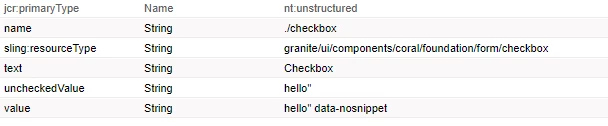
Checkbox dialog field should be like

Your HTL should be

<div class="${properties.checkbox @context='unsafe'}>Heading</div>

Important Note: Make sure you don't close the quote after expression i.e quote started after class= and it should not end in HTL as the quote is coming from the dialog properties.

Output:


8 replies

arunpatidar
New Participant
Oct 30, 2021 6:20 PM UTC

Hi,

Try below

<div class="hello" data-sly-attribute.data-nosnippet="${properties.propertyCheckbox ? true : ''}">heading</div>
Translate
Arun Patidar
Anudeep_Garnepudi
New Participant
Oct 28, 2021 4:17 PM UTC

@samsundar23 

Firstly, HTL currently supporting HTML attributes with key-value pairs.

Approach 1 (Recommended):

So, you can add attribute something like data-nosnippet="true" if checkbox is checked and no attribute if unchecked.

In your dialog checkbox field add value attribute and set value as (String) true.

Note: It is always recommended to use uncheckedValue property for checkbox.

Add uncheckedValue property and set a blank value.

In HTL

<div class="hello" data-nosnippet=${properties.checkboxName}>Heading</div>

Approach 2 (Personally don't recommended):

If you srtictly want to use attribute data-nosnippet without any value. Then you need to apply a cheat.

  1. You need an attribute which present always. Here you can take class.
  2. To your dialog checkbox filed value property set value as hello" data-nosnippet
  3. To your dialog checkbox feild uncheckedValue property set value hello"

In HTL

<h1 class="${properties.checkboxName @context='unsafe'}>Heading</h1>

-AG

Translate
samsundar23
Level 4
Oct 29, 2021 5:35 AM UTC

Your suggestion did not work bro I meant to say about the 2nd approach which fits in my requirement best.

Can you elaborate much more to make sure I'm not missing anything from my end.


Thanks

Translate
Anudeep_Garnepudi
Anudeep_GarnepudiAccepted solution
New Participant
Oct 29, 2021 6:35 AM UTC

Checkbox dialog field should be like

Your HTL should be

<div class="${properties.checkbox @context='unsafe'}>Heading</div>

Important Note: Make sure you don't close the quote after expression i.e quote started after class= and it should not end in HTL as the quote is coming from the dialog properties.

Output:


Translate
Asutosh_Jena_
New Participant
Oct 28, 2021 2:07 PM UTC

Hi @samsundar23 


data-sly-attribute should work here:


<section class="radio-section radio-section-1" data-sly-attribute.data-nosnippet=${properties.checkboxValue}>


It will give something like below when the checkbox is checked.


<section class="radio-section radio-section-1" data-nosnippet="true">


https://experienceleague.adobe.com/docs/experience-manager-htl/using/htl/block-statements.html?lang=en


Thanks!

Translate
samsundar23
Level 4
Oct 29, 2021 5:39 AM UTC

Understood your overall post on this but our requirement is to make this work. 😞

  • <div class="hello" data-nosnippet>heading</div>
Translate
Siva_Sogalapalli
New Participant
Oct 28, 2021 1:24 PM UTC

did you try something like this? 


<div class="hello" ${handler.checbox ? 'data-nosnippet' : ''}> heading </div> 


or 

   <sly data-sly-test="${handler.chebox.}" data-sly-unwrap>

        <div class="hello" data-nosnippet>heading</div>

  </sly>


Translate
samsundar23
Level 4
Oct 29, 2021 5:37 AM UTC

@siva_sogalapalli 

- Tried below option, it did not work

<div class="hello" ${handler.checbox ? 'data-nosnippet' : ''}> heading </div> 

- Yet to try second option, the HTML seems to be quite big, can't copy & paste it twice based on the checkbox selection in same HTML.


Thanks

Translate