Needing help on script FormcCal or Java | Community
Skip to main content
New Participant
August 26, 2021
Solved

Needing help on script FormcCal or Java

  • August 26, 2021
  • 2 replies
  • 811 views

Hi,


I'm new to Adobe forms and am struggling to write the script for the requirement needed. Any pointers/help would be greatly

appreciated.


Requirement: Only want to display rows that DocumentReferenceID value starts with "009". Note that there will be a total for the amount which starts with "009".


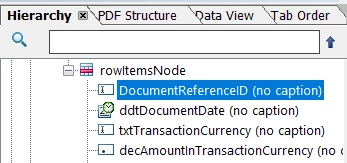
Sample data of rowItemsNode table:-

DocumentReferenceIDddtlDocumentDatetxtTransactionCurrencydecAmountInTransactionCurrency
00900126/05/2021USD100
00900227/05/2021USD100
14000128/05/2021USD300


rowItemsNode table 


Output that I want:-

DocumentReferenceIDddtlDocumentDatetxtTransactionCurrencydecAmountInTransactionCurrency
00900126/05/2021USD100
00900227/05/2021USD100
Total   200


Is the script below correct?

if (Left(Form.bdyMain.frmItems.tblItems.rowItemsNode[*].DocumentReferenceID, 3) == "009");
{
tblItems._rowItemsNode.removeInstance(true); 
xfa.form.recalculate(true); 
}


Many thanks in advance!!

This post is no longer active and is closed to new replies. Need help? Start a new post to ask your question.
Best answer by radzmar

You can use conditional bindings with predicates so you won't need any scripting.

Given your table row "rowItemsNode" now has a binding like $.tableData.rowData[*] you can use a predicate statement within the brackets to filter the data directly when it's merged with template to the form you get rendered on screen.


$.tableData.rowData.[Left($.DocumentReferenceID, 3) eq "009"]


2 replies

radzmar
radzmarAccepted solution
New Participant
August 26, 2021

You can use conditional bindings with predicates so you won't need any scripting.

Given your table row "rowItemsNode" now has a binding like $.tableData.rowData[*] you can use a predicate statement within the brackets to filter the data directly when it's merged with template to the form you get rendered on screen.


$.tableData.rowData.[Left($.DocumentReferenceID, 3) eq "009"]


arunpatidar
New Participant
August 26, 2021

Hi,

You should post this in dedicated AEM Form community to get faster response.

Please check the AEM Forms guide if that help.

AEM Form Community - https://experienceleaguecommunities.adobe.com/t5/adobe-experience-manager-forms/ct-p/adobe-experience-manager-forms-community 

Guide - https://helpx.adobe.com/pdf/aem-forms/6-2/formcalc-reference.pdf


Arun Patidar