Not able to delete filed in metadata schema (Cannot Delete Field! One or more field(s) are dependant on the field.) | Community
Skip to main content
krishna_garikapati
New Participant
August 24, 2023
Solved

Not able to delete filed in metadata schema (Cannot Delete Field! One or more field(s) are dependant on the field.)

  • August 24, 2023
  • 3 replies
  • 1194 views

Hello, There.

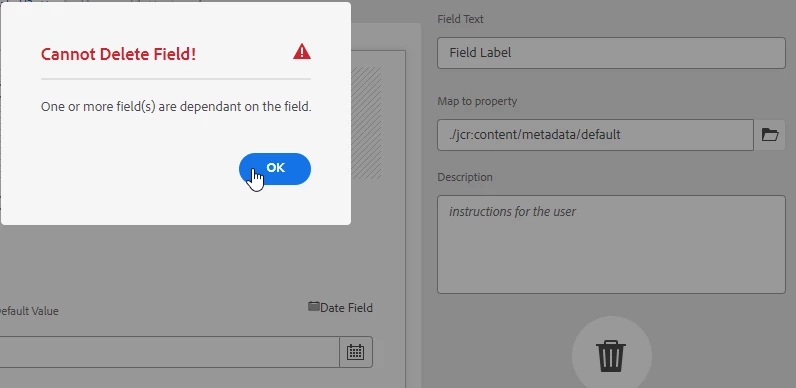
i was adding multiple field labels to AEM assets Metadata schema to test the field limit and now when i try to delete the field labels it's blocking with error "Cannot Delete Field! One or more field(s) are dependant on the field."

Has anyone experienced this error before and how to fix or find the dependent fields.


This post is no longer active and is closed to new replies. Need help? Start a new post to ask your question.
Best answer by lukasz-m

Hi @krishna_garikapati,

This issue is related to cascading metadata feature:

Long story short, you can control visibility or other aspects of field in metadata schema base on value(s) of other field. This can be done using Rule editor.

In your particular example it looks that one or many fields in your schema has a Rule that rely on different field, and you are trying to remove the field that is dependency to others.

So you first have to delete this relationship, before you will be able to successfully remove filed that is used by other fields.

Information about dependency is stored under granite:data node located under main node that defines specific filed in you schema.
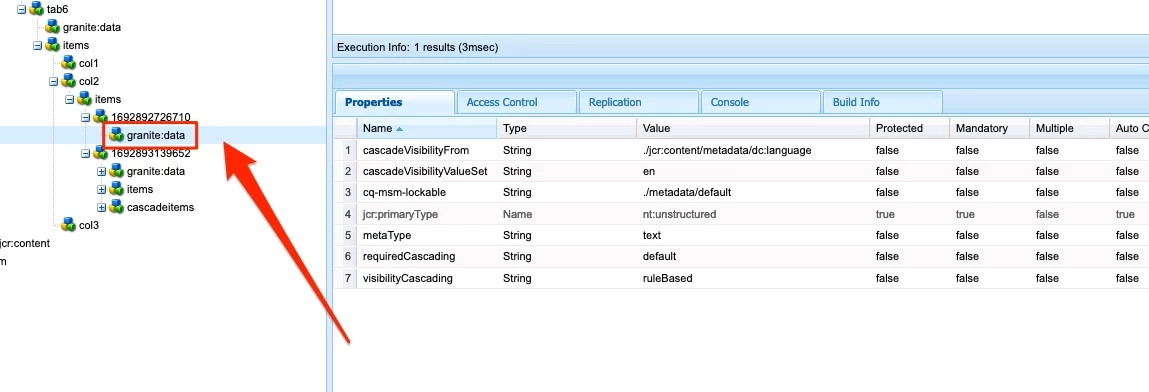
To identify this you can either verify all the fields in your schema, checking Rule section. Or you can run below query.

The query search for all the fields that has any dependency, you can modify query on your own changing condition related to cascadeVisibilityFrom property.

SELECT * FROM [nt:base] AS s WHERE ISDESCENDANTNODE([/conf]) AND s.[sling:resourceType] = "dam/gui/components/admin/schemafield" AND s.[/granite:data/cascadeVisibilityFrom] <> ""

More specific query, that will look only for fields that depends on Language property (./jcr:content/metadata/dc:language)

SELECT * FROM [nt:base] AS s WHERE ISDESCENDANTNODE([/conf]) AND s.[sling:resourceType] = "dam/gui/components/admin/schemafield" AND s.[/granite:data/cascadeVisibilityFrom] = "./jcr:content/metadata/dc:language"

3 replies

aanchal-sikka
New Participant
August 25, 2023

Hello @krishna_garikapati 


Since, you have added the fields just to check the threshold, may be just take the package of the Schema from a healthy instance and deploy here.


A replace mode in package should clean-up the redundant fields and you should have the expected metadata schema

Aanchal Sikka
lukasz-m
lukasz-mAccepted solution
New Participant
August 24, 2023

Hi @krishna_garikapati,

This issue is related to cascading metadata feature:

Long story short, you can control visibility or other aspects of field in metadata schema base on value(s) of other field. This can be done using Rule editor.

In your particular example it looks that one or many fields in your schema has a Rule that rely on different field, and you are trying to remove the field that is dependency to others.

So you first have to delete this relationship, before you will be able to successfully remove filed that is used by other fields.

Information about dependency is stored under granite:data node located under main node that defines specific filed in you schema.

To identify this you can either verify all the fields in your schema, checking Rule section. Or you can run below query.

The query search for all the fields that has any dependency, you can modify query on your own changing condition related to cascadeVisibilityFrom property.

SELECT * FROM [nt:base] AS s WHERE ISDESCENDANTNODE([/conf]) AND s.[sling:resourceType] = "dam/gui/components/admin/schemafield" AND s.[/granite:data/cascadeVisibilityFrom] <> ""

More specific query, that will look only for fields that depends on Language property (./jcr:content/metadata/dc:language)

SELECT * FROM [nt:base] AS s WHERE ISDESCENDANTNODE([/conf]) AND s.[sling:resourceType] = "dam/gui/components/admin/schemafield" AND s.[/granite:data/cascadeVisibilityFrom] = "./jcr:content/metadata/dc:language"
krishna_garikapati
New Participant
August 28, 2023

Hello, Lukasz.

Thanks, For the detailed explanation. However, i was deleted the other fields that are updated to map the property as it was test form and later able to delete the issue fields.

Shashi_Mulugu
New Participant
August 24, 2023

@krishna_garikapati interesting, never seen this kind of error, what kind of field is it? Is the field is used anywhere else? Are their any assets with metadata populated with this field?