Not able to find where clientlibs are include in core component in AEM 6.4 | Community
Skip to main content
New Participant
June 22, 2018
Solved

Not able to find where clientlibs are include in core component in AEM 6.4

  • June 22, 2018
  • 3 replies
  • 1305 views

Hello ,

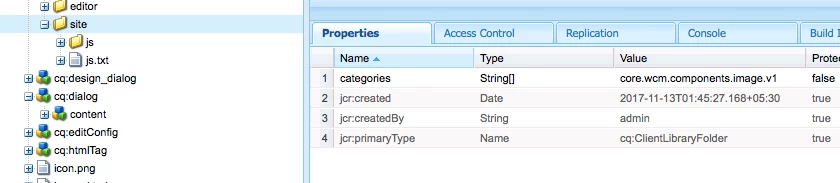
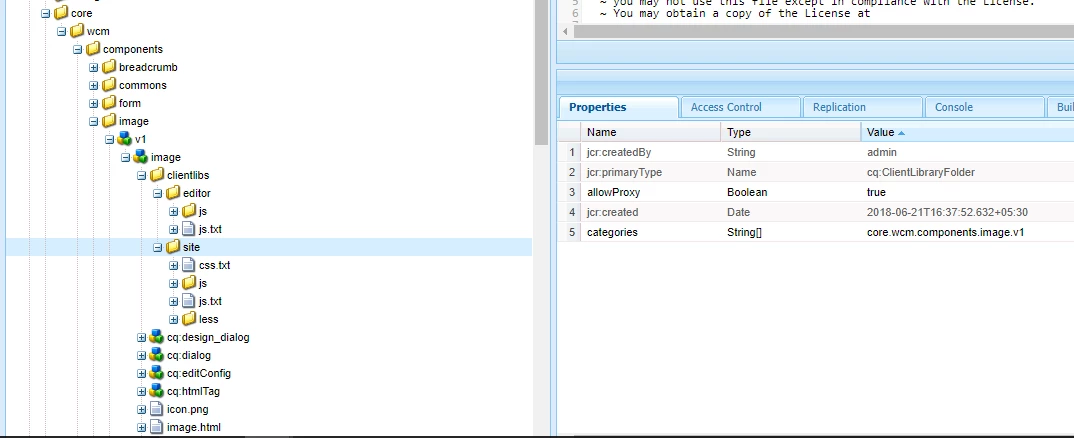
I am not able to find where clientlibs are included in core components. Example " /apps/core/wcm/components/image/v1/image/clientlibs/site".

Any one know where its included.
This post is no longer active and is closed to new replies. Need help? Start a new post to ask your question.
Best answer by arunpatidar

It is used only for dialog authoring purpose not at the page level.

It is added using category.

What is your requirement? what you wanna do with this core clientLibs?

Thanks
Arun

3 replies

arunpatidar
arunpatidarAccepted solution
New Participant
June 22, 2018

It is used only for dialog authoring purpose not at the page level.

It is added using category.

What is your requirement? what you wanna do with this core clientLibs?

Thanks
Arun

Arun Patidar
New Participant
June 22, 2018

Hi arunp99088702 ,

Where is the use of "/apps/core/wcm/components/image/v1/image/clientlibs/site". How css files under 'site' are included.

arunpatidar
New Participant
June 22, 2018

Yes, this is extraClientLibs used only for components. Added in components dialogs

/apps/core/wcm/components/image/v1/image/cq:dialog

/apps/core/wcm/components/image/v1/image/cq:design_dialog

To have your client library loaded solely for your component dialog (i.e. it will not be loaded for another component) you need to set the property extraClientLibs of your dialog to the category name of the client library you have just created. This is advisable if your client library is quite big and/or your field is specific to that dialog and will not be needed in other dialogs. To have your client library loaded for all dialogs, set the category property of your client library to cq.authoring.dialog.

Thanks

Arun

Arun Patidar