Not able to install any package through Package Manager | Community
Skip to main content
AEM_Dev_Newbie
New Participant
May 25, 2020
Solved

Not able to install any package through Package Manager

  • May 25, 2020
  • 15 replies
  • 24480 views

I have been having this issue since last week. Tried to create a new AEM instance so I deleted the crx-quickstart folder and started AEM again. Everything went fine but when I tried to install the AEM service pack it could not be installed. The same behavior is happening for any package being installed through http://localhost:4502/crx/packmgr/index.jsp and I get the following error:
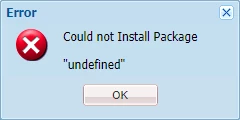
Also get the following error in logs whenever the above problem occurs:

*ERROR* [qtp1913257142-71] org.apache.jackrabbit.vault.packaging.impl.ZipVaultPackage Error during install.
org.eclipse.jetty.io.RuntimeIOException: org.eclipse.jetty.io.EofException
at org.eclipse.jetty.server.ResponseWriter.isOpen(ResponseWriter.java:133) [org.apache.felix.http.jetty:4.0.8]
at org.eclipse.jetty.server.ResponseWriter.format(ResponseWriter.java:467) [org.apache.felix.http.jetty:4.0.8]
at org.eclipse.jetty.server.ResponseWriter.printf(ResponseWriter.java:439) [org.apache.felix.http.jetty:4.0.8]
at com.day.crx.packaging.impl.response.StreamedScriptResponse.writeCallback(StreamedScriptResponse.java:228) [com.adobe.granite.crx-packagemgr:1.2.74]
at com.day.crx.packaging.impl.response.StreamedScriptResponse.access$000(StreamedScriptResponse.java:44) [com.adobe.granite.crx-packagemgr:1.2.74]
at com.day.crx.packaging.impl.response.StreamedScriptResponse$1.flush(StreamedScriptResponse.java:82) [com.adobe.granite.crx-packagemgr:1.2.74]
at java.io.PrintWriter.flush(Unknown Source)...

There are more lines in error.log


I have tried starting AEM in a completely fresh browser such that not extensions interfere or any scripts don't get blocked. Still no luck. This problem started happening suddenly. There has been no change in the way I start new AEM instances and no change in code or my system's Java installation.

This post is no longer active and is closed to new replies. Need help? Start a new post to ask your question.
Best answer by PiotrR

I have noticed similar problems after updating the chrome to Version 83.0.4103.61 (Official Build) (64-bit).

It looks like new chrome close the connection too early and I am not able to upload the package with Chrome.

Try different browser and let's hope it will be fixed in next Chrome update.

15 replies

New Participant
June 15, 2020

This issue has been resolved in the latest AEM service pack 6.5.5.

Employee
June 8, 2020


This issue is resolved with the latest version of Chrome Version 83.0.4103.97 (Official Build) (64-bit)


You can also raise a support ticket to get a fix if you are not upgrading Chrome 

Employee
June 8, 2020

This issue is resolved with the latest version of Chrome Version 83.0.4103.97 (Official Build) (64-bit)


You can also raise a support ticket to get a fix if you are not upgrading Chrome 

Surabhi_Katiyar
Employee
June 4, 2020

The issue has come up with the customers who are upgrading to the latest chrome version Version 83.0.4103.61 (Official Build). The fix will be available soon for the customers. Or you can open a daycare ticket to get the hot-fix. Workaround would be to build and deploy packages with other browsers like Firefox, Edge or IE

New Participant
June 2, 2020

I was also facing the same issue since yesterday and after checking this post i tried internet explorer to upload the package. I was able to do so. So it seems issue is with latest version of Chrome.


Following error i was getting:


org.apache.jackrabbit.vault.packaging.impl.ZipVaultPackage Error during install. org.eclipse.jetty.io.RuntimeIOException: org.eclipse.jetty.io.EofException

debasis-swain
New Participant
June 1, 2020

Hi,


This issues is with chrome browser latest version 83.0.4103.61 . There is a known bug reported Jira bug number : GRANITE-30226 with Adobe for fix.


In the meanwhile you can use other browsers for installing.


Thanks,


Yogas24
New Participant
June 1, 2020

It's Chrome Browser issue, works with Mozilla . 


Thanks.

New Participant
May 29, 2020

Meanwhile Adobe confirmed that this is a problem with the package manager. So Chrome is not to blame here (only because they implemented a slightly more strict sandboxing model).


This is tracked internally at GRANITE-30226 (Package Manager) and GRANITE-30280 (CRX DE) and the following bundle contains the fix: com.adobe.granite:com.adobe.granite.crx-packagemgr:1.2.100.


This is supposed to be contained in an upcoming ServicePack/Hotfix.

Employee
May 29, 2020
This is correct.
Employee
May 26, 2020

This issue has been observed by quite a few people and organizations.

Specific to build 83.0.4103.61 of Google Chrome.

bohdanm13335765
New Participant
May 27, 2020
Hi aemmarc. Do you guys expect that this issue will be resolved with the future Chrome updates or do we need to wait for some fix from you? As our project supports only Chrome and we do not want to switch users between browsers for stuff like that. Thanks!
sunjot16
Employee
May 25, 2020

It's reproducible. Seems like a Chrome issue.


Try to reload the browser after a few seconds. You will see the package installed.

Or, you can either go back to a previous version of Chrome, or use some other browser.


Hope it helps !!


BrianKasingli
New Participant
May 25, 2020

@sunjot16 

My Chrome was automatically updated to Version 83.0.4103.61 (Official Build) (64-bit), and I started experiencing a lot of weird situations. Even a new AEM startup, locally caused problems.

The temporary solution is using another browser such as Safari or Firefox, ane AEM was working as expected. 

Whats really strange is that I am seeing weird icons that I've never seen before, on Chrome. on other browsers, the icons are rendering as expected.