Not installing our Project apps package | Community
Skip to main content
This post is no longer active and is closed to new replies. Need help? Start a new post to ask your question.
khamat_bn
khamat_bnAccepted solution
Level 4
Jun 4, 2020 3:21 PM UTC

@nagarajuk207258  I was also facing same issue recently. Its the issue with chrome browser. Can you try with Safari, IE or Firefox.It will Work Let us Know 


5 replies

Surabhi_Katiyar
Employee
Jun 11, 2020 10:43 AM UTC

Try updating the chrome from the Version 83.0.4103.61 to the latest one.  This issue is fixed in the latest version of Chrome i.e. 83.0.4103.97 (Official Build) (64-bit)


Else you can reach out to Adobe Support team to get the hotfix for the current version of the Chrome.

Translate
Level 2
Jun 16, 2020 7:29 AM UTC

This worked for me. Thanks!

Translate
khamat_bn
khamat_bnAccepted solution
Level 4
Jun 4, 2020 3:21 PM UTC

@nagarajuk207258  I was also facing same issue recently. Its the issue with chrome browser. Can you try with Safari, IE or Firefox.It will Work Let us Know 


Translate
Employee
Jun 4, 2020 2:22 PM UTC

There is something wrong with your package and how it was constructed.


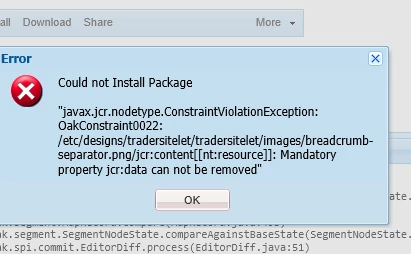
OakConstraint0022 implies that some mandatory property is omitted from the package.


From the specific error you are seeing the jcr:data property is seemingly missing from a nt:resource node from that path under /etc/designs 

Translate
Employee
Jun 4, 2020 1:55 PM UTC

Are you using the latest chrome version i.e. 83.0.4103.61 ? It seems the latest chrome version causes similar issues. Can you try using a different browser to verify ? The issue I am referring to is under investigation via GRANITE-30226

Translate