Oak Index with AEM as Cloud service | Community
Skip to main content
New Participant
October 26, 2021
Solved

Oak Index with AEM as Cloud service

  • October 26, 2021
  • 1 reply
  • 2146 views

I am trying to create a custom Index.

I have placed Index under apps/_oak_index.


I am using below filter

<filter root="/oak:index">
<include pattern="/oak:index/cqPageLucene-custom-.*(/.*)?"/>
</filter>


I have set allowIndexDefinitions as true.

Jackrabbit FileVault Package Plugin used as below in the all POM


<groupId>org.apache.jackrabbit</groupId>
<artifactId>filevault-package-maven-plugin</artifactId>
<extensions>true</extensions>
<version>1.1.6</version>


we are getting the below error
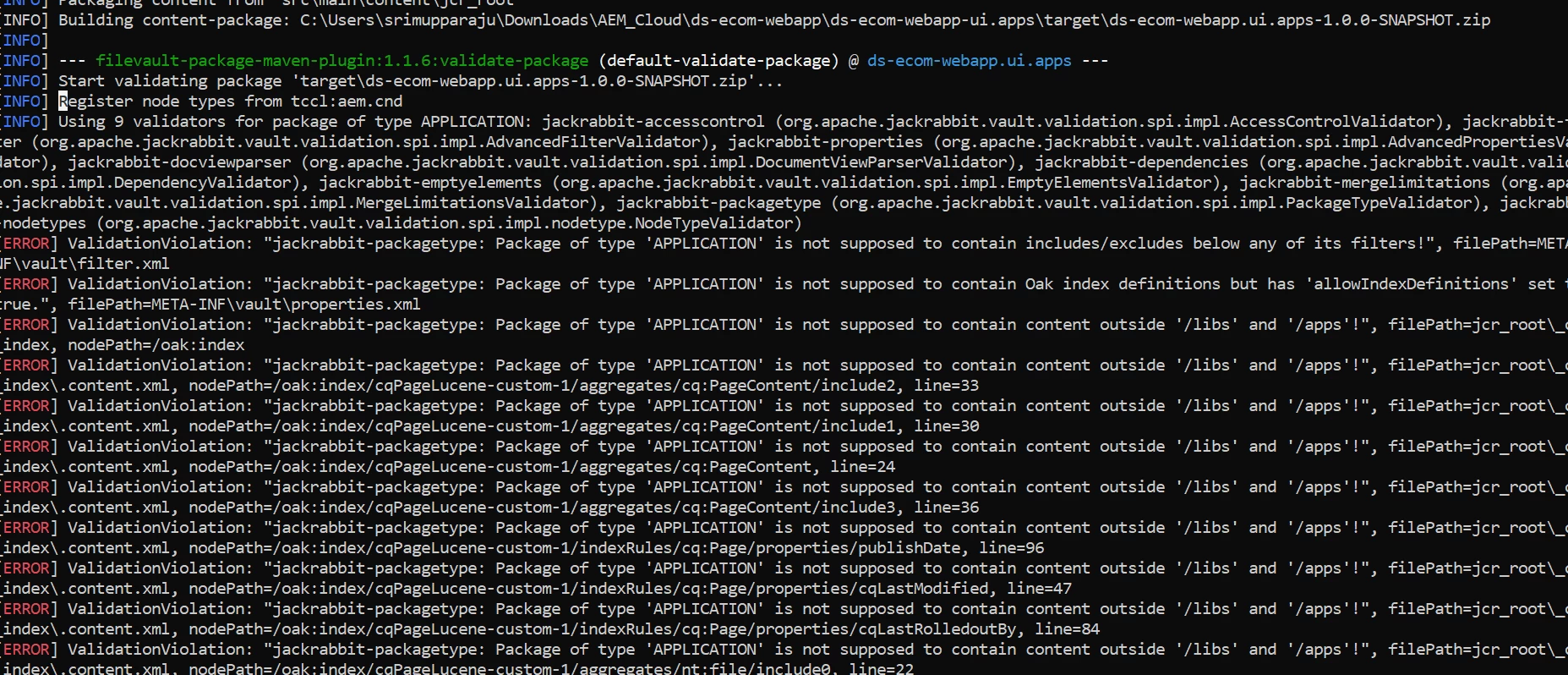


error log:

Register node types from tccl:aem.cnd
[INFO] Using 9 validators for package of type APPLICATION: jackrabbit-accesscontrol (org.apache.jackrabbit.vault.validation.spi.impl.AccessControlValidator), jackrabbit-filter (org.apache.jackrabbit.vault.validation.spi.impl.AdvancedFilterValidator), jackrabbit-properties (org.apache.jackrabbit.vault.validation.spi.impl.AdvancedPropertiesValidator), jackrabbit-docviewparser (org.apache.jackrabbit.vault.validation.spi.impl.DocumentViewParserValidator), jackrabbit-dependencies (org.apache.jackrabbit.vault.validation.spi.impl.DependencyValidator), jackrabbit-emptyelements (org.apache.jackrabbit.vault.validation.spi.impl.EmptyElementsValidator), jackrabbit-mergelimitations (org.apache.jackrabbit.vault.validation.spi.impl.MergeLimitationsValidator), jackrabbit-packagetype (org.apache.jackrabbit.vault.validation.spi.impl.PackageTypeValidator), jackrabbit-nodetypes (org.apache.jackrabbit.vault.validation.spi.impl.nodetype.NodeTypeValidator)
[ERROR] ValidationViolation: "jackrabbit-packagetype: Package of type 'APPLICATION' is not supposed to contain includes/excludes below any of its filters!", filePath=META-INF\vault\filter.xml

This post is no longer active and is closed to new replies. Need help? Start a new post to ask your question.
Best answer by davidjgonzalezzzz

There error is: 


[ERROR] ValidationViolation: "jackrabbit-packagetype: Package of type 'APPLICATION' is not supposed to contain includes/excludes below any of its filters!", filePath=META-INF\vault\filter.xml


So i think you need to explicitly name your index definition node to include, so far example:


<filter root="/oak:index/cqPageLucene-3-custom-4"/>


Rather than using the include/excludes under the filter (which allow your wild cards) - try naming your indexes explicitly.

1 reply

davidjgonzalezzzzAccepted solution
Employee
October 26, 2021

There error is: 


[ERROR] ValidationViolation: "jackrabbit-packagetype: Package of type 'APPLICATION' is not supposed to contain includes/excludes below any of its filters!", filePath=META-INF\vault\filter.xml


So i think you need to explicitly name your index definition node to include, so far example:


<filter root="/oak:index/cqPageLucene-3-custom-4"/>


Rather than using the include/excludes under the filter (which allow your wild cards) - try naming your indexes explicitly.

New Participant
April 7, 2022

Hi we have tried everything but it seems like when we have to convert the oak indexes by
running aio aem-migration:index-converter as mention in the https://experienceleague.adobe.com/docs/experience-manager-learn/cloud-service/migration/moving-to-aem-as-a-cloud-service/search-and-indexing.html?lang=en

we are getting error of 
Index Conversion Start...
Base AEM Version for Reference 65
Error: ENOENT: no such file or directory, copyfile
'/D:/ACS-Rebuild/AEM_Branches/ACS/AEM/ui.apps/src/main/content/META-INF/vault/filter.xml' ->

'target\index\filter.xml'
Code: ENOENT
we have already seen the yaml file and the location of filter.xml and _oak_indexes is fine too.

Employee
April 7, 2022

Im not entirely certain (i dont have a Windows machine to test) but it looks like its failing (because it cant find the folder/file) to copy /D:/ACS-Rebuild/AEM_Branches/ACS/AEM/ui.apps/src/main/content/META-INF/vault/filter.xml'


... That makes some sense since it appears the Windows path is actually starting with a "/D:...." which, i assume is invalid path syntax? Assuming you arent putting the leading slash in - Maybe you could try making the path to your project relative and see if that works?