On Page property cq/gui/components/authoring/dialog/fileupload now working | Community
Skip to main content
Level 6
Feb 28, 2023 10:03 AM UTC
Solved

On Page property cq/gui/components/authoring/dialog/fileupload now working

While creating page I have made this image mandatory it is appearing somewhat like this I dont know why. Even "Clear" , "Pick" button is not working. 

 

Am I doing something wrong in here?

This post is no longer active and is closed to new replies. Need help? Start a new post to ask your question.
Shivam153
Shivam153Accepted solution
Level 3
Feb 28, 2023 10:52 AM UTC

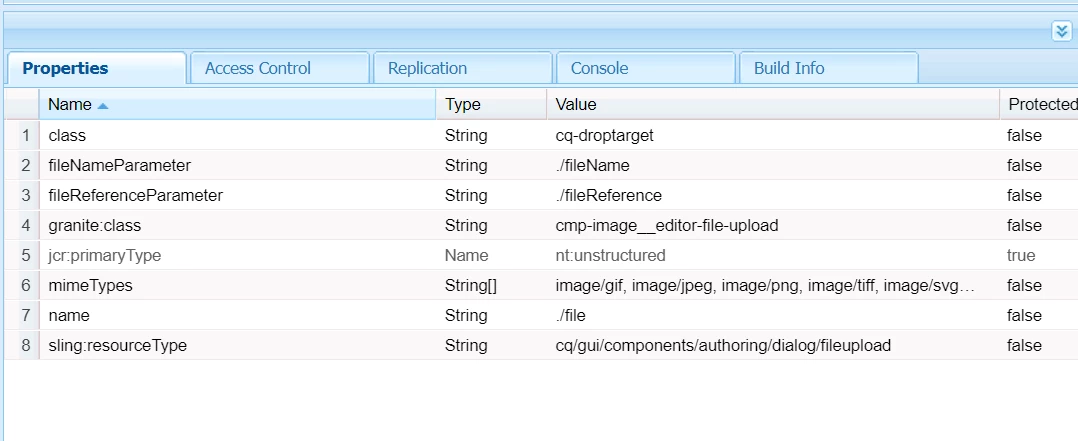
Hi @ronnie09 Please try adding these properties.

Thanks

Shivam

4 replies

Rohit_Utreja
New Participant
Mar 1, 2023 8:38 PM UTC

@ronnie09 

check /libs/granite/ui/components/foundation/form/fileupload/render.jsp and compare all properties added to this node. All properties need to be adjusted according to this jsp file

Translate
cwalter-1
Level 2
Feb 28, 2023 1:04 PM UTC

Are you using the coral version of the widget? It will cause trouble if you mix old&new widgets. Please refer to the docs here:


https://developer.adobe.com/experience-manager/reference-materials/6-5/granite-ui/api/jcr_root/libs/granite/ui/components/coral/foundation/form/fileupload/index.html


It takes a bit of trail & error until you figure out which attributes need to be set and which can be left out.

Translate
Shivam153
Shivam153Accepted solution
Level 3
Feb 28, 2023 10:52 AM UTC

Hi @ronnie09 Please try adding these properties.

Thanks

Shivam

Translate
ChitraMadan
New Participant
Feb 28, 2023 10:25 AM UTC

Hi @ronnie09 ,


Try to use like below:

<image jcr:primaryType="nt:unstructured" sling:resourceType="granite/ui/components/foundation/form/fileupload" allowUpload="{Boolean}false" autoStart="{Boolean}false" class="cq-droptarget" fieldLabel="Required Image" fileNameParameter="./imageName" fileReferenceParameter="./fileReference" mimeTypes="[image]" multiple="{Boolean}false" name="./imgReference" title="Upload Image" uploadUrl="${suffix.path}" useHTML5="{Boolean}true"/>

It will appear like this


Translate