org.apache.sling.jcr.resource,version=[2.2,3) -- Cannot be resolved AEM 6.5.0 | Community
Skip to main content
Level 3
Dec 10, 2021 3:03 AM UTC
Solved

org.apache.sling.jcr.resource,version=[2.2,3) -- Cannot be resolved AEM 6.5.0

Hi all,


We upgraded AEM 6.2 to 6.5.0. After upgrading, the customized main bundle in "Installed" state. I upgraded uber jar into 6.5.0 as well.


I also tried upgrading 2.2.2 to 3.0.18. But, the issues didn't solve.


pom.xml

<dependency>
<groupId>org.apache.sling</groupId>
<artifactId>org.apache.sling.jcr.resource</artifactId>
<version>2.2.2</version>
<scope>provided</scope>
</dependency>


This is "org.apache.sling.jcr.resource" after upgrading AEM into 6.5.0.
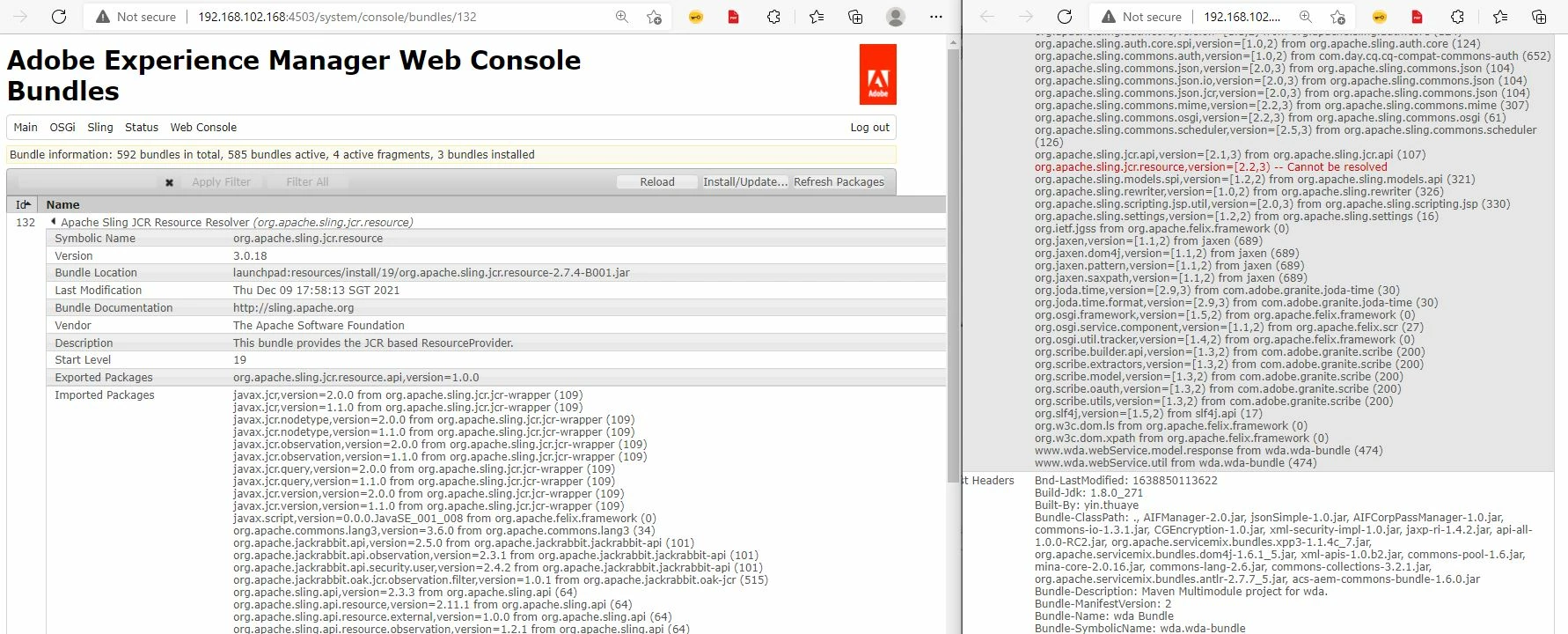
 

Please suggest. Thanks in advance.


This is "org.apache.sling.jcr.resource" before upgrading. AEM is 6.2.
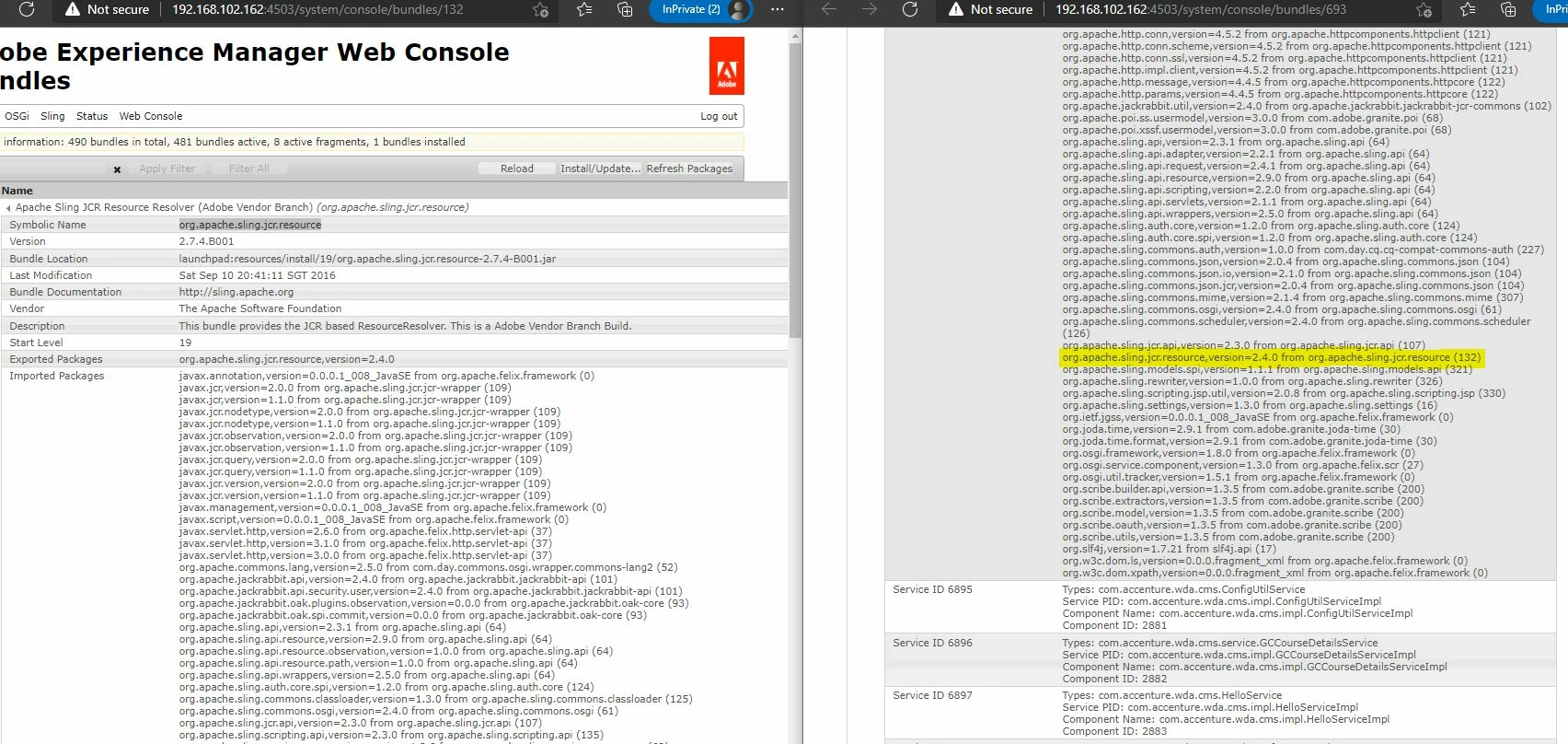
 

This post is no longer active and is closed to new replies. Need help? Start a new post to ask your question.
AlisahaliAccepted solution
Level 3
Dec 10, 2021 3:27 AM UTC

Hey. I ran into the same problem a few days ago. I've found a temporary solution to this problem. Could be worth a try if it's a blocker. Here's the question I had posted earlier today with some details just in case you want to use it for reference - https://experienceleaguecommunities.adobe.com/t5/adobe-experience-manager/import-package-version-mismatch-problem-after-upgrading-to-aem-6/td-p/434161 


So basically, the bundle with the version mismatch problem expects this package that falls within a given version range. However, org.apache.sling.jcr.resource bundle exports a package with version 1.0.0 . Hence why you run into a version mismatch problem. 


4 replies

Pavan_Kalyan-1
Level 3
Dec 13, 2021 7:40 AM UTC

Hi @ariesyinn 

may I know that is the version of core WCM components which you are using..??

Translate
milind_bachani
Employee
Dec 10, 2021 8:16 AM UTC

Hi @ariesyinn ,

A thread to similar issue : 
https://experienceleaguecommunities.adobe.com/t5/adobe-experience-manager/aem-6-4-beta-apache-sling-jcr-resource-resolver-not-present/td-p/256374

This pretty much looks like the issue caused by restructuring of uber-jar. Since, you are upgrading from 6.2 to 6.5, you might want to have a look at deprecated stuff documented here :
https://www.adobe.io/experience-manager/reference-materials/6-5/javadoc/deprecated-list.html


Regards,
Milind

Translate
Level 3
Dec 10, 2021 8:27 AM UTC

Hey @milind_bachani , could you please please have a look at https://experienceleaguecommunities.adobe.com/t5/adobe-experience-manager/import-package-version-mismatch-problem-after-upgrading-to-aem-6/td-p/434161 . Any pointers would be really helpful. Thank you 🙂

Translate
AlisahaliAccepted solution
Level 3
Dec 10, 2021 3:27 AM UTC

Hey. I ran into the same problem a few days ago. I've found a temporary solution to this problem. Could be worth a try if it's a blocker. Here's the question I had posted earlier today with some details just in case you want to use it for reference - https://experienceleaguecommunities.adobe.com/t5/adobe-experience-manager/import-package-version-mismatch-problem-after-upgrading-to-aem-6/td-p/434161 


So basically, the bundle with the version mismatch problem expects this package that falls within a given version range. However, org.apache.sling.jcr.resource bundle exports a package with version 1.0.0 . Hence why you run into a version mismatch problem. 


Translate