Page not loading in touch UI edit Mode- AEM | Community
Skip to main content
New Participant
August 29, 2019
Solved

Page not loading in touch UI edit Mode- AEM

  • August 29, 2019
  • 3 replies
  • 2451 views

In Touch Ui edit mode half of the page is not loading does anyone faces a similar type of issue as we are using AEM 6.3
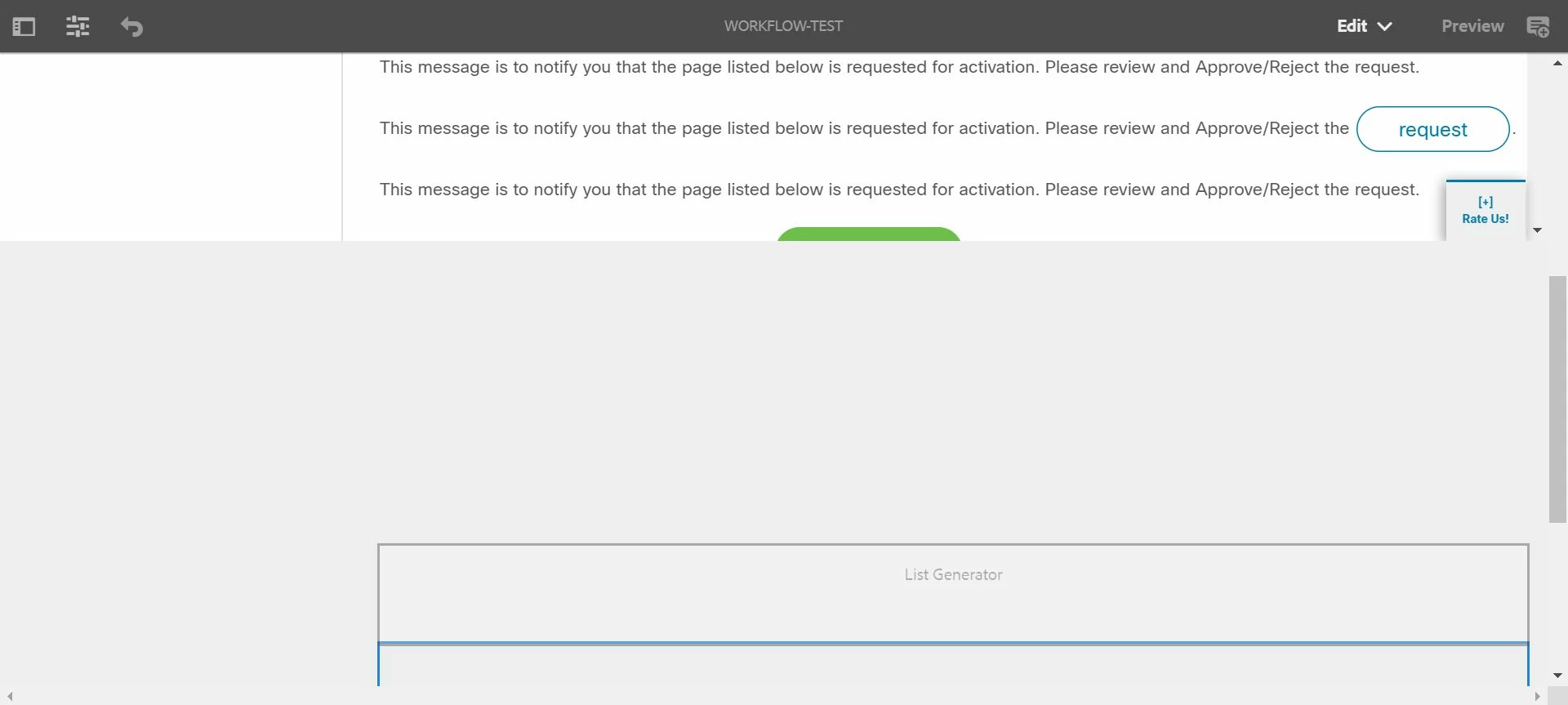
This post is no longer active and is closed to new replies. Need help? Start a new post to ask your question.
Best answer by Umesh_Sondhi

Hi kanthetis58563433

Please check your HTML file maybe there is a problem in some class you been using in your code .

Check the below thread

AEM 6.1 SP1 Component height not calculated correctly in edit mode touch UI

Thanks

3 replies

Umesh_Sondhi
Umesh_SondhiAccepted solution
New Participant
August 30, 2019

Hi kanthetis58563433

Please check your HTML file maybe there is a problem in some class you been using in your code .

Check the below thread

AEM 6.1 SP1 Component height not calculated correctly in edit mode touch UI

Thanks

Employee
August 29, 2019

Also you can perform a force a recompilation of all Sling scripts jsps, java, and sightly:

How to force a recompilation of all Sling scripts jsps, java, and sightly in AEM 6.4

Employee
August 29, 2019

This probably caused by one of the components whose css is not working as expected. Try to go to the jcr:content of the page in crxde and try to remove the components and check which one caused it.