Page Status in Touch UI User Admin | Community
Skip to main content
New Participant
July 11, 2023
Solved

Page Status in Touch UI User Admin

  • July 11, 2023
  • 2 replies
  • 671 views

We are currently in the process of migrating from Classic UI to Touch UI interface, and we noticed a few things that seem to be missing in the Site Administration interface (http://localhost:4502/sites.html/content).

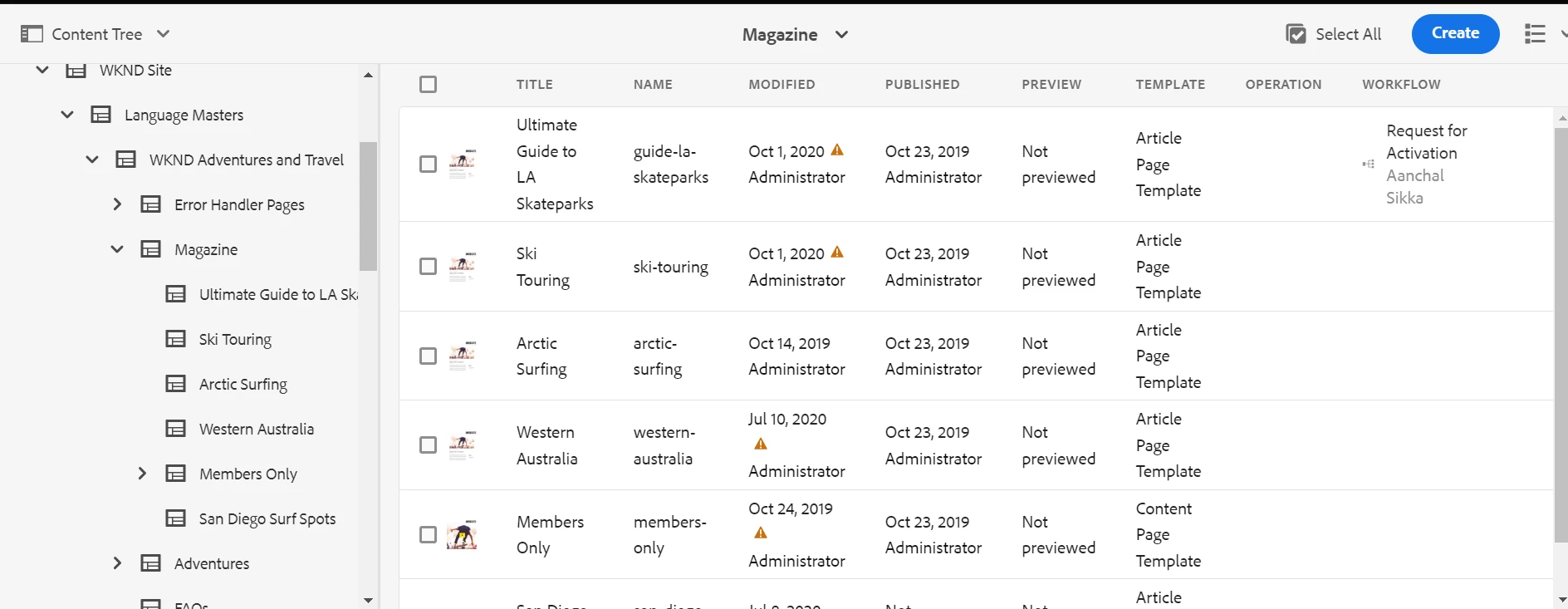
One thing would be the lack of information about the Page Status. For now, we found that "Page Locked" information is only available in the Card view. If we recommend the "Card View" as the default view for Authors, then there seems to be no "Page in Workflow" information in the view.


Is there a view (or configuration step) where we could display the following information to the Author, without doing the code change to AEM? 
This post is no longer active and is closed to new replies. Need help? Start a new post to ask your question.
Best answer by aanchal-sikka

hello @jbunic 


Custom code would be needed to display Lock info, because the column in not defined under "/libs/wcm/core/content/common/availablecolumns"


Displaying Lock/custom column:

1. Overlay "/libs/wcm/core/content/common/availablecolumns" in "/apps"

2. Configure additional column for Status

3. Follow this Blog to configure data for the column https://experience-aem.blogspot.com/2019/10/aem-6520-aem-assets-add-custom-metadata-columns-in-assets-console-list-view.html 


Generally, authors use a combination of "Content Finder + List View" Or "Content Finder + card view" based on their preferrences.


2 replies

ManviSharma
Employee
July 11, 2023

Hi,


In the Touch UI interface of AEM, the Site Administration interface lacks certain information about page status compared to the Classic UI. To display additional information to authors without code changes:

  1. Customize the Card view to include "Page in Workflow" information.
  2. Utilize the Page Properties dialog to add custom fields or tabs indicating page status or workflow information.
  3. Leverage Page Metadata to define custom metadata schemas and properties for displaying additional information.

Both Page Properties and Page Metadata can be configured without code changes in AEM. Consult AEM documentation or seek community support for implementation details.

I hope this clarifies the options available to you. Let me know if you have further questions.


aanchal-sikka
aanchal-sikkaAccepted solution
New Participant
July 11, 2023

hello @jbunic 


Custom code would be needed to display Lock info, because the column in not defined under "/libs/wcm/core/content/common/availablecolumns"


Displaying Lock/custom column:

1. Overlay "/libs/wcm/core/content/common/availablecolumns" in "/apps"

2. Configure additional column for Status

3. Follow this Blog to configure data for the column https://experience-aem.blogspot.com/2019/10/aem-6520-aem-assets-add-custom-metadata-columns-in-assets-console-list-view.html 


Generally, authors use a combination of "Content Finder + List View" Or "Content Finder + card view" based on their preferrences.


Aanchal Sikka