PageManager API not creating components | Community
Skip to main content
keithbsalmon
Level 2
Jan 4, 2018 9:45 AM UTC
Solved

PageManager API not creating components

Using AEM 6.3.

We are generating some recipe detail pages programmatically based on recipe data using the PageManager API.

The recipe detail page is based on a template which contains a collection of components.

When creating a recipe detail through the Touch UI (Sites > Create > Page > Template: Recipe Detail > Name: RecipeTest) the page is created as shown below.
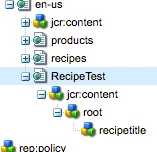
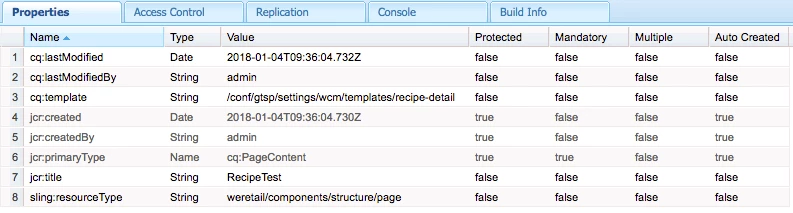
RecipeTest Node Properties

jar:content Node Properties
However, when using the PageManager API as illustrated in the code snippet below, which uses the same template it behaves differently.

// Create Page

PageManager pageManager = resourceResolver.adaptTo(PageManager.class);

prodPage = pageManager.create(path, pageName, _recipeDetailsTemplate, pageTitle, true);

_logger.debug(String.format("Created page using Template[%s]", _recipeDetailsTemplate));

Node pageNode = prodPage.adaptTo(Node.class);

Node jcrNode = null;

if (prodPage.hasContent()) {

     jcrNode = prodPage.getContentResource().adaptTo(Node.class);

     jcrNode.setPrimaryType("cq:PageContent");

     _logger.debug(String.format("hasContent() so adapted Path[%s]", jcrNode.getPath()));

} else {

     jcrNode = pageNode.addNode("jcr:content", "cq:PageContent");

}

jcrNode.setProperty("cq:template", _recipeDetailsTemplate);

jcrNode.setProperty("sling:resourceType", _recipeDetailsRenderer);

_logger.debug(String.format("Set Renderer[%s]", _recipeDetailsRenderer));

_jcrSession.refresh(true);

When using the PageManager as shown above I expected to get the same behaviour but what gets created is this.
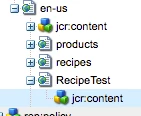
You'll notice it is missing the root node and the recipetitle component node.

RecipeTest Node Properties

jar:content Node Properties
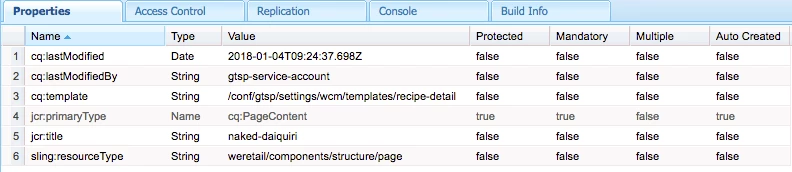
I was expecting the page content to be created (recipe title component or whatever is on the specified template) but when creating the page programmatically that doesn't happen.

Clearly I'm missing something, can anyone help?

This post is no longer active and is closed to new replies. Need help? Start a new post to ask your question.
smacdonald2008
smacdonald2008Accepted solution
Level 10
Jan 4, 2018 6:25 PM UTC

I got it to work perfectly using the Page Manager API

Helpx community article here -- Scott's Digital Community: Creating an Experience Manager 6.3 Page using the Page Manager API

8 replies

smacdonald2008
Level 10
Jan 10, 2018 2:40 PM UTC
keithbsalmon
Level 2
Jan 10, 2018 2:38 PM UTC

Thank you so much for the responses, I've been asked to focus on something else for a short while but I will be returning to this very soon.

Translate
kautuk_sahni
Employee
Jan 8, 2018 1:03 PM UTC

I would recommend, session.save(); first then session.refresh(true) [If needed];

Source:- https://www.albinsblog.com/2014/12/programmatically-create-page-in-cq5.html#.WlNpo0qWbRY

Translate
Kautuk Sahni
smacdonald2008
smacdonald2008Accepted solution
Level 10
Jan 4, 2018 6:25 PM UTC

I got it to work perfectly using the Page Manager API

Helpx community article here -- Scott's Digital Community: Creating an Experience Manager 6.3 Page using the Page Manager API

Translate
joerghoh
Employee
Jan 4, 2018 6:16 PM UTC

Instead of refreshing your session you should save it :-)

Jörg

Translate
smacdonald2008
Level 10
Jan 4, 2018 5:46 PM UTC

I am working on this use case and will post back findings. We will also create a HELPX article that shows use of the PageManager API to create pages.

Translate
smacdonald2008
Level 10
Jan 4, 2018 3:07 PM UTC

Does the page you created with code open?

Translate
Ratna_Kumar
Level 10
Jan 4, 2018 3:06 PM UTC

Hi,

Can you check this blog http://keysandstrokes.info/aem-code-snippets-create-page-using-pagemanager/

I hope this would help you.

Thanks,

Ratna.

Translate