Preview XDP forms in designer | Community
Skip to main content
New Participant
January 18, 2018
Solved

Preview XDP forms in designer

  • January 18, 2018
  • 4 replies
  • 3541 views

Hi,

I just installed AEM on my local and everything is working fine on server side.

When I try to preview the xdp forms as HTML in my designer, I consistently get the error " Please check Server URL in Server Options page in Options dialog from Tools menu". I am using ES4 designer version 11.

I have configured everything as per the article on Adobe Experience Manager Help | Generate HTML5 preview of an XDP form

When I go directly to preview page in chrome, it works fine . i.e. If I hit localhost:8080/lc/content/xfaforms/profiles/default.html?contentRoot=C:/development/Scrubber/AEM&template=conference.xdp

It renders the form fine. Here are the server options in my designer -
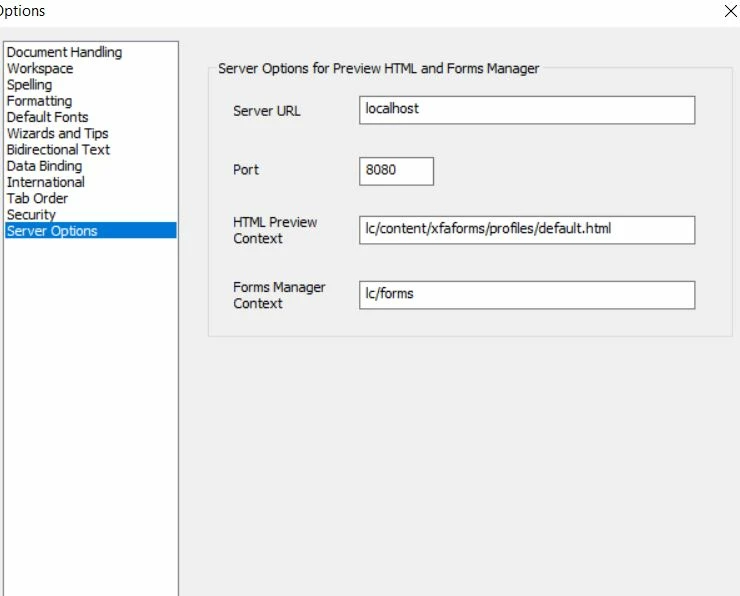
Can some body let me know what else I can check in designer to make it work ?

This post is no longer active and is closed to new replies. Need help? Start a new post to ask your question.
Best answer by pravur

My bad, I was not using http as prefix to server address.

such a stupid mistake.

Issue solved...

Thanks everyone.

4 replies

pravurAuthorAccepted solution
New Participant
January 30, 2018

My bad, I was not using http as prefix to server address.

such a stupid mistake.

Issue solved...

Thanks everyone.

Employee
January 22, 2018

Server url: http://myserver

Port: 8080

HTML Preview Context: lc/content/xfaforms/profiles/default.html

Forms Manager Context: lc/fm <- I believe you have this incorrect

pravurAuthor
New Participant
January 19, 2018

Yes, Did everything listed on this page.

Employee
January 18, 2018

Have you followed the instructions listed here? Adobe Experience Manager Help | Generate HTML5 preview of an XDP form