Product Selector in Metadata Schema | Community
Skip to main content
Level 2
Apr 20, 2022 5:25 PM UTC
Solved

Product Selector in Metadata Schema

Hey guys,


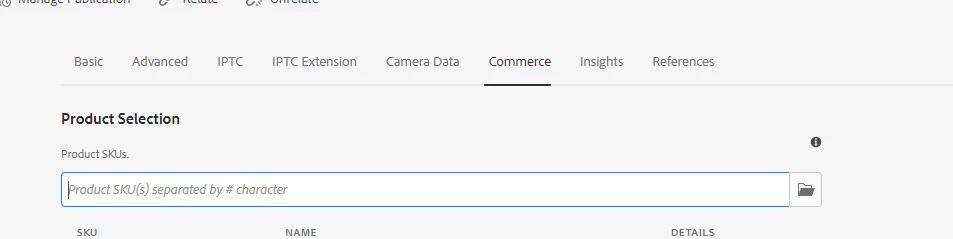
I'm attempting to add a field to the "default" metadata schema . I've read the documentation here https://experienceleague.adobe.com/docs/experience-manager-64/assets/administer/metadata-schemas.html?lang=en , but I want the field that I'm adding to mimic the functionality of the default "Product Skus." field under the commerce tab (picture attached). Said "Product Skus." field appears as a Text Field in the gui, but obviously there is some functionality under the hood allowing the user to select from a list of products. Is this functionality possible to duplicate in a custom field? Or is there some place in CRX I can look to see how the "Product Skus." field operates? 


This post is no longer active and is closed to new replies. Need help? Start a new post to ask your question.
arunpatidar
arunpatidarAccepted solution
New Participant
Apr 21, 2022 12:44 PM UTC

You need to add metadata schema here, you can add clientlibs also 

/conf/global/settings/dam/adminui-extension/metadataschema

e.g.

<tab5 granite:rel="aem-assets-metadata-form-tab"
                    jcr:primaryType="nt:unstructured"
                    jcr:title="Commerce"
                    sling:resourceType="granite/ui/components/coral/foundation/container"
                    listOrder="4">
                    <granite:data jcr:primaryType="nt:unstructured"
                        tabid="dd9d71ff-4524-435d-a16c-0249020660fc" />
                    <items jcr:primaryType="nt:unstructured">
                        <tabs jcr:primaryType="nt:unstructured"
                            sling:resourceType="granite/ui/components/coral/foundation/include"
                            path="/apps/myproj/dam/metadata/accesscontrol/tabs" />
                        <clientlibs jcr:primaryType="nt:unstructured"
                            sling:resourceType="granite/ui/components/coral/foundation/includeclientlibs"
                            categories="myproj.dam.metadataeditor.commerce" />
                    </items>
                </tab5>
Arun Patidar

3 replies

arunpatidar
New Participant
Apr 20, 2022 6:14 PM UTC

Hi,

Technically, it is possible to reuse the logic for assets as well.

You can create the metadata schema using granite types and can check the logic for Product SKU and write the same code/could be a small piece of code to make a request to some API. 

but it is possible. 

I did something similar but not for the products.

Translate
Arun Patidar
user00928Author
Level 2
Apr 20, 2022 6:17 PM UTC

Hey Arun,


Thanks for your response -- where did your xml end up living in CRX? I'm having some trouble tracking that down haha...

Translate
arunpatidar
arunpatidarAccepted solution
New Participant
Apr 21, 2022 12:44 PM UTC

You need to add metadata schema here, you can add clientlibs also 

/conf/global/settings/dam/adminui-extension/metadataschema

e.g.

<tab5 granite:rel="aem-assets-metadata-form-tab"
                    jcr:primaryType="nt:unstructured"
                    jcr:title="Commerce"
                    sling:resourceType="granite/ui/components/coral/foundation/container"
                    listOrder="4">
                    <granite:data jcr:primaryType="nt:unstructured"
                        tabid="dd9d71ff-4524-435d-a16c-0249020660fc" />
                    <items jcr:primaryType="nt:unstructured">
                        <tabs jcr:primaryType="nt:unstructured"
                            sling:resourceType="granite/ui/components/coral/foundation/include"
                            path="/apps/myproj/dam/metadata/accesscontrol/tabs" />
                        <clientlibs jcr:primaryType="nt:unstructured"
                            sling:resourceType="granite/ui/components/coral/foundation/includeclientlibs"
                            categories="myproj.dam.metadataeditor.commerce" />
                    </items>
                </tab5>
Translate
Arun Patidar