Re-enable inheritance scenarios | Community
Skip to main content
New Participant
February 2, 2024
Solved

Re-enable inheritance scenarios

  • February 2, 2024
  • 2 replies
  • 736 views

Hi,

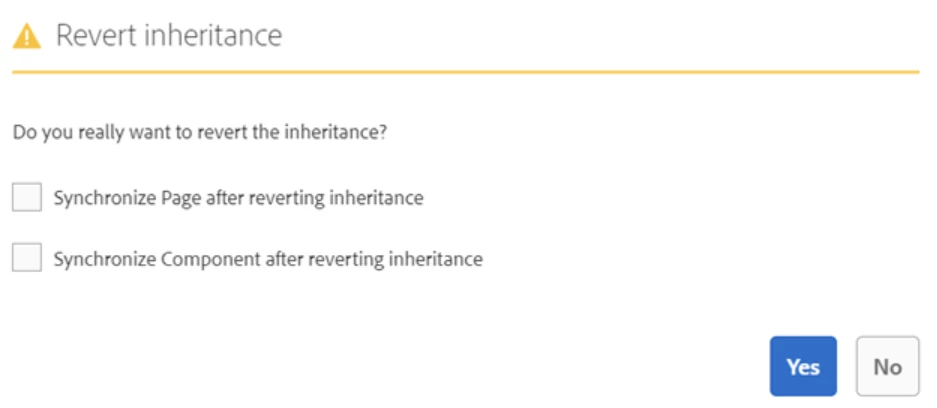
If we broken inheritance on  master page, what the result will be if:

1. I re-enable inheritance by clicking only on YES

2. re-enable inheritance by clicking on Synch page after reverting inheritance

3. re-enable inheritance by clicking on Synch component after reverting inheritance

4. re-enable inheritance by clicking on both tick boxes


Thanks,

Vani

 

Best answer by Harwinder-singh

@vani1012  


1. I re-enable inheritance by clicking only on YES   --- This means the live copy is not synchronized for past changes in the blueprint but will receive any future rollout updates.

2. re-enable inheritance by clicking on Synch page after reverting inheritance  - Page is synchronized with the blueprint for any current changes in blueprint page and also enables future content rollout updates.

3. re-enable inheritance by clicking on Synch component after reverting inheritance - Same thing as #2 but this is at a component level (on the page)

4. re-enable inheritance by clicking on both tick boxes - if you want both the live copy page and its all components to be synchronized with the current content in blueprint.

2 replies

kautuk_sahni
Employee
February 6, 2024

@vani1012 Did you find the suggestions from users helpful? Please let us know if more information is required. Otherwise, please mark the answer as correct for posterity. If you have found out solution yourself, please share it with the community.

Kautuk Sahni
Harwinder-singh
Harwinder-singhAccepted solution
New Participant
February 2, 2024

@vani1012  


1. I re-enable inheritance by clicking only on YES   --- This means the live copy is not synchronized for past changes in the blueprint but will receive any future rollout updates.

2. re-enable inheritance by clicking on Synch page after reverting inheritance  - Page is synchronized with the blueprint for any current changes in blueprint page and also enables future content rollout updates.

3. re-enable inheritance by clicking on Synch component after reverting inheritance - Same thing as #2 but this is at a component level (on the page)

4. re-enable inheritance by clicking on both tick boxes - if you want both the live copy page and its all components to be synchronized with the current content in blueprint.

Kamal_Kishor
New Participant
February 2, 2024

@vani1012: On top of what is already explained in detail by @harwinder-singh, you can refer this video documentation to see few other features around MSM :-https://experienceleague.adobe.com/docs/experience-manager-learn/sites/multi-site-management/manage-page-inheritance-live-copy.html?lang=en